












OFFICIAL PLUGIN GUIDE
Marketplace-ready product feeds, without rigid exports.
WooCommerce XML – CSV Feeds creates configurable XML, CSV, and text catalogs, keeps them updated automatically, and gives you precise control over products, fields, prices, images, variations, languages, and marketplace requirements.
Plugin 1.2.0
WordPress 5.5+
WooCommerce 4.7
PHP 7.4+
15 marketplace presets
Welcome
WooCommerce XML – CSV Feeds turns WooCommerce catalog data into public feed files for marketplaces, advertising catalogs, price-comparison services, affiliate networks, and custom integrations. You can begin with a preset or build the exact output structure required by a destination.
Each feed has independent templates, product rules, mappings, language, currency, filename, validation, generation history, and Action Scheduler timing. Large catalogs are generated in resumable background batches so the last complete public file remains available until its replacement is ready.
Built for safe upgrades. Existing templates, filenames, product selection, variation output, hooks, and cached files remain compatible. New advanced controls are opt-in.
Requirements
| Component | Requirement |
|---|---|
| WordPress | 5.5 or newer; tested through 7.0 |
| WooCommerce | 4.7 or newer; tested through 11.0.1 |
| PHP | 7.4 or newer |
| License | An active license is required to preview, validate, or generate new output |
| Scheduling | WooCommerce Action Scheduler plus working WP-Cron or a real server cron |
The plugin declares compatibility with WooCommerce High-Performance Order Storage. It exports product catalog information, not customer or order data.
Installation and quick start
- Install and activate WooCommerce if not already installed.
- Open Plugins → Add New Plugin → Upload Plugin, upload the plugin ZIP, and activate it.
- Open WOO Feeds → License & Updates and activate your license.
- Open WOO Feeds → Add New and enter a descriptive title.
- Apply a marketplace preset or create custom Header, Main, Images, Attributes, and Footer templates.
- Set a safe cached filename, preview and validate the feed, then publish it.
- Select Run now in background, then copy the public feed URL into the marketplace.
- Choose an automatic schedule when stock and pricing must refresh without manual work.
Backward-compatible upgrades
Existing templates, filenames, product selection, variation behavior, hooks, and cached files are preserved. Advanced controls are opt-in. Legacy scheduled feeds are migrated to per-feed Action Scheduler actions and duplicate old cron events are cleared.
Before upgrading a production shop, make a normal site backup and test the update on staging when the catalog uses custom code or unusually large feeds.
License activation and updates
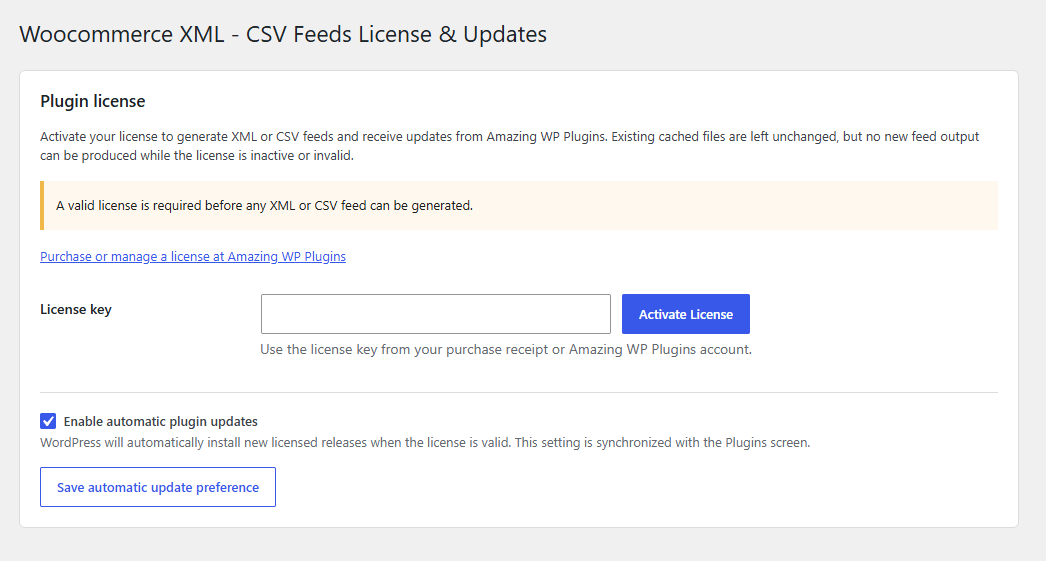
Enter the license key supplied by Amazing WP Plugins and select Activate License. The same page displays the license state, expiration details when available, a manual update check, and an automatic-update preference synchronized with the WordPress Plugins screen.
Manual update checks
Use Check for updates to refresh update information immediately. A valid license is required to download licensed releases.
Automatic updates
Enable automatic updates on the license page or Plugins screen. The preference stays synchronized with WordPress.
When the license is inactive: manual, scheduled, save-triggered, background, external-cron, REST, public dynamic, preview, validation, and WP-CLI generation are blocked. Existing cached files are not deleted.
License and update requests communicate with amazingwpplugins.com and include the key, site URL, EDD product title, and update metadata. Product, customer, order, template, and generated-feed contents are never included.
The feed editor
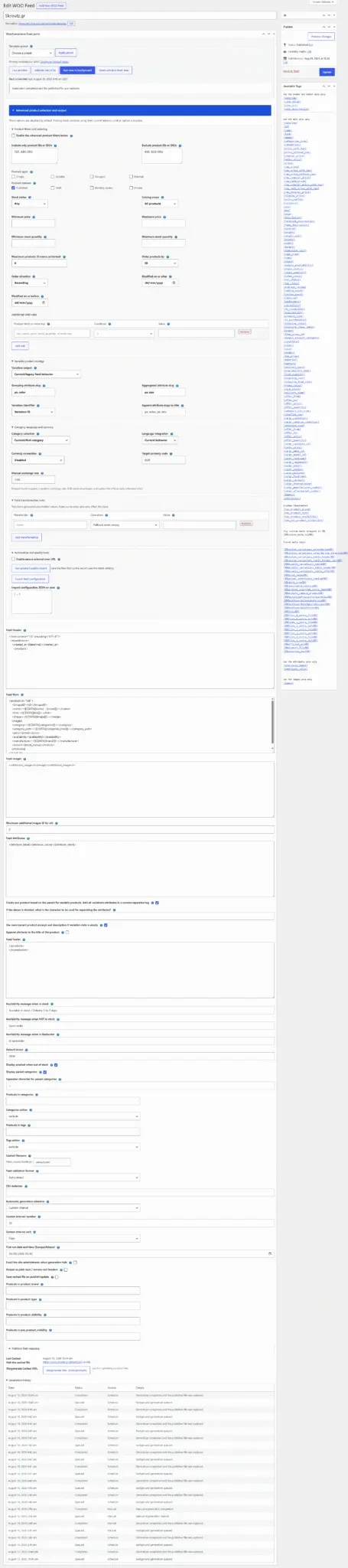
Template parts
Header is written once, Main repeats per exported item, Images and Attributes repeat within an item, and Footer is written once.
Catalog behavior
Set availability wording, brand fallback, categories, tags, custom taxonomies, out-of-stock behavior, language, and variable-product behavior.
Output & timing
Set the cached filename, format, CSV delimiter, schedule, first-run time, failure email, plain-text response, and save-time generation.
| Area | Purpose |
|---|---|
| Template tools | Apply a preset, preview, validate, run generation, reset timing, and review current status. |
| Advanced product selection and output | Opt-in filters, variation strategies, category choice, language, currency, transformations, automation, and portability. |
| Feed Header and Footer | Opening and closing content written once. Use for an XML declaration/root nodes or CSV heading row. |
| Feed Main | The record template repeated for every product, variation, or group. |
| Feed Images | A mini-template repeated for gallery images. Insert {images} in Feed Main where the expanded image markup belongs. |
| Feed Attributes | A generic attribute mini-template. Insert {attributes} in Feed Main. Dedicated fields such as color and size should use their own mapped placeholders. |
| Selection and output | Categories, tags, taxonomies, stock behavior, filename, format, schedule, and language. |
| Feed health | Public URL, last run, validation, quality report, and bounded generation history. |
Every field label has an information icon. Select it to reveal what the setting controls and how it affects feed output.
Template presets
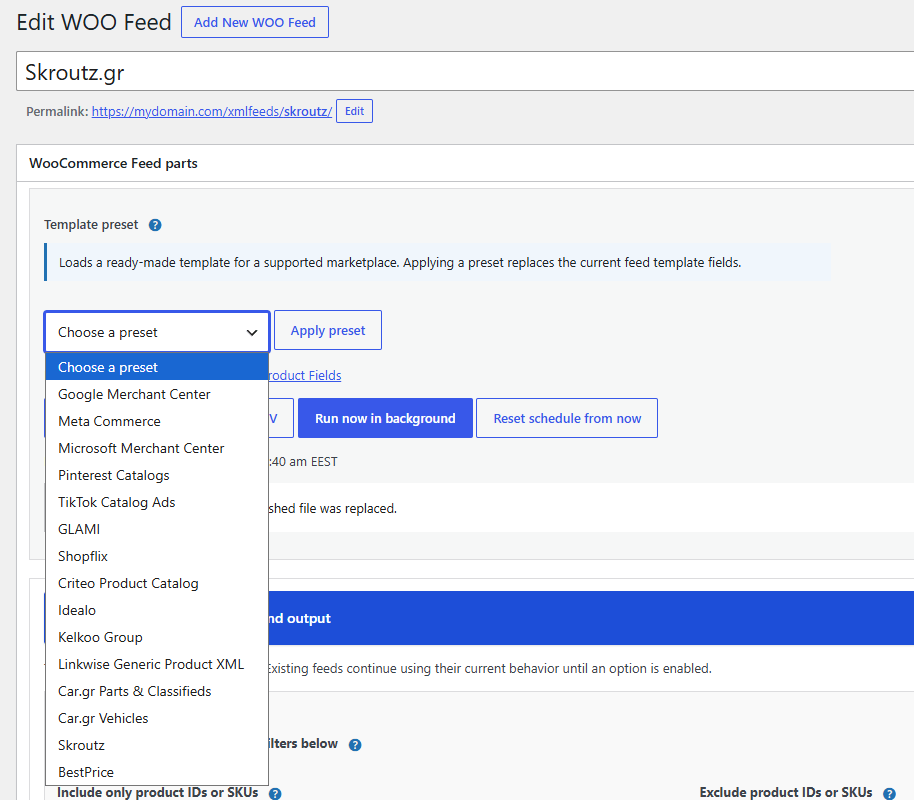
Presets supply the starting Header, Main, Images, Attributes, Footer, filename, format, image limit, availability wording, and applicable field defaults. Applying a preset replaces the current template fields, so export an existing configuration first if you may need it again.
| Preset | Format | Typical use |
|---|---|---|
| Google Merchant Center | XML | Google Shopping / Merchant Center catalogs |
| Meta Commerce | XML | Facebook and Instagram catalogs |
| Microsoft Merchant Center | XML | Microsoft Advertising product catalogs |
| Pinterest Catalogs | XML | Pinterest shopping catalogs |
| TikTok Catalog Ads | CSV | TikTok commerce catalog import |
| GLAMI | XML | Fashion marketplace catalog |
| Shopflix | XML | Shopflix marketplace products and offers |
| Criteo Product Catalog | XML | Criteo commerce advertising feeds |
| Idealo | CSV | Idealo price comparison feed |
| Kelkoo Group | XML | Kelkoo merchant catalog |
| Linkwise Generic Product XML | XML | Affiliate product data feed |
| Car.gr Parts & Classifieds | XML | Parts and classified listings |
| Car.gr Vehicles | XML | Vehicle listings and vehicle-specific data |
| Skroutz | XML | Skroutz merchant product feed |
| BestPrice | XML | BestPrice merchant product feed |
Marketplace specifications can change. Treat the preset as an editable, validated starting point and confirm current requirements in the destination account before submission.
Templates and placeholders
Click a tag in the Available Tags sidebar to insert it into a template. Header and Footer are written once; Main repeats for each selected product, variation, or variation group. Custom product metadata can be inserted as {%%custom_meta_key%%}.
Header and footer tags
{datetime}, {iso8601}, {site_title}, {site_url}, and {site_description}.
Identity, content, links, and media
{id}, {item_group_id}, {sku}, {mpn}, {gtin}, {name}, {description}, {excerpt}, {feed_description}, {facebook_description}, {link}, {image}, and {images}.
Prices and currency
Formatted prices follow store display settings. Marketplace feeds should normally use raw numeric values: {raw_price}, {raw_price_with_tax}, {raw_price_without_tax}, {raw_regular_price}, {raw_sale_price}, {raw_regular_price_with_tax}, {raw_sale_price_with_tax}, and {raw_display_price}. Add {currency} separately where required.
Raw price placeholders are display-independent. They use a stable decimal point without a currency symbol or thousands separator, preventing store formatting from breaking marketplace imports.
Catalog, stock, shipping, and dimensions
{categories}, {categories_tree}, {category_ids_tree}, {tags}, {tags_tree}, {brand}, {product_type}, {availability}, {google_availability}, {availability_date}, {stock}, {stock_status}, {stock_quantity}, {total_stock}, {feed_quantity}, {backorders}, {shipping_class}, {shipping_class_label}, {shipping_cost}, {shipping_lead_time}, {delivery_time}, {delivery_days}, {weight}, {weight_unit}, {height}, {width}, {length}, and {dimension_unit}.
Marketplace attributes and offers
{google_product_category}, {condition}, {color}, {size}, {gender}, {age_group}, {material}, {pattern}, {group_value}, {size_stock}, {offer_from}, {offer_to}, {offer_price}, {offer_quantity}, and {attributes}.
Images, attributes, and CSV values
{images}expands the Feed Images mini-template once for every additional gallery image. It is not a single URL or a genericadditional_imagesvalue.{attributes}expands a generic attribute list. Use dedicated{color},{size},{gender},{age_group},{material}, and{pattern}mappings for marketplace fields.- CSV presets use
{csv_field_name}companion tags that safely quote and escape commas, delimiters, quotes, and line breaks. - Custom taxonomies are available as
{tax_taxonomy_slug}.
Feed Product Fields
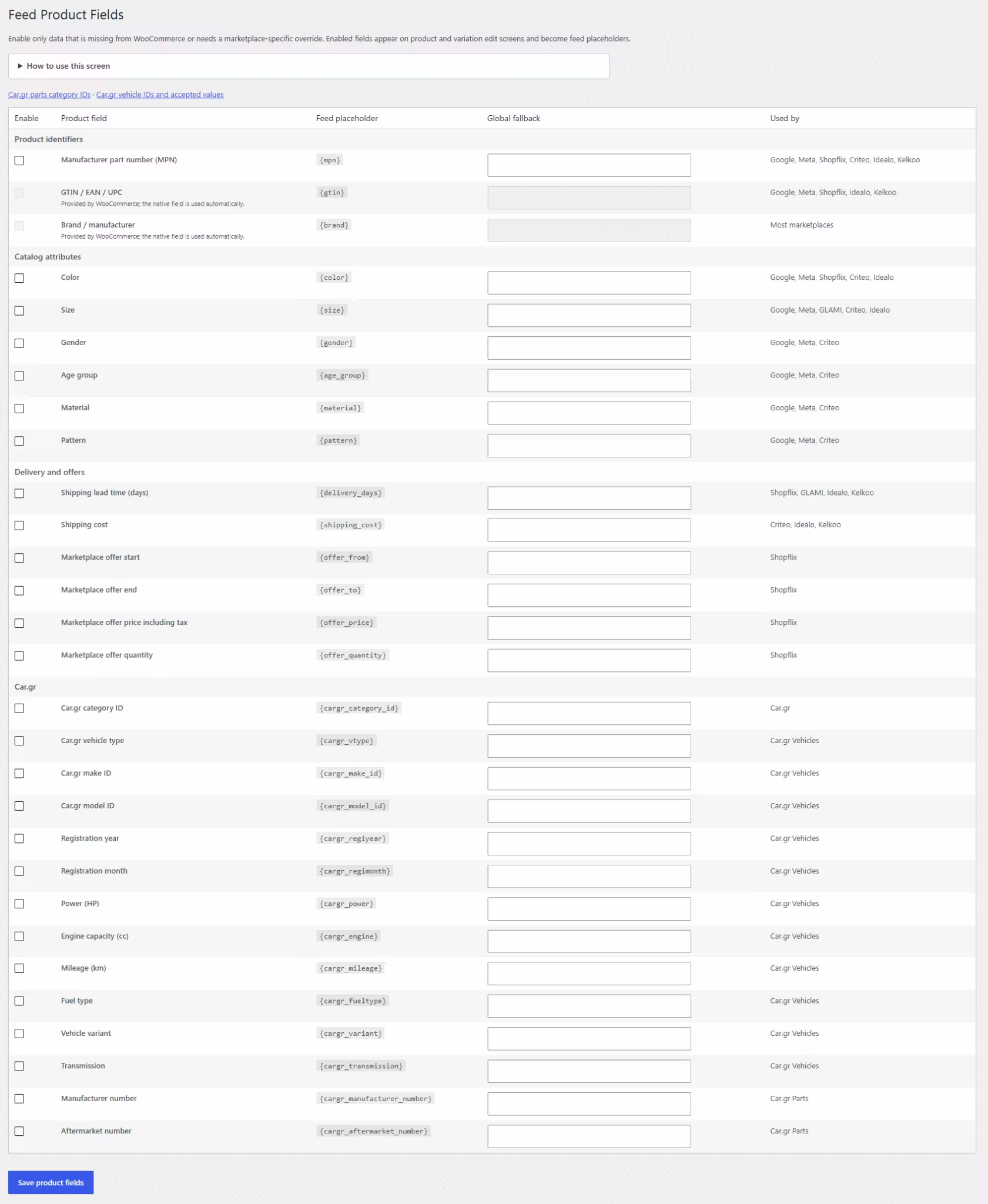
Open WOO Feeds → Product Fields when a marketplace needs information WooCommerce does not provide natively. Enable only the fields you need. Enabled fields appear on product and variation edit screens and become feed placeholders.
- Enable the required identifier, catalog, delivery, offer, or Car.gr field.
- Add an optional global fallback.
- Enter product-specific values; variations can override or inherit their parent values.
- Map standardized fields to attributes, taxonomies, custom fields, or fallbacks in the feed editor.
- Use value replacements in
Store value = Feed valueformat where marketplace wording differs.
Per-feed mappings
The feed editor can map standardized fields to a WooCommerce attribute, taxonomy, custom field, or fallback. Value replacements convert store terminology to accepted marketplace values, one mapping per line in Store value = Feed value format.
Google product category
Set a feed-wide Google taxonomy default, map WooCommerce categories to numeric Google category IDs, and optionally override individual products. Resolution uses the most specific available value: product override, mapped WooCommerce category, then feed default.
Condition
Choose a feed default of new, refurbished, or used. Products and variations can override it. Presets normalize or translate the result when a platform requires different accepted wording.
Advanced product selection and output
The blue Advanced product selection and output panel is intentionally opt-in. Until advanced filters are enabled, an upgraded feed continues using its existing product query and behavior.
| Control | What it solves |
|---|---|
| Include or exclude IDs/SKUs | Create curated feeds or remove specific products. |
| Product type and status | Limit the feed to selected WooCommerce types and WordPress statuses. |
| Stock, sale, and featured | Create availability- or campaign-specific catalogs. |
| Price and inventory ranges | Exclude items outside commercial or stock limits. |
| Modified dates | Restrict output to a catalog update window. |
| Ordering and limits | Set result order and cap feed size. |
| Custom rules | Compare WooCommerce properties or product metadata with text, numeric, and empty/not-empty operators. |
All enabled criteria are combined with AND logic. Main-screen category, tag, and custom-taxonomy filters continue to apply.
Variable products
| Strategy | Output |
|---|---|
| Current / legacy behavior | Preserves the feed’s existing parent and variation options. |
| Parent only | Exports one parent record and can combine available variation attributes. |
| Every variation | Exports each visible variation separately with configured parent fallbacks. |
| Grouped variations | Groups by one attribute, such as color, while aggregating another, such as size. |
Grouped output provides {group_value}, {size}, {size_stock}, and {total_stock}. Variation identifiers can use the WooCommerce ID, SKU when present, or a parent/group combination. Selected attributes can also be appended to titles.
Per-feed scheduling
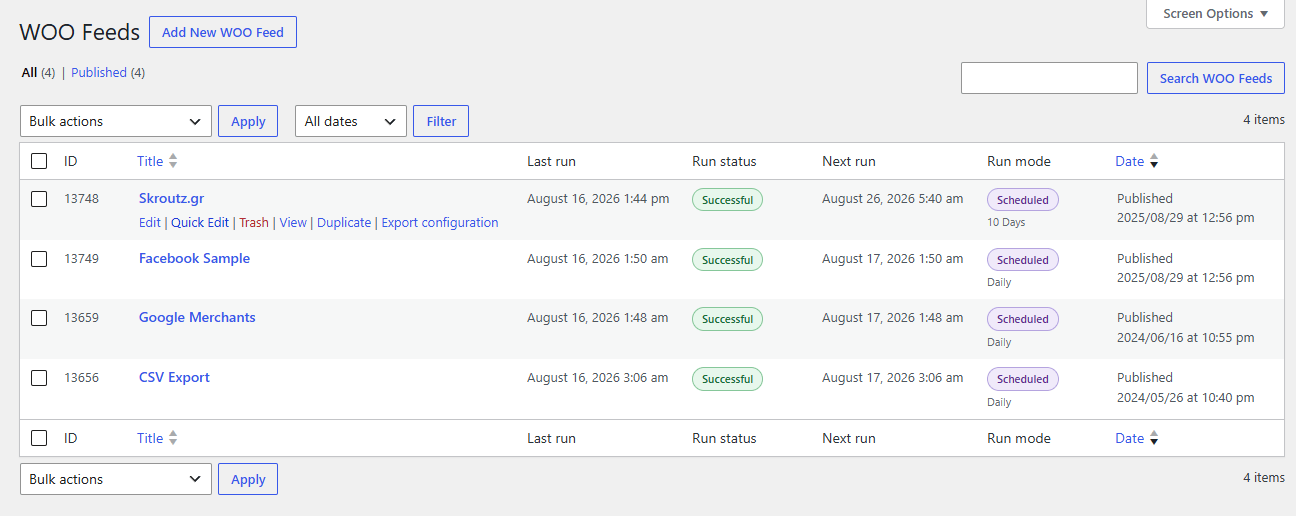
Every published feed has an independent Action Scheduler action. Choose Disabled, Hourly, Twice daily, Daily, Weekly, or Custom interval. A custom interval accepts a number from 1 to 999 with Minutes, Hours, or Days. For example, 3 Hours runs every three hours and 2 Days runs every two days.
The optional first-run date and time uses the WordPress site timezone. The feeds list displays the exact custom timing instead of a generic “Custom interval” label.
Existing cron events are handled safely.
On upgrade, published feeds are migrated to independent Action Scheduler timing and duplicate legacy cron events are removed without changing templates or cached output.
The feeds list displays each feed’s exact run mode (including “Every 3 Hours”), last run, status, and next run.
Action Scheduler still needs WordPress cron dispatch. Low-traffic shops should configure a real server cron to call WordPress cron regularly.
Manual and background generation
Select Run now in background to start a resumable job. Products are processed in bounded batches instead of requiring one long browser or PHP request. Progress is saved, interrupted work can resume, and the last complete public file stays online until a validated replacement is ready.
- Queued: the source, state, and starting position are saved.
- Processing: batches append to a temporary file and update progress.
- Publishing: after completion, the new file atomically replaces the previous public file.
- History: manual runs are logged in the same way as scheduled runs.
Live preview and validation
Preview renders up to three selected products using the current editor values. XML validation checks well-formed markup plus platform-specific required fields and accepted values. CSV validation checks delimiter consistency, headers, columns, quoting, and preset requirements.
A preview is representative, not exhaustive.
It can pass while another product has missing data. Run the complete quality report and treat the marketplace’s diagnostics as the final authority.
A new feed must pass validation before first publication. After editing an existing feed, validate again before replacing the marketplace URL or forcing a refresh.
Feed files and public URLs
The cached filename is relative to the WordPress site URL. A value such as feeds/google-products.xml produces a public URL in that location. Absolute paths, traversal segments, and unsafe destinations are rejected.
- Use an
.xmlextension for XML and.csvfor CSV. - Keep filenames stable after submitting them to a marketplace.
- Use different filenames for different languages, currencies, and destinations.
- Save cached file on publish/update refreshes output while saving; for large catalogs, prefer background generation.
- Output as plain text changes response headers for text or CSV-style integrations.
Treat feed URLs as public catalog data. Do not place confidential metadata, wholesale prices, private product fields, or credentials in a template.
Generation history, errors, and health
Generation History records queued, completed, failed, and cancelled events from manual and automatic jobs. Entries include the time, source, message, processed count, and file size where available.
- The newest 25 records per feed are retained by default to protect edit-screen performance.
- Developers can change the limit with
wxf_generation_log_limit. - Optional failure email alerts notify the WordPress administrator.
- The feeds list uses color-coded last-run results, while WordPress Site Health reports scheduling and generation problems.
Product data quality reports
Run the quality report after saving a feed. It checks products for missing preset-required values, invalid URLs or prices, duplicate feed identifiers, and duplicate GTINs. Use the results to fix product data, mappings, or fallbacks before a marketplace rejects the catalog.
Recommended workflow: preview the structure, run the quality report across the catalog, generate the complete feed, then use the destination marketplace’s diagnostics as the final authority.
Languages, currencies, and transformations
| Feature | Behavior |
|---|---|
| Languages | WPML, Polylang, and TranslatePress integration when the selected provider is active. Create separate feeds and filenames for each language. |
| Currencies | Keep raw prices in store currency, apply a manual multiplier, or use cached European Central Bank daily reference rates. Formatted store-price placeholders are deliberately not converted. |
| Transformations | Ordered fallback, prefix, suffix, replacement, case, HTML removal, truncation, multiplication, division, and rounding rules. CSV-safe companion values are refreshed afterward. |
The administration interface includes Spanish, Italian, Russian, German, Greek, French, Simplified Chinese, Turkish, Hindi, and Arabic translation catalogs.
External automation and portability
| Feature | Behavior |
|---|---|
| External cron | Enable a private, token-protected URL when an external scheduler should start a feed. Treat the URL as a password; disable and re-enable the endpoint to rotate an exposed token. |
| Duplicate feeds | Clone a configured feed, then change its destination, language, currency, schedule, or catalog selection. |
| JSON export/import | Move compatible feed configuration between feeds or sites, then review site-specific categories, paths, and sources. |
| REST and product CSV | Dedicated marketplace product fields are available through product REST metadata and WooCommerce’s built-in product CSV import/export. |
WP-CLI
wp woo-xml-feed generate <feed-id>
wp woo-xml-feed generate --all
wp woo-xml-feed generate <feed-id> --sync
wp woo-xml-feed status <feed-id>
wp woo-xml-feed validate <feed-id>
wp woo-xml-feed quality <feed-id> [--limit=500]
wp woo-xml-feed logs <feed-id>
wp woo-xml-feed cancel <feed-id>
The default generate command starts a resumable background job. Use --sync only when the command runner has enough memory and execution time for the complete catalog.
Developer hooks
Current extension points use the wxf_ prefix. Legacy wooxml_skip_product and dynamic wooxml_custom_meta_{$meta_key} filters remain available for backward compatibility.
Common filters
| Hook | Purpose |
|---|---|
wxf_feed_presets | Add or adjust template presets. |
wxf_catalog_product_values | Add or change generated product values and custom placeholders. |
wxf_skip_product | Exclude a product programmatically. |
wxf_products_query_args | Adjust the final WordPress product query. |
wxf_feed_output | Modify assembled output. |
wxf_validation_errors | Add or remove validation errors. |
wxf_generation_log_limit | Change the default 25-entry history limit. |
wxf_batch_size | Change the default generation batch size of 100. |
wxf_feed_field_help | Add or replace editor information-icon explanations. |
wxf_marketplace_product_fields | Register additional dedicated marketplace fields. |
Generation actions
wxf_generation_queued, wxf_generation_resumed, wxf_generation_started, wxf_before_generation_batch, wxf_after_generation_batch, wxf_generation_completed, wxf_generation_failed, and wxf_generation_cancelled.
Add a generated placeholder
add_filter( 'wxf_catalog_product_values', function ( $values, $product, $feed_id ) {
	$values['warehouse_code'] = $product->get_meta( '_warehouse_code', true );
	return $values;
}, 10, 3 );
React after generation
add_action( 'wxf_generation_completed', function ( $feed_id, $state, $file, $validation ) {
	error_log( sprintf( 'Feed %d completed: %s', $feed_id, $file['path'] ) );
}, 10, 4 );
The plugin package includes docs/hooks.md with the complete hook contracts and arguments. Use the wxf_feed_file path filter cautiously and keep its path and public URL inside the intended feed directory.
Troubleshooting
| Symptom | Checks |
|---|---|
| Generation is blocked | Activate or refresh the key under WOO Feeds → License & Updates. |
| A due schedule does not run | Confirm the feed is published, inspect WooCommerce Scheduled Actions and Site Health, and ensure WP-Cron is dispatched. |
| XML validation fails | Check for mismatched tags across Header, Main, Images, Attributes, and Footer. Use CDATA for free-form text where appropriate. |
| CSV columns do not match | Use the same delimiter in the header and row template and prefer {csv_*} placeholders. |
| Marketplace fields are empty | Review source mapping, product/variation override, and global fallback. |
| A large job stops midway | Use background generation, then check history, Scheduled Actions, file permissions, PHP logs, and server resource limits. |
| The marketplace shows old data | Confirm a successful last run, inspect the public URL, clear relevant caches, and request a fresh marketplace fetch. |
Frequently asked questions
Will existing feeds continue to work after upgrading?
Yes. Existing templates, selection, output behavior, filenames, hooks, and cached files remain compatible. Advanced features are opt-in and old schedules are migrated safely.
Can every feed run at a different time?
Yes. Each published feed has independent hourly, twice-daily, daily, weekly, or every-N-minutes/hours/days timing plus an optional first-run date and time.
Are manual generations saved in history?
Yes. Manual runs record queued, completed, failed, or cancelled events and identify their source as manual.
How many history entries are kept?
The newest 25 records per feed are retained by default. Developers can change this with wxf_generation_log_limit.
Are {weight} and {shipping_weight} the same?
The documented core product weight is {weight}, with {weight_unit} separately. Map a custom field if a destination requires an independent shipping-specific weight.
Can {images} be used for additional_images?
{images} is the expanded Feed Images mini-template, not a plain list. Put the destination’s exact element or column format in Feed Images, then insert {images} in Feed Main.
Can {attributes} supply color, size, or gender?
It creates a generic attribute list. Marketplace-specific values should use dedicated {color}, {size}, {gender}, {age_group}, {material}, and {pattern} mappings.
Can one plugin feed multiple marketplaces?
Yes. Create a separate feed for each destination, language, currency, or catalog subset. Every feed has its own templates, filename, mappings, filters, and schedule.
Does an inactive license delete generated files?
No. It blocks new preview, validation, and generation requests but leaves the last cached files unchanged.
Changelog
1.2.0: Modernization, marketplaces, automation, and licensing
- Added per-feed Action Scheduler timing, custom intervals, first-run control, legacy cron migration, and run columns.
- Added resumable background generation, atomic replacement, manual history, bounded logs, failure email, and Site Health checks.
- Added live preview, XML/CSV validation, platform-aware checks, and product quality reports.
- Added 15 marketplace presets and reusable product-field/category mappings.
- Added Product Fields settings, overrides, Google taxonomy, condition, image limits, and raw numeric prices.
- Added advanced selection, variation grouping, transformations, language/currency support, external cron, REST, WP-CLI, duplication, and JSON portability.
- Added extension hooks, field help, ten translation catalogs, admin refinements, EDD licensing, update checks, and automatic updates.
1.1.17: Previous CodeCanyon release
The previous public release before the modernization work.