




















The most complete and easy-to-use
Wishlist plugin for WooCommerce

Amazing Wishlist for WooCommerce turns casual browsers into returning customers by letting them save products for later — across multiple lists, before they even create an account. It’s fast, fully customizable, and built to drop straight into any WooCommerce store, regardless of theme or page builder.
It is a feature-rich Wishlist plugin that lets shoppers create multiple named wishlists, save and restore entire carts for later, and share lists publicly on social media or by email.
It supports both logged-in users and guests via cookies, with automatic merging on login, plus price-drop and back-in-stock alerts delivered by email. An analytics dashboard tracks wishlist and saved-cart activity, while admins get dedicated tabs to browse every customer’s lists and carts. It ships with shortcodes, Gutenberg blocks, and Elementor widgets, is WPML / Polylang multilingual-ready, and integrates Software Licensing for automatic updates.

Get it Now!
Whether you’re running a small boutique or a high-traffic store, Amazing Wishlist for WooCommerce gives your customers a reason to come back — and gives you the flexibility to make it look and behave exactly the way you want.
Why store owners choose it
Guests don’t lose their wishlist
Visitors can save products via a cookie-based session with no account required — and the moment they log in or register, that wishlist merges automatically into their account.
Works with page builders
Shortcodes, Gutenberg blocks, and Elementor widgets are all included for both the wishlist page and the Add to Wishlist button — no extra add-ons needed.
Fast and lightweight
No bundled third-party libraries or frameworks — just one small CSS file and a single jQuery-based script (using jQuery, which WordPress already loads). Admin-only assets like the color picker load strictly on the plugin’s own settings screen.
Core features


Multiple Wishlists
Customers can create several named wishlists, mark one as the default, and switch between them via tabs on the wishlist page or sliding panel.
Guest & Logged-In Support
Wishlists work for guests via a browser cookie and automatically merge into the account on login or registration.
Saved Carts
“Save for Later” snapshots the current cart; saved carts can be restored, appended, or have individual items added/removed (with undo).
Price-Drop & Back-in-Stock Alerts
Customers set a target price or stock notification per item, and get emailed automatically when it’s triggered.
Price-Drop Broadcasts
Notifies every user watching a product when its price drops, queued and throttled via WooCommerce’s Action Scheduler.
Sharing
Public/private wishlist visibility, shareable links, email sharing, and social sharing buttons (Facebook, X, Pinterest, WhatsApp, Telegram). All sharing functionality can be configured from the intuitive settings panel.
One-click migration
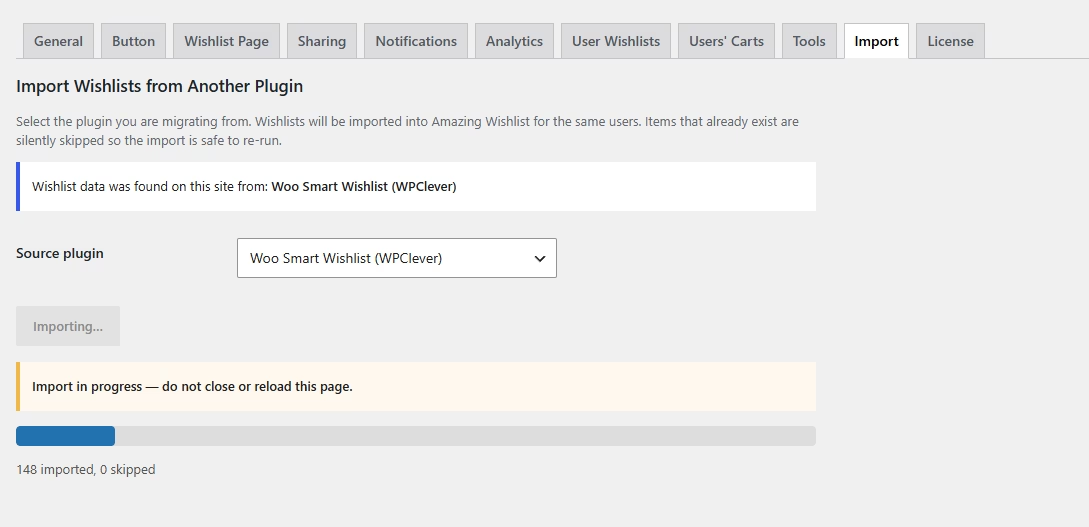
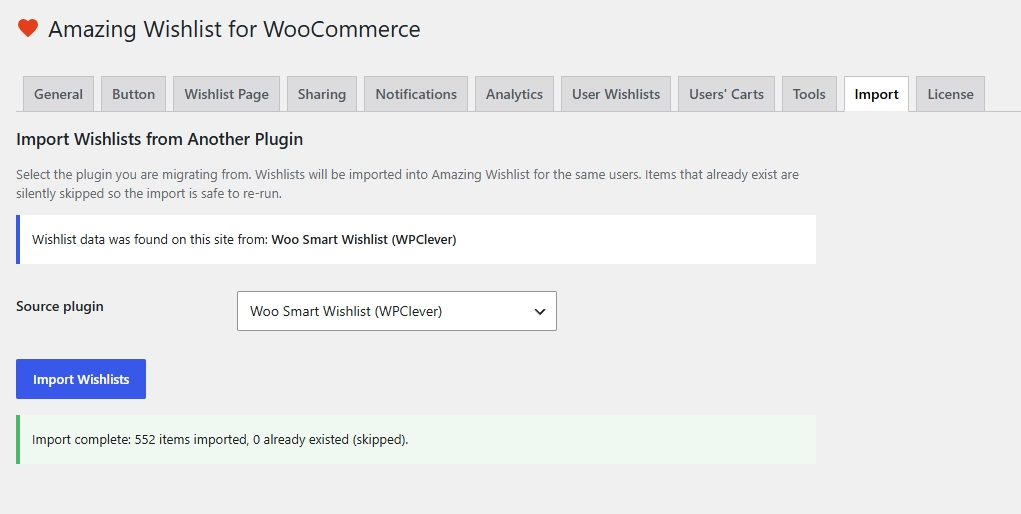
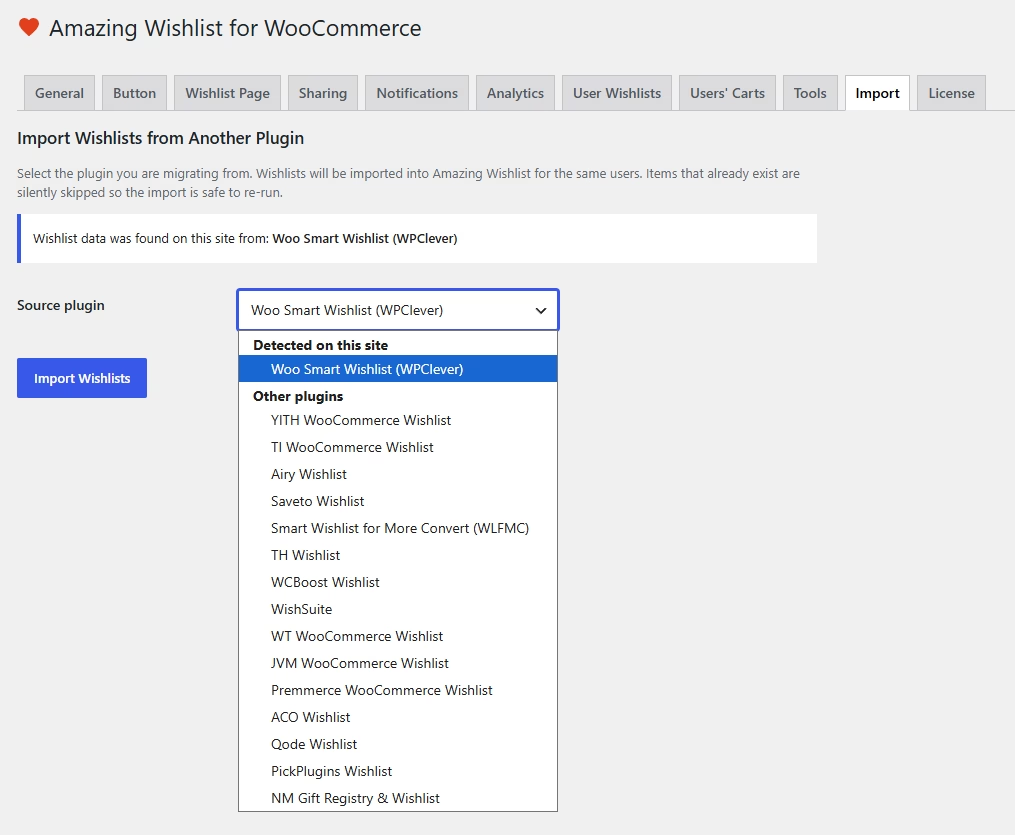
Import the Wishlists of your users from our free Lite version and 16 popular Wishlist plugins — the importer detects which of them actually have data on your site and only offers those.
Analytics & Reporting
Date-range stats, top-products tables, and admin tabs listing every user’s wishlists and saved carts.
Flexible Placement
Shortcodes, Gutenberg blocks, and Elementor widgets for the wishlist page, add-to-wishlist button, saved carts page, and mini saved-carts widget.
One-Click Menu Integration
Add “Wishlist” and “Saved Carts” links to any menu via Appearance → Menus, with optional icons and item-count bubbles.
Multilingual Ready
Full WPML and Polylang compatibility, including automatic per-language page creation.
Built for WooCommerce
HPOS compatible, full AJAX interactions, theme-overridable templates, and developer hooks throughout.
Zero-Configuration Setup
No tedious setup required — activating the plugin automatically creates the Wishlist and Saved Carts pages with the right shortcodes already in place, and if WPML or Polylang is active, it creates and links a properly translated page for every language on the site. Store owners can be up and running in seconds, not hours.
Admin Screenshots


Built for developers too
- Theme-overridable templates, following the same convention as WooCommerce
- Dozens of
do_action/apply_filtershooks for deep customization - WPML compatible and translation-ready (English, German, Greek, Spanish, and Italian included)
- WooCommerce High-Performance Order Storage (HPOS) compatible
Who this plugin is for
Stores that want customers to revisit products, restore an earlier cart or receive availability and price alerts. Use a simple save button if that is all shoppers need. Choose this plugin if you also need guest wishlists, saved carts, sharing or customer alerts.
Related reading: Compare alternatives · How to Add a Wishlist to WooCommerce
FAQ
Does a shopper need to sign in to save a product?
Guests can use the wishlist. Some features, such as price-drop and back-in-stock alerts, are for signed-in customers. Test both visitor states before launch.
What happens after I purchase?
After checkout, open My Downloads for the ZIP and My Licenses for the license key. Upload the ZIP in WordPress under Plugins → Add New → Upload Plugin, then activate the key in the plugin’s settings. See the product documentation for its setup steps.
Get it Now!
Whether you’re running a small boutique or a high-traffic store, Amazing Wishlist for WooCommerce gives your customers a reason to come back — and gives you the flexibility to make it look and behave exactly the way you want.