












Installation
There are two ways to upload and activate the plugin:
A. The recommended way
- Extract the content of the plugin zip file
- Upload the created ai-content-assistant-for-woocommerce folder via FTP to your
/wp-content/plugins/directory - Go to Plugins
- Activate the plugin
B. The normal way
- Extract the zip file you have downloaded.
- Login to your administration panel (ex. http://www.yourdomain.com/wp-admin).
- Go to Plugins → Add New.
- At the top of the page click the “Upload Plugin” link
- Click Choose File (or what your browser uses to navigate to your files)
- From the extracted files navigate to and select ai-content-assistant-for-woocommerce.zip and click “Install Now“
- You may be asked to confirm your wish to install the plugin.
- If this is the first time you’ve installed a WordPress plugin, you may need to enter your FTP login credentials. This information is available through your web server host.
- Click Proceed to continue with the installation. The resulting installation screen will list the installation as successful or note any problems during the install.
- If successful, please click Activate Plugin to activate it.
After activation
The plugin doesn’t create anything in the front end of the website — it is purely a wp-admin editorial tool, and a small aica_logs database table is created automatically to record AI request history (kept up to date on plugin updates via an internal version check, no manual steps required).
Three things must be in place before the assistant can generate anything, and the plugin will tell you clearly if any is missing:
- A valid license key must be entered and activated under AI Assistant → Settings → License (purchased from amazingwpplugins.com). Without an active license, the metabox shows a warning instead of its buttons, the underlying AI actions are also rejected server-side, and a sitewide admin notice links straight to the License field.
- The official AI plugin (
ai/ai.php) must be installed and active — it provides the underlyingWordPress\AiClientSDK this plugin builds on. If it isn’t, an admin notice appears with a direct Install or Activate button. - At least one AI provider connector (e.g. AI Provider for Google, AI Provider for OpenAI, AI Provider for Anthropic) must be installed and configured with credentials under Settings → Connectors. If none is configured, a warning banner appears across wp-admin linking straight to that screen.
WooCommerce is optional — the plugin works on any public post type. It’s only needed to unlock the WooCommerce-specific features (product description generation, brand assignment, SKU/GTIN buttons, and product gallery import).
Features
Content Generation
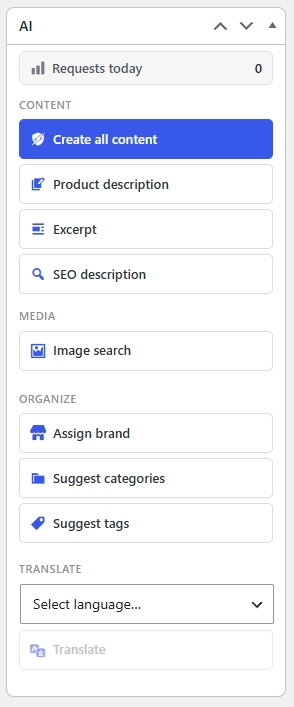
- Create all content: one click generates the main content (or WooCommerce product description), the excerpt, and — when an SEO plugin is detected — the SEO meta description, all in a single AI request
- Product description (WooCommerce products) / Post content (every other post type): HTML content with headings, paragraphs and lists, written from the post title
- Excerpt: a short, plain-text excerpt — inserted into the native WordPress excerpt field, or the WooCommerce product short description editor
- SEO description: only shown when Yoast SEO or All in One SEO is active; the generated meta description is written straight into that plugin’s own field (with a manual-copy fallback if the field can’t be found)
- Translate to…: translates the current editor content into any language configured in WPML, Polylang, or TranslatePress
- A configurable writing tone (Formal, Casual, Persuasive, Technical, Luxury, or Creative) is applied to every generation, set independently per post type
- Every AI button works in both the Classic Editor and the Block Editor (Gutenberg)
Images
- Image search: searches the web (multiple search engines and product-page scraping) for likely official product/post images matching the title, then shows a gallery of candidates to preview and choose from
- Pick any candidate as the Featured Image or add it to the WooCommerce product gallery
- If no usable image is found on the web, the assistant offers to generate one with AI instead (configurable Gemini image model), or you can paste a direct image URL
- Configurable number of AI gallery images per product, number of web search results returned, and whether results are ordered by relevancy or by file size
WooCommerce Taxonomies & Fields
- Assign brand: suggests a
product_brandterm (an existing one, or a new name) and assigns it once you confirm - Suggest categories / Suggest tags: clickable suggestion “pills” for existing or brand-new terms — clicking creates the term if needed and assigns it to the product/post
- AI buttons next to the WooCommerce SKU and GTIN (Global Unique ID) fields generate a ready-to-use value — the GTIN’s EAN-13 check digit is always computed correctly server-side
- Live validity indicators (green check / red cross) next to the SKU and GTIN fields as you type
Admin Dashboard
- Dashboard: per-connector usage stats — today, this month (with a month picker), and all-time totals broken down by request type (text, SEO, tags, categories, images), including failure counts and the time of the last request
- Logs: a paginated, searchable-by-eye history of every AI request — connector, type, related post, the request sent, success/failure, and any error message
- Settings: default content language, request timeout, per-post-type tone, Gemini text/image model selection, image search behaviour, and log retention (keep forever, or auto-prune after a configurable period)
- A “Requests today” counter is also shown directly in the metabox on every post edit screen
Licensing & Updates
- License key activation/deactivation right at the top of Settings, before the General section
- A daily background check automatically re-validates the stored license (expirations or cancellations are reflected without needing to revisit Settings)
- Without an active license: a sitewide admin notice linking to Settings, a warning instead of the metabox’s buttons, and the underlying AJAX actions rejected server-side as well
- Once active, the plugin can update itself automatically, straight from the store, with no separate downloads
Under the Hood
- Built on the WordPress Connectors API and the official
AIplugin’sWordPress\AiClientSDK — works with whichever provider connectors you install, with automatic sequential fallback if one fails - Clear admin notices guide you to install/activate the required
AIplugin, activate a license, or configure a connector, with direct one-click links - Hardened AJAX endpoints: nonce-verified, capability-checked (including WordPress’s own term-creation capability, not just generic edit access), license-gated, and SSRF-safe outbound image requests
- Dozens of action and filter hooks for developers (see For Developers)
- No frontend footprint at all — no shortcodes, blocks, widgets, or public-facing pages
Requirements
- WordPress 7.0+
- PHP 7.4+
- A valid license key, purchased from amazingwpplugins.com and activated under Settings → License (see Licensing)
- The official AI plugin (
ai/ai.php), installed and active - At least one AI provider connector installed and configured with credentials under Settings → Connectors (e.g. AI Provider for Google, AI Provider for OpenAI, AI Provider for Anthropic)
- WooCommerce — optional, only required for the product-specific features (product description, brand assignment, SKU/GTIN buttons, gallery import)
- Yoast SEO or All in One SEO — optional, only required for the “Create SEO description” action
- WPML, Polylang, or TranslatePress — optional, only required for the “Translate to…” action
Licensing
The plugin is licensed through Software Licensing and requires an active license key, purchased from amazingwpplugins.com, to generate content.
Without an active license
- A dismissible-style warning is shown on every wp-admin page for users who can manage options, linking straight to the License field
- The AI metabox on every post/product edit screen shows a warning instead of its buttons — no content, image, tag, category, brand, or SKU/GTIN actions are available
- The plugin’s AJAX endpoints reject every request server-side as well, so the underlying functionality is blocked even if a request bypasses the metabox UI
- The plugin will not receive automatic updates
Activating your license
- Go to AI Assistant → Settings — the License field appears first, above General
- Paste in the license key from your purchase receipt or your account on amazingwpplugins.com
- Click Activate License
Once active, the key is shown masked (only the last 4 characters visible) along with its renewal date, and a daily background check keeps the status up to date automatically — an expired or cancelled license is detected without needing to revisit this page.
Each license key can be active on a limited number of sites at a time (per your purchase). To move it to a different site, click Deactivate License & Remove Key first — this frees up the activation for use elsewhere.
Usage
The AI metabox
Edit (or create) any post, page, or WooCommerce product. An “AI” box appears in the sidebar with the following groups:
- Content: Create all content, Product description / Post content, Excerpt, and SEO description (if an SEO plugin is detected).
- Media: Image search, with a preview area for the results.
- Organize (shown when the post type has matching taxonomies): Assign brand, Suggest categories, Suggest tags.
- Translate (shown when a supported translation plugin is active): a language picker and Translate button.
- A running “Requests today” counter, and a status line showing progress and results for the action in progress.
All buttons require a title of at least 3 characters before they become active. If more than one AI connector is configured, the plugin tries them one after another until one succeeds, showing which connector ultimately fulfilled the request.
WooCommerce product fields
On the product data panel, the SKU and GTIN, UPC, EAN or ISBN fields each get a small AI icon button beside them — click it to generate a value, and watch the green check / red cross indicator confirm it’s valid as you (or the AI) edit it.
Plugin Settings
Navigate from your WordPress administration panel to AI Assistant → Settings. The page is organized into the following sections.
License
Shown first, above General. A License Key field plus an Activate License button — once active, the key is masked and the button becomes Deactivate License & Remove Key, with the renewal date shown alongside it. See Licensing for what happens while inactive and how to move a license between sites.
General
- Default content language: leave empty to write in English, or specify a language (e.g. Greek, Spanish, French) to have every generation written in it.
- Request timeout: maximum seconds to wait for each AI request before giving up (5–600, default 60). Image generation and large posts may need a higher value.
Content Tone (per post type)
A table listing every public post type with a Tone dropdown for each: Formal & Professional, Casual & Friendly, Persuasive & Sales-focused, Technical & Detailed, Luxury & Premium, or Creative & Engaging. The selected tone is appended to every generation prompt for that post type.
Google (Gemini)
- Gemini model: choose a specific Gemini text model, or leave on “Default” to let the provider pick automatically. This field is disabled with an explanatory note if the Google connector isn’t active.
Images
- Image model: the Gemini image model used when AI image generation is needed (e.g. when no web image was found).
- AI gallery images per product: how many images to generate per product when using AI generation for the gallery (1–10, default 3).
- Web image search results: how many normal web search results to return for picking (1–30, default 10).
- Order search results by: Relevancy (best match to the title) or Size (prefer larger files, closer to 1MB).
Log Retention
- Keep logs forever: on by default. When unchecked, a daily job deletes log entries older than the period you specify (a number of days, weeks, months, or years).
Dashboard & Logs
AI Assistant → Dashboard shows, per connector, today’s usage, a month-by-month breakdown by request type (with a month picker), month and all-time totals, and the time of the last request. AI Assistant → Logs lists every individual AI request ever made, paginated, with its connector, type, related post, the text that was sent, whether it succeeded, and any error message.
For Developers
Hooks
The plugin exposes the following action and filter hooks, grouped by the file they’re fired in.
Actions
/ai-content-assistant.php
    aica_loaded                                                fired once, after all plugin components are initialized

/includes/class-ajax.php
    aica_before_ai_request( $prompt, $provider )               fires immediately before any AI text request is sent
    aica_after_ai_request( $result, $prompt, $provider )       fires after a successful AI text response is received
    aica_term_created( $term_id, $taxonomy, $name )            fires after a new taxonomy term is created via the assistant
    aica_term_assigned( $post_id, $taxonomy, $term_id )        fires after a term is assigned to a post
    aica_featured_image_set( $post_id, $attachment_id )        fires after the assistant sets a post's featured image
    aica_gallery_images_added( $post_id, $ids )                fires after attachment IDs are added to a product's gallery

/includes/class-bulk-actions.php
	aica_bulk_action_completed( $post_id, $action, $post_type )            fires after each item is processed in a bulk AI action

/includes/class-logger.php
    aica_request_logged( $connector, $type, $post_id, $success, $error )   fires after every AI request is logged

/includes/class-settings.php
    aica_settings_saved( $out, $input )                        fires after settings are sanitized, just before saving

/includes/class-metabox.php
    aica_metabox_before_buttons( $post )                       fires inside the metabox, before the button groups
    aica_metabox_after_buttons( $post )                        fires inside the metabox, after the button groups
Filters
/ai-content-assistant.php
    aica_connectors( $connectors )                              the full list of registered AI connectors
    aica_configured_connectors( $configured, $connectors )      connectors considered to have usable credentials
    aica_connector_logo_paths( $known )                          known provider-plugin logo paths keyed by connector ID
    aica_connector_logo( $logo, $connector_id, $connector_data ) the resolved logo URL for a connector
    aica_connector_daily_limit( $limit, $connector_id, $connector_data )   a connector's daily request limit, if known
    aica_seo_plugin( $plugin )                                   the detected SEO plugin slug ('yoast', 'aioseo', or '')

/includes/class-ajax.php
    aica_ai_prompt( $prompt, $provider )                         the final prompt sent for every text request
    aica_ai_response( $result, $prompt, $provider )              the raw text response from the AI provider
    aica_generate_prompt( $prompt, $action, $post_id )           the per-action prompt (description, excerpt, seo…)
    aica_generated_content( $result, $action, $post_id )         generated content, before being returned to the editor
    aica_generated_content_bundle( $bundle, $post_id )           the parsed content/excerpt/seo bundle
    aica_suggest_tags_prompt( $prompt, $title, $taxonomy, $post_id )
    aica_suggested_tags( $tags, $post_id, $taxonomy )            suggested tags before being returned to the editor
    aica_suggest_categories_prompt( $prompt, $title, $taxonomy, $post_id )
    aica_suggested_categories( $matched, $post_id, $taxonomy )   suggested categories before being returned to the editor
    aica_suggest_brand_prompt( $prompt, $title, $post_id )
    aica_suggested_brand_name( $brand_name, $post_id, $title )   the AI-suggested brand name, before lookup/creation
    aica_generate_sku_prompt( $prompt, $field, $title, $post_id )
    aica_generated_sku( $value, $field, $post_id )                the generated SKU or GTIN value
    aica_ai_image_prompt( $prompt, $provider )                    the prompt sent for AI image generation
    aica_image_search_methods( $methods )                         the ordered list of web image search sources
    aica_image_candidates( $candidates, $title )                  web image search candidates, before being returned
    aica_allowed_image_url( $allowed, $url )                      whether a candidate image URL is allowed to be fetched

/includes/class-settings.php
    aica_tones( $tones )                                          the available content tone presets
    aica_google_text_models( $models )                            the selectable Gemini text models
    aica_google_image_models( $models )                           the selectable Gemini image models

/includes/class-translation.php
    aica_translation_languages( $languages )                      the list of languages available for translation

/includes/class-metabox.php
    aica_metabox_post_types( $post_types )                        post types the AI metabox is registered for

/includes/class-admin.php
    aica_dashboard_types( $types )                                request types shown as columns on the dashboard

/includes/class-woo-fields.php
    aica_woo_fields_enabled( $enabled, $post )                    whether the SKU/GTIN field icons show for a product
Frequently Asked Questions
- Do I need a license key to use the plugin? Yes. A valid, activated license key is required for the assistant to generate anything. Without one, a sitewide notice appears, the metabox shows a warning instead of its buttons, and the underlying AJAX actions are also blocked server-side. See Licensing.
- Where do I get a license, and how do I activate it? Purchase one at amazingwpplugins.com, then paste the key into the License field at the top of AI Assistant → Settings and click Activate License.
- Can I move my license to a different site? Yes — click Deactivate License & Remove Key on the original site first, which frees up that activation, then activate the same key on the new site.
- Will an expiring or cancelled license be caught automatically? Yes, a daily background check re-validates the stored key, so its status stays current even if nobody visits the Settings page.
- Does the plugin update itself? Yes, once licensed — updates are delivered straight from amazingwpplugins.com and appear on the normal Plugins screen like any other update. Without an active license, updates don’t happen automatically.
- Which AI providers does it support? Whichever provider connectors you install and configure through WordPress’s own Settings → Connectors screen — for example AI Provider for Google, AI Provider for OpenAI, or AI Provider for Anthropic. The assistant tries every configured connector in turn until one succeeds.
- Do I need WooCommerce? No. The AI metabox appears on every public post type. WooCommerce-specific actions (product description, Assign Brand, SKU/GTIN buttons, product gallery import) only appear when WooCommerce is active and you’re editing a product.
- What happens if no AI connector is configured? A warning banner appears across wp-admin linking directly to Settings → Connectors, and the metabox itself shows “No active AI connector” instead of its buttons.
- What happens if the “AI” plugin isn’t installed or active? An admin notice appears with a one-click Install or Activate button, and the rest of the plugin stays dormant until it’s active — this plugin builds directly on its
WordPress\AiClientSDK. - Where do the images in “Image search” come from? The assistant first searches the web for an existing, likely-official image matching the title. If nothing usable turns up, it offers to generate one with AI instead, or you can paste a direct image URL.
- Is the generated GTIN guaranteed to be a valid barcode? Yes — the EAN-13 check digit is always computed correctly on the server, regardless of what the AI returns for the other digits.
- Can I control the writing tone? Yes, independently for each post type, under Settings → Content Tone.
- Does it work in both the Classic Editor and the Block Editor? Yes — content insertion, tags, categories, brand assignment, and translation all work in both.
- Is my AI usage tracked? Yes. Every request is recorded — connector, type, related post, and success/failure — and visible under AI Assistant → Dashboard and AI Assistant → Logs. Retention is configurable in Settings, or you can keep logs forever.
- Can I extend or customize how it behaves? Yes — see For Developers for the full list of action and filter hooks, covering prompts, generated content, term/image handling, and more.
Changelog
1.2.28 03 Jul 2026
- Improvement: Removed call-to-action wording from product description generation prompts
1.2.27 30 Jun 2026
- Feature: AI actions in the Bulk Actions dropdown on every post type list table — generate content, excerpt, SEO description, tags, categories, brand, SKU, and GTIN across multiple posts or products in one click, with a configurable per-run batch cap and a clear success/failure/remaining notice
- Improvement: AI request logic extracted into a shared internal client used by both the per-post metabox and the new bulk actions, so the same connector-fallback chain, prompt filters, and action hooks apply everywhere
- Improvement: AIOSEO SEO description save now uses AIOSEO’s own Post model instead of raw SQL — all other AIOSEO data for the post (title, robots meta, OG/Twitter meta, etc.) is preserved correctly
- Improvement: Metabox taxonomy detection refactored into a shared static method used by both the metabox and bulk actions
1.2.26 29 Jun 2026
- EDD-based license activation (Settings → License, shown above General) — required for content generation, with sitewide and metabox warnings while inactive, server-side AJAX gating, and automatic plugin updates once active
- AI metabox (Content, Media, Organize, Translate groups) for every public post type, with per-connector fallback via the WordPress Connectors API
- Content actions: Create all content, Product description / Post content, Excerpt, SEO description, Translate
- Per-post-type writing tone setting
- Web image search with AI-generation fallback, for both the Featured Image and the WooCommerce product gallery
- WooCommerce brand, category and tag suggestions, plus AI-generated SKU/GTIN with live field validation
- Admin Dashboard and Logs screens with per-connector usage stats and request history
- Admin notices guiding installation/activation of the required “AI” plugin and configuration of an AI connector
- An extensive set of action and filter hooks for developers
1.0.0 03 Jun 2026
- Initial release
Sources and Credits
This plugin does not bundle any third-party PHP libraries or JavaScript frameworks beyond what WordPress core already ships (jQuery, Dashicons, Thickbox). AI generation is performed by whichever provider connector(s) you configure through the WordPress Connectors API; web image search makes outbound requests to public search engines at runtime and bundles no code from them.