











Official plugin guide
Growth metrics that matter, inside WordPress.
Amazing WP Analytics helps you to track visitors, views, goals, routes, referrers, devices, live activity, and recognized bots with first-party data and a deliberately lightweight public-site footprint.
Requirements
| Requirement | Details |
|---|---|
| WordPress and PHP | WordPress 6.2 or newer and PHP 7.4 or newer. The plugin uses standard database, REST API, WP-Cron, capability, nonce, and privacy-policy APIs. |
| Database | The WordPress MySQL or MariaDB user must be able to create and update plugin tables during activation and upgrades. |
| Browser | The core tracker uses local storage, sendBeacon, and a small JavaScript fallback. Browsers blocking JavaScript or storage will not produce normal human analytics. |
| Administration | Administrators need manage_options. A valid license is required to display reports, Live visitors, and imported analytics in wp-admin. |
Collection and reporting are separate. Statistics continue to be collected when a license is missing, expired, or invalid. Report screens remain locked until the license is active.
Installation and quick start
- Upload the plugin folder to
wp-content/plugins/, or install its ZIP through Plugins → Add New → Upload Plugin. - Activate Amazing WP Analytics. Required tables and conservative defaults are created automatically.
- Open AWP Analytics → License, enter the purchased license key, and activate it.
- Open AWP Analytics and review Settings. The default 356-day retention and role exclusions suit many sites.
- Add a custom URL goal or enable only the automated goals your site needs.
- Visit the public site in a non-excluded browser, stay beyond the tracker delay, then return to the dashboard.
Collection flow
- Page finishes loading
- The quiet delay elapses
- The small tracker loads
- A beacon records the view
- The dashboard reads compact roll-ups
Lightest starting point Keep enhanced engagement disabled, respect Do Not Track, exclude staff roles, and enable only the goals and bot reporting you need.
License activation and updates
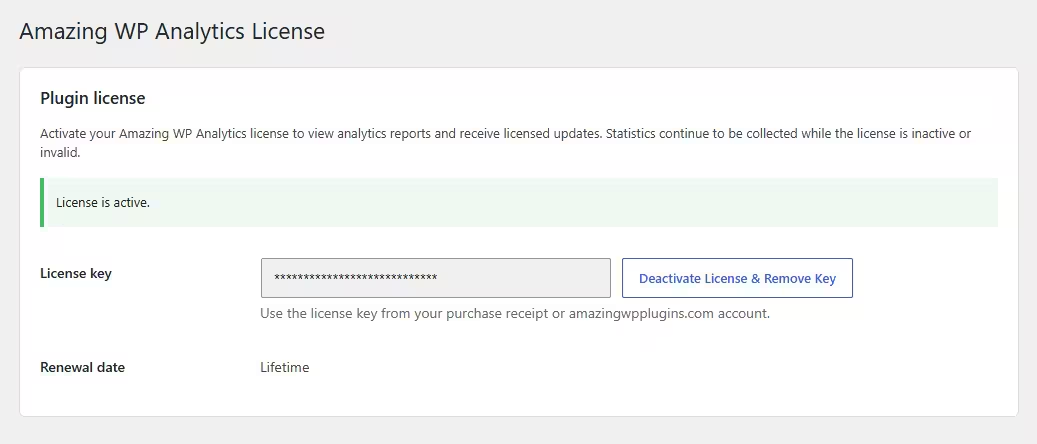
Open AWP Analytics → License, enter the purchased license key, and select Activate License.
- A valid license unlocks the dashboard, Live visitors, Import reports and plugin updates.
- Tracking remains active while reports are locked by an invalid or inactive license.
- WordPress performs daily license validation and licensed update checks.
- The License page includes a manual update check.
Licensing privacy Visitor analytics, report values, paths, referrers, and engagement data are never included in licensing requests to amazingwpplugins.com.
How tracking works
The public page receives a tiny delayed loader. After page load and an eight-second quiet window, it requests the roughly 1 KB core tracker and sends one fire-and-forget page-view beacon. Public page rendering performs no analytics report queries.
| Concept | How it works |
|---|---|
| Visitors | A random first-party browser identifier is stored locally and irreversibly HMAC-hashed before database storage. It supports new and returning classification plus daily unique counts. |
| Sessions | A session groups browsing activity and restarts after 30 minutes of inactivity. Duration is measured between tracked views; there is no heartbeat. |
| Paths and referrers | Normalized URL paths and referrer hostnames are stored. Query parameters and full referrer URLs are discarded by default. |
| Rollups | Compact daily tables power most reports. Raw events are retained for the configured period and removed in bounded cleanup batches. |
The delay is intentional. A visitor who leaves before the delayed tracker runs may not be counted. This tradeoff keeps analytics away from the critical rendering path and protects PageSpeed performance.
Dashboard
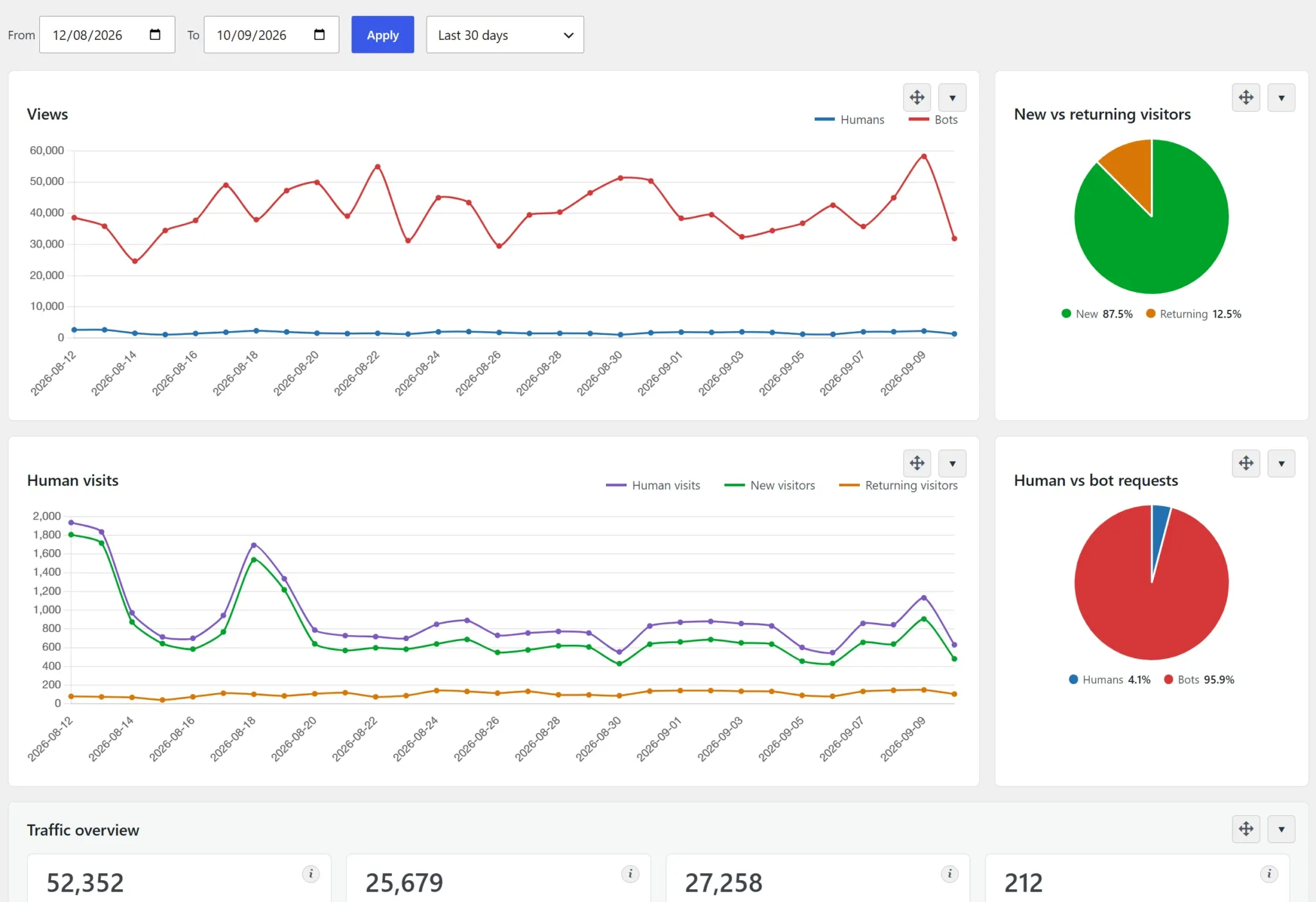
The main Amazing WP Analytics page supports From and To date filters. Headline values compare the selected range with the immediately preceding equal-length range: green indicates an increase and red indicates a decrease.
| Feature | Behavior |
|---|---|
| Charts | Views separates human and bot requests. Human visits includes visits, new visitors, and returning visitors. Compact pie charts show audience shares. |
| Best months | Each metric independently displays its strongest calendar month. The active month can become the current best before month-end. |
| Clickable metrics | Headline cards link to their detailed panels. Bot and AI bot request cards link to Detected bots. |
| Auto-refresh | Headline metrics and charts refresh every 20 seconds while the dashboard tab is visible. |
| Collapsible panels | Every report panel can be collapsed. Each administrator’s choices are remembered in that browser. |
| Database usage | The footer displays combined plugin table and index size, recalculated no more than once every three hours. |
Available report panels
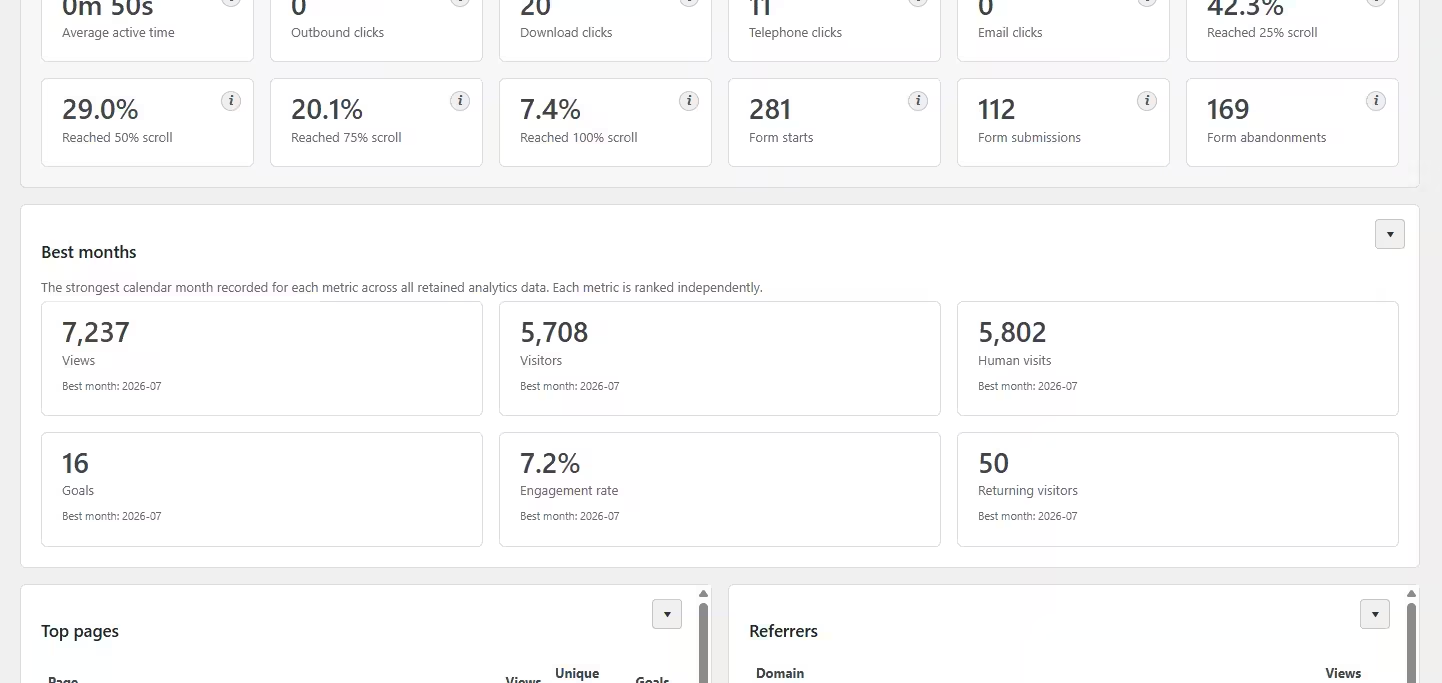
Top pages and unique views, referrers, channels, devices, countries, browsers and operating systems, screen resolutions, landing pages, exit pages, detected bots, goal conversions, routes to goals, traffic hours, weekdays, languages, UTM campaigns, content types, 404 views, conversion entry pages, and optional engagement reports.
Click a legend label above Views or Human visits to hide or show that line. Hidden labels are crossed out, and your selection stays in effect during automatic refresh. You can also focus a label with Tab and toggle it with Enter or Space.
Audience pies refresh independently of line visibility, using numeric counts so localized thousands separators cannot affect their percentages. Humans are blue and bots red; new visitors are green and returning visitors orange.
Google Search Console
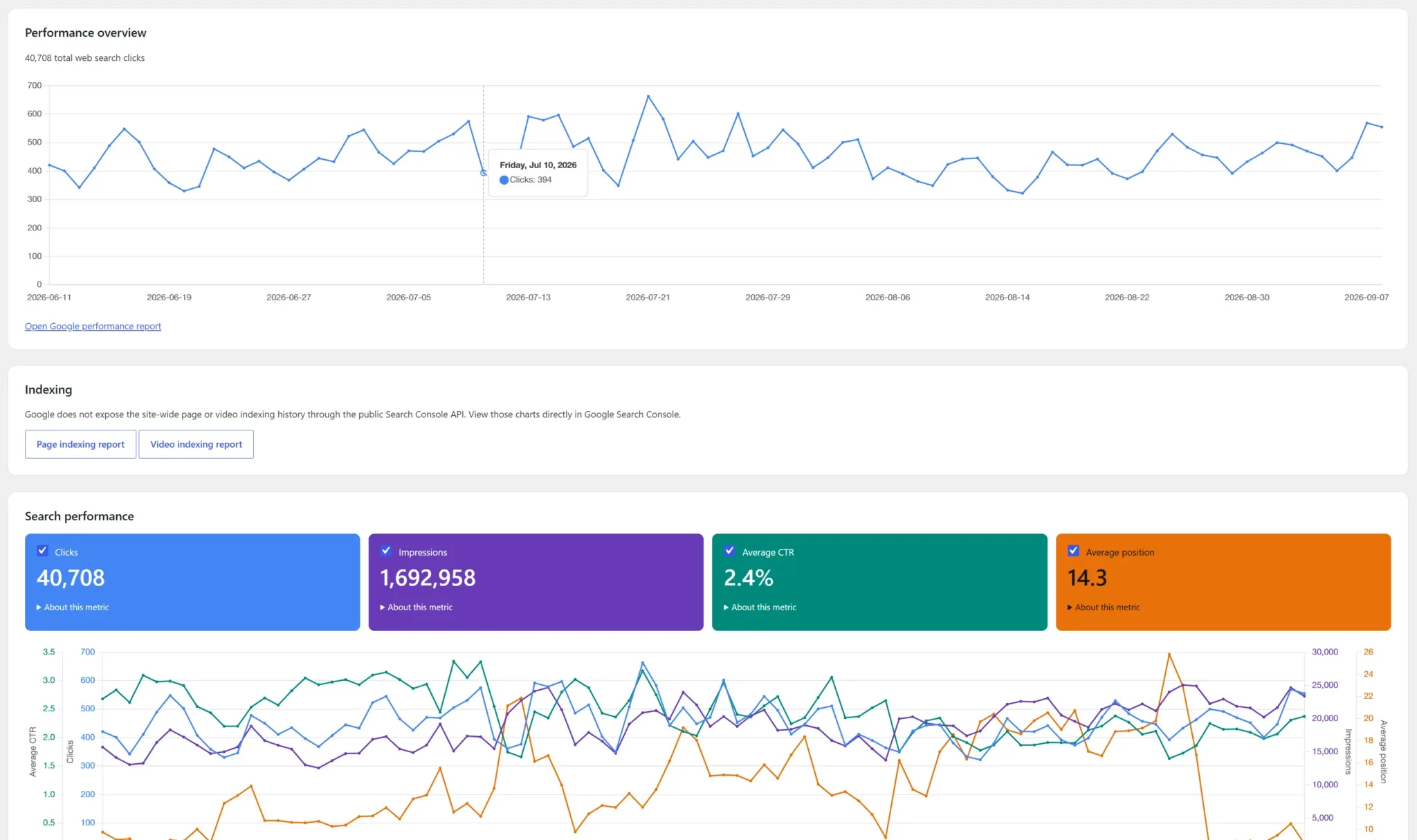
Click any report column header to sort the cached rows; click again to reverse the order. Arrows show the current direction. Numeric columns sort by their underlying values, and headers support keyboard activation. Sorting makes no additional Google requests and applies to the rows already fetched.
Open AWP Analytics → Search Console for a separate cached Google organic search report: clicks, impressions, CTR, average position, and up to 100 top queries and landing pages. Choose a rolling 7, 28 or 90-day window ending three days ago. Dates use Pacific Time, and Google may omit private queries. These aggregates cannot identify an individual visitor’s search term.
Enable the Search Console API in Google Cloud, configure OAuth consent, and create a Web application client. Register the exact redirect URI shown on the plugin page, then save your client ID, secret and exact Google Search Console property (for example sc-domain:example.com or https://example.com/). Connect a Google account with access to that property. In testing mode, add the account as a test user; refresh tokens can expire after seven days. Production apps may need Google verification.
Credentials are encrypted using WordPress salts; changing salts requires reconnecting. The module loads only in admin or WP-Cron. Twice-daily scheduled updates depend on site traffic, manual refresh is limited to once per 15 minutes, and failures preserve the last successful report. An active license is required. Disconnect removes the local token and report and attempts revocation at Google; access can also be removed from your Google account. The integration sends no locally collected visitor events and adds no public-page JavaScript.
Metrics reference
| Metric | Definition | Important detail |
|---|---|---|
| Views | Total tracked human page loads. | Repeat loads are included. Bot requests are shown separately. |
| Unique views | One anonymous visitor per normalized page per UTC day. | Temporary page deduplication keys are retained for three days. |
| Visitors | Unique anonymous visitors recorded per UTC day. | The same browser may count once on each day in a multi-day range. |
| Sessions / Human visits | Browsing sessions started by tracked human visitors. | A new session begins after 30 minutes of inactivity. |
| New visitors | Browsers without the plugin’s first-party visitor identifier. | Cleared storage, private browsing, or another browser can appear new. |
| Returning visitors | Browsers that already contain the identifier. | This is browser-based, not a cross-device identity. |
| Bounce rate | Sessions containing one tracked page view. | A delayed or blocked next view can affect the result. |
| Engagement rate | Sessions with multiple views or a configured goal. | Core engagement does not require optional enhanced tracking. |
| Session duration | Time between tracked page views in a session. | Time after the final page view is not included. |
| Goals | Recorded custom URL and enabled automated conversions. | Equivalent URL and automated goals may both count when both are enabled. |
| Bot requests | Recognized automated requests that reached WordPress. | User-agent classification can be missing or spoofed. |
| AI bot requests | Bot requests whose normalized family is AI-related. | Earlier Other bot rows cannot be reclassified retroactively. |
Live visitors
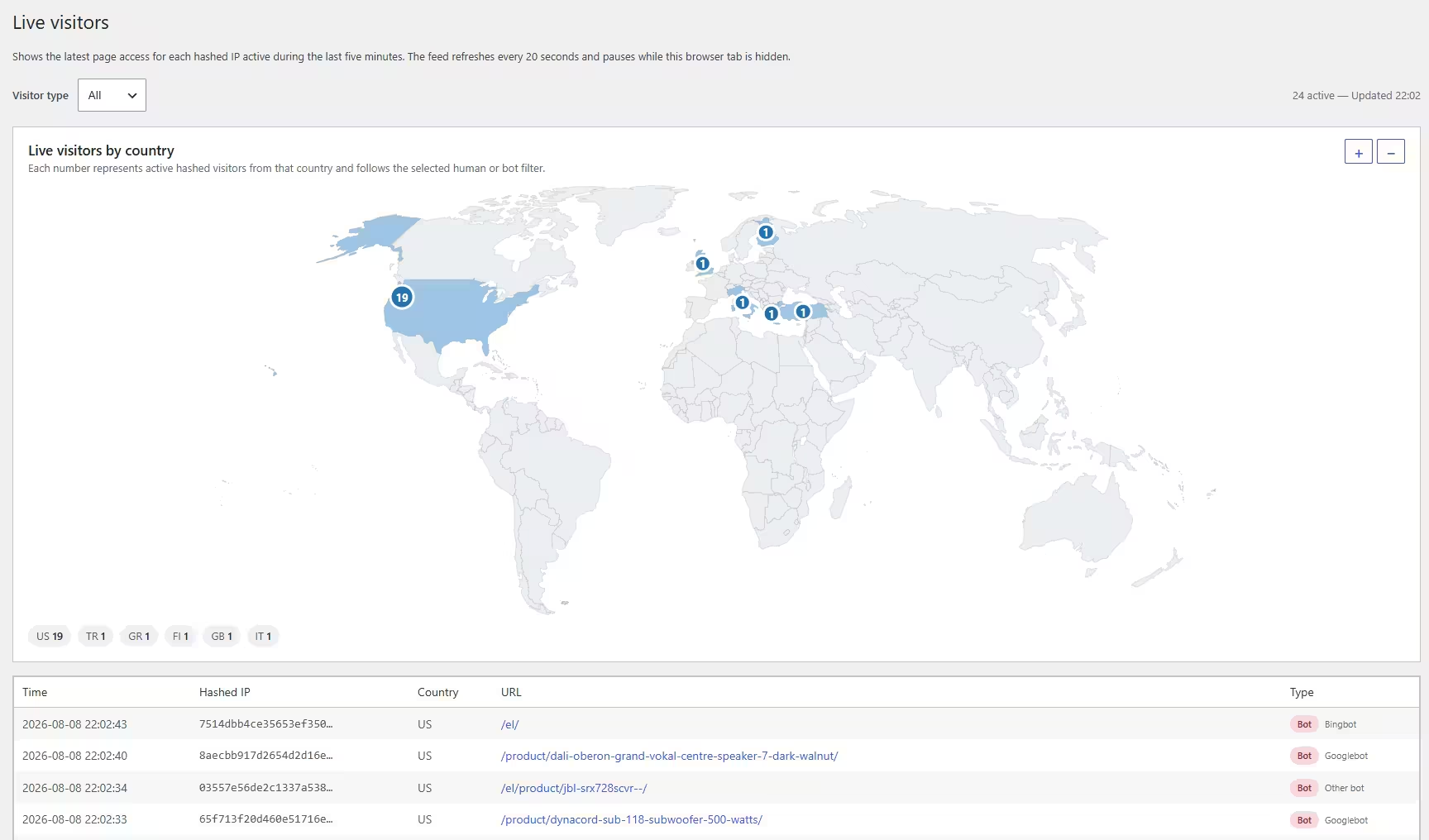
Open AWP Analytics → Live to see the latest access for each hashed connection IP active during the most recent five minutes.
| Column | Meaning |
|---|---|
| Time | The access time in the WordPress site timezone. |
| Hashed IP | A shortened site-specific irreversible HMAC. The raw address is never stored. |
| Country | A two-letter country code supplied by a supported CDN or host, or Unknown. No external lookup is performed. |
| URL | The normalized path most recently accessed by that hashed address. |
| Type | Human or Bot, followed by the normalized crawler family for bots. |
- Filter by All, Human, or Bot.
- A numbered world map groups filtered live visitors by country, with Unknown in the legend.
- Hover or keyboard-focus a badge for the full country name and separate human and bot totals.
- Zoom from 1× to 4× and drag to pan. Badge size remains visually stable and anchored.
- The dashboard country map uses the selected date range and the same top-25 values as the Countries panel.
- The Live page refreshes every 20 seconds and pauses while hidden.
- The default limit is 200 current rows with a hard maximum of 500; the activity window defaults to five minutes.
New data only Events created before version 0.10.0 do not contain connection-IP hashes and cannot appear in Live visitors. Human visits appear after the normal delayed beacon.
Bots and AI crawlers
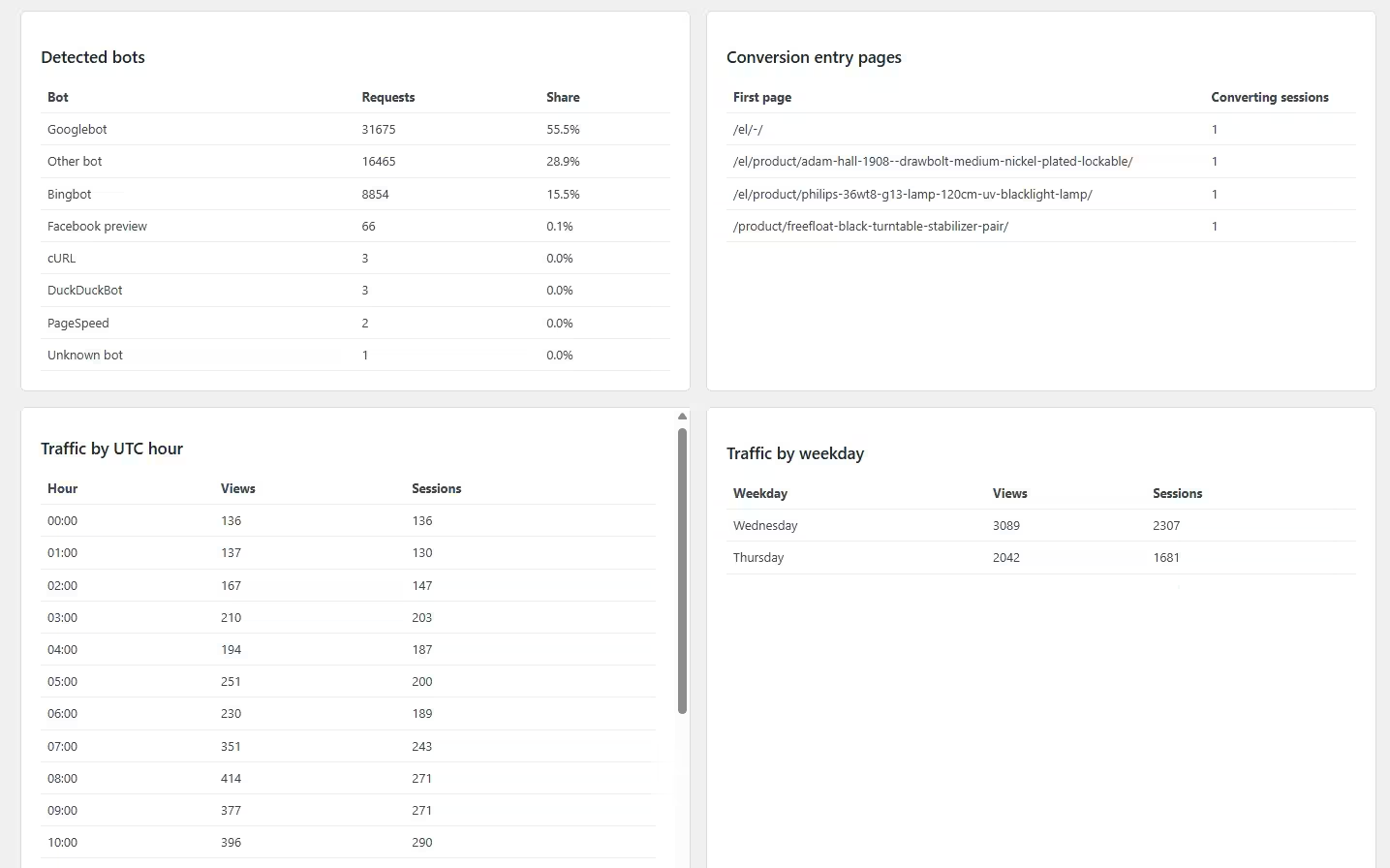
Bot detection examines the reported user agent and maps recognized signatures to bounded crawler-family names. Raw user-agent strings are not stored. Families include major search crawlers, SEO crawlers, social previews, performance tools, headless browsers, command-line clients, and common AI crawler or user-fetch agents.
| Report | Meaning |
|---|---|
| Detected bots | Request counts and percentage share per normalized family for the selected dates. |
| AI bot requests | A Traffic overview card summing normalized families configured as AI-related. |
Counting boundary Only bot requests that reach WordPress can be counted. Requests served, blocked, or cached entirely by a CDN, firewall, reverse proxy, or web server are invisible to the plugin.
Classification is indicative. User agents can be spoofed, and legitimate crawlers may use unexpected identifiers. Treat these numbers as estimates, not verified proof of ownership.
Goals
Custom URL goals
Create a goal name, choose URL contains or URL exactly matches, and enter a normalized path such as /thank-you/ or /order-received/.
WooCommerce order-received URLs A URL goal counts browser page views, not authoritative orders. Reloads may be deduplicated, and orders can complete without that page being tracked. Use the WooCommerce automated order goal for reliable order counts.
Automated server-side goals
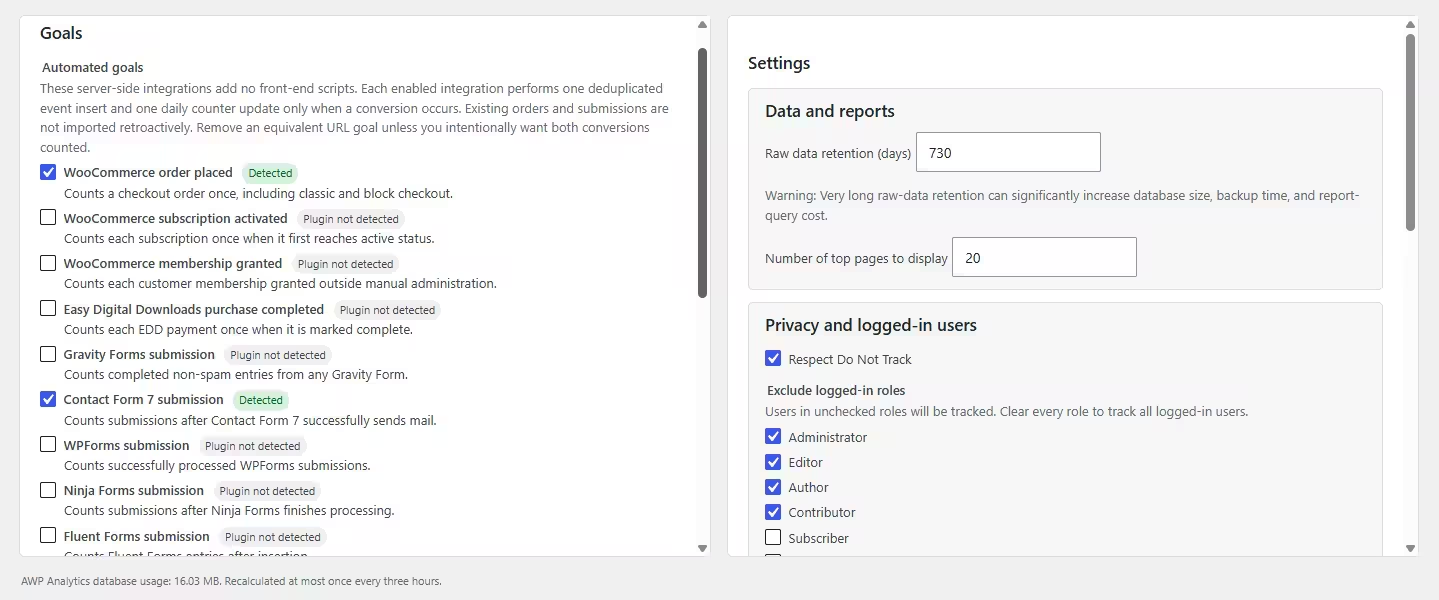
Automated goals are disabled by default, add no public script, and run only on a supported plugin’s completion hook. Each source event is irreversibly hashed and deduplicated.
| Integration | Recorded event |
|---|---|
| WooCommerce | Checkout order placed, including classic and block checkout. |
| WooCommerce Subscriptions | Subscription first reaches active status. |
| WooCommerce Memberships | Customer membership granted outside manual administration. |
| Easy Digital Downloads | Purchase marked complete. |
| Gravity Forms | Completed non-spam submission. |
| Contact Form 7 | Submission after mail is sent successfully. |
| WPForms, Ninja Forms, Fluent Forms, Formidable Forms | Successfully processed or inserted submission. |
| Elementor Pro Forms | Form record after configured actions run. |
| MemberPress | Completed recurring or non-recurring transaction. |
| LearnDash | Unique user and course completion. |
Existing historical orders, purchases, submissions, memberships, and completions are not imported retroactively. Automated conversions appear in Goal conversions but have no browser route.
Enhanced engagement
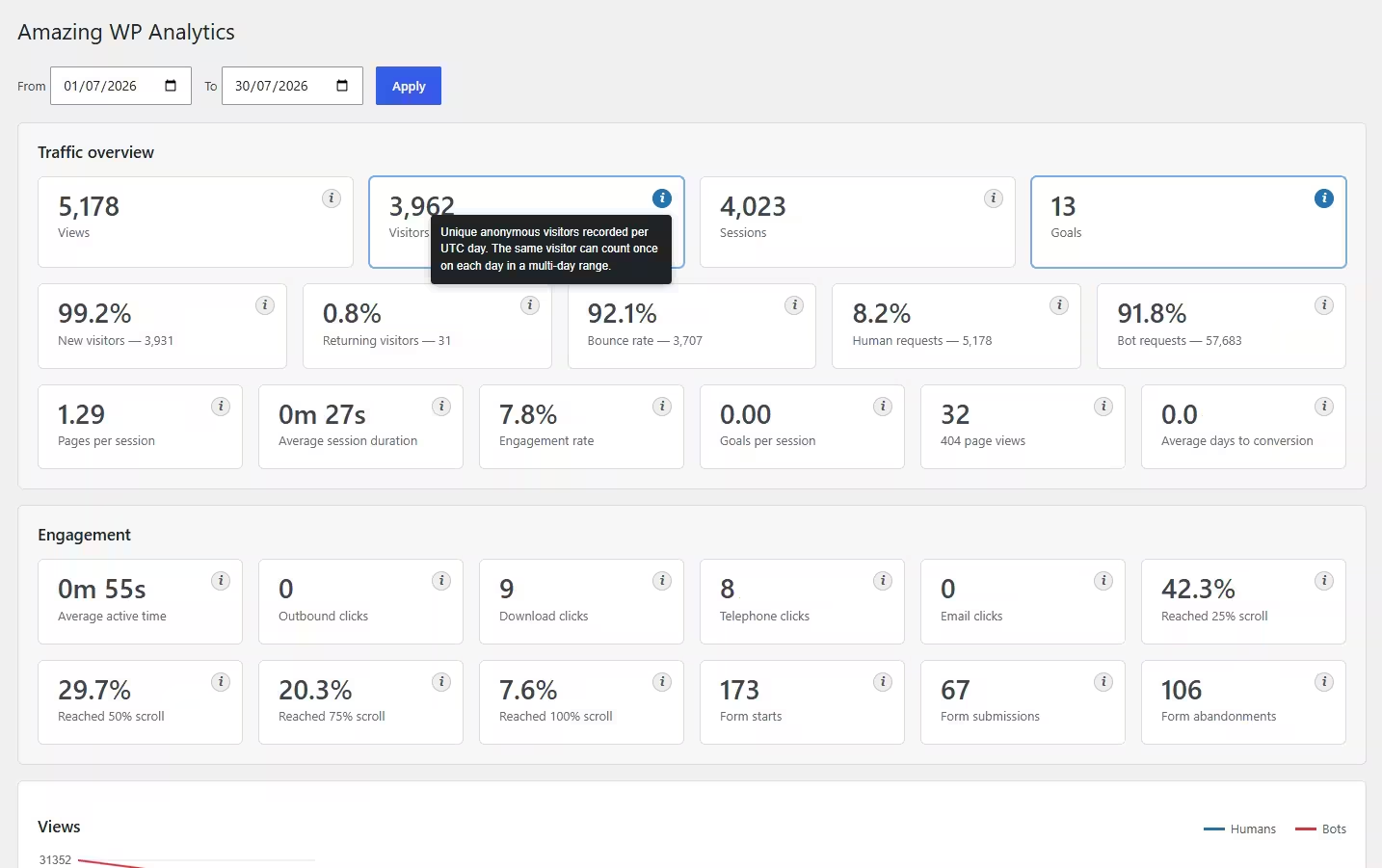
Enhanced engagement is optional and disabled by default. It listens for scroll milestones, visibility and active time, outbound links, downloads, telephone and email links, and form start or submission state.
| Area | Collected summary |
|---|---|
| Page activity | Average active time and 25%, 50%, 75%, and 100% scroll milestones. |
| Clicks | Outbound hosts, download extensions, telephone clicks, and email clicks without addresses or numbers. |
| Forms | Starts, submissions, and abandonments without form identifiers, field names, or values. |
| Network behavior | One extra summarized request when the page lifecycle ends, not one request per interaction. |
Small additional cost This feature loads another script, installs browser listeners, and sends one additional request. Leave it disabled when the absolute lightest footprint is the priority. Engagement panels remain hidden while disabled.
Settings reference
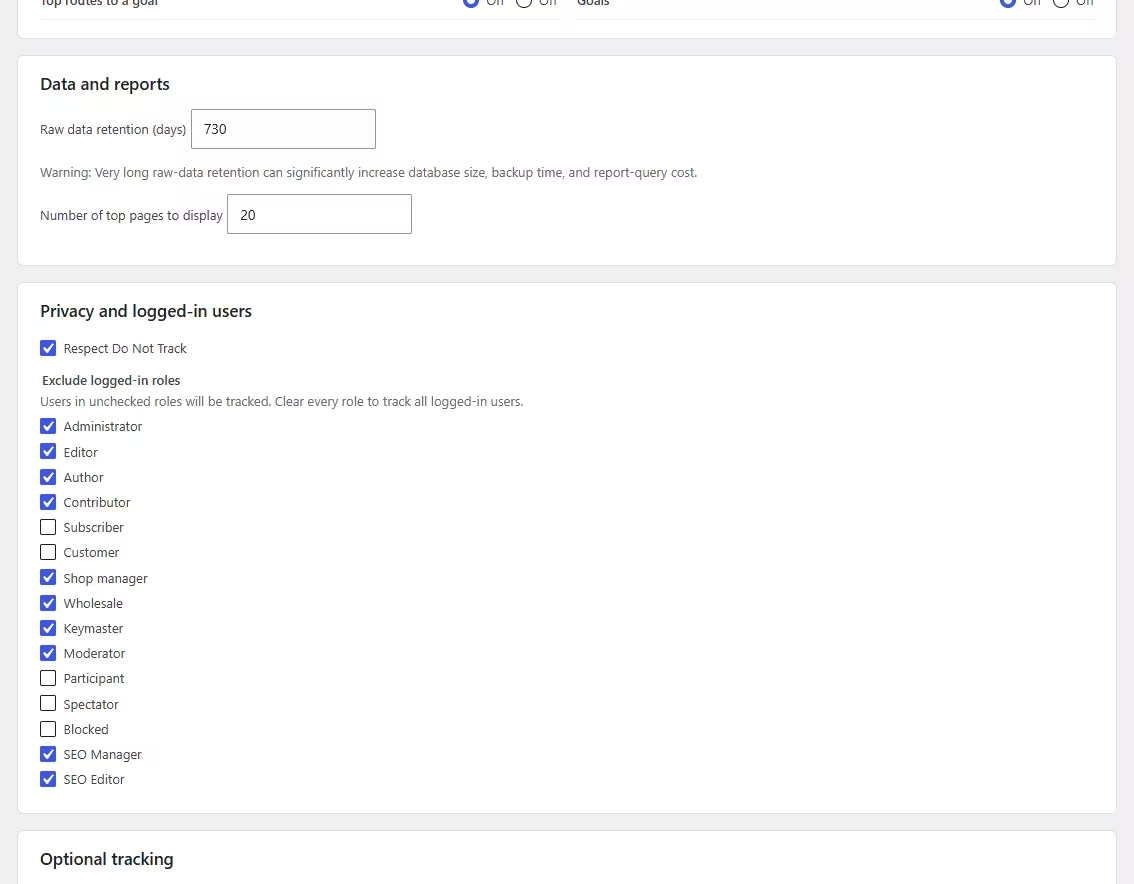
| Setting | Default | What it controls |
|---|---|---|
| Raw data retention | 356 days | How long raw events, sessions, visitors, and automated conversions remain. There is no fixed maximum. |
| Top pages | 20 | Maximum rows in the Top pages report. |
| Respect Do Not Track | Enabled | Skips the public tracker when the browser sends a Do Not Track preference. |
| Excluded logged-in roles | Administrator, Editor, Author | Prevents selected roles from being tracked. Clear every role to include all logged-in users. |
| Enhanced engagement | Disabled | Enables the optional engagement script and reports. |
| Track recognized bots | Enabled | Adds one aggregate database write for each recognized bot request reaching WordPress. |
| Delete data on uninstall | Disabled | Permanently removes plugin tables, goals, settings, reports, import ledgers, and license options when the plugin is deleted. |
Retention has no artificial maximum. Very long retention can increase database size, backup duration, and report cost. Daily roll-ups remain available after raw rows are cleaned.
Legacy analytics import
In order to import statistics data from your previous stats plugin to Amazing WP Analytics, open AWP Analytics → Import to copy compatible aggregate history. Imports run only on this administration page, use short resumable AJAX batches, and never modify or delete source tables.
| Source | Importable data |
|---|---|
| Burst Statistics | Views, visitors, top pages, and unique page views. |
| Independent Analytics | Views, visitors, sessions, top pages, unique page views, and referrers. |
| Koko Analytics | Views and visitors; top pages and referrers when rollup tables exist. |
| Matomo Analytics | Retained raw views, visitors, sessions, new and returning visitors, bounces, pages, unique views, and referrers. |
| WP SlimStat | Human views, visitors, sessions, top pages, unique page views, and referrers. |
| WP Statistics | Views, visitors, top pages, unique page views, and referrers. |
| Visitors Traffic Real Time Statistics | Legacy visits mapped as views, plus visitors. |
| Quantely Analytics | Detected but not imported because evolving rules cannot be mapped safely. |
| WP Stats Manager | Detected but not imported because mixed dimensional rows risk double-counting. |
Avoid overlapping dates. Choose an import end date before AWP Analytics began collecting. Dates containing native traffic or another imported source are skipped.
Only equivalent metrics are copied. Missing sessions, bounce information, devices, routes, geography, or engagement are not estimated. Matomo page and referrer detail requires retained raw Matomo tables.
Privacy and data storage
| Data class | Handling |
|---|---|
| Never stored | Raw IP addresses, full referrer URLs, raw user-agent strings, names, email addresses, telephone numbers, order details, form fields, and form values. |
| Hashed identifiers | Visitor, session, source-event, and connection-IP identifiers use site-specific irreversible HMAC hashes. |
| Geolocation | Country uses an existing trusted CDN or host header. No external IP lookup is made; unavailable countries appear as Unknown. |
| Query parameters | URL query strings are discarded by default. Developers may explicitly allow only known-safe keys with a filter. |
The plugin adds suggested wording to WordPress’s Privacy Policy Guide. Site owners remain responsible for adapting their privacy notice, lawful basis, consent configuration, and retention policy.
Hashed does not always mean anonymous. A persistent hash can still be pseudonymous data in some jurisdictions. Treat analytics access and retention accordingly.
Performance and server load
- The core tracker loads after page load and an eight-second quiet window.
- Collection uses
sendBeaconwhere available and does not block navigation. - Public page rendering performs no analytics report queries.
- Most reports read compact indexed daily roll-ups.
- Native canvas charts avoid a third-party charting library.
- Dashboard and Live polling run only while their administration tabs are visible.
- Database-size calculation is cached for three hours.
- Cleanup uses bounded batches and schedules continuation when needed.
No analytics system has zero cost. Every recorded view requires collection and database work. On very high-traffic sites, use persistent object caching and consider an edge collector or queue instead of bootstrapping WordPress for every hit.
Developer hooks
Consent
add_filter( 'awa_tracking_allowed', function () {
	return ! empty( $_COOKIE['analytics_consent'] );
} );
Trusted proxy connection address
Live hashes REMOTE_ADDR by default. Override it only when the hosting configuration guarantees the selected proxy header cannot be supplied directly by a visitor.
add_filter( 'awa_connection_ip', function ( $address ) {
	if ( isset( $_SERVER['HTTP_CF_CONNECTING_IP'] ) ) {
		return sanitize_text_field( wp_unslash( $_SERVER['HTTP_CF_CONNECTING_IP'] ) );
	}
	return $address;
} );
Live report limits
add_filter( 'awa_live_window_minutes', function () {
	return 10;
} );

add_filter( 'awa_live_visitor_limit', function () {
	return 300;
} );
AI crawler families
add_filter( 'awa_ai_bot_names', function ( $names ) {
	$names[] = 'My AI crawler';
	return $names;
} );
Custom automated goal
add_filter( 'awa_automated_goal_integrations', function ( $definitions ) {
	$definitions['my_integration'] = array(
		'name'        => 'My completed event',
		'description' => 'Counts a completed event from My Plugin.',
		'detected'    => class_exists( 'My_Plugin' ),
	);
	return $definitions;
} );

do_action( 'awa_record_automated_conversion', 'my_integration', $private_event_id );
Primary filters
awa_tracking_allowed, awa_excluded_roles, awa_tracker_delay, awa_tracker_config, awa_collection_max_body_bytes, awa_token_grace_weeks, awa_require_same_origin, awa_collection_rate_limit, awa_query_parameter_allowlist, awa_normalized_path, awa_country_code, awa_connection_ip, awa_is_bot, awa_bot_name, awa_ai_bot_names, awa_track_bots, awa_live_window_minutes, awa_live_visitor_limit, awa_automated_goal_integrations, awa_enabled_automated_goals, awa_automated_conversion_allowed, awa_retention_days, awa_cleanup_batch_size, awa_cleanup_time_limit, awa_top_pages_limit, awa_database_size_cache_ttl, awa_import_sources, awa_import_batch_days, and awa_import_day_data.
Lifecycle actions
awa_before_tracking_enqueue, awa_after_tracking_enqueue, awa_collection_rejected, awa_before_collect, awa_after_collect, awa_after_engagement_collect, awa_bot_recorded, awa_record_automated_conversion, awa_automated_conversion_recorded, awa_automated_goals_saved, awa_database_error, awa_after_cleanup, awa_schema_upgraded, awa_goal_saved, awa_goal_deleted, awa_settings_saved, awa_import_started, awa_imported_day, awa_import_completed, awa_best_months_updated, and awa_best_months_invalidated.
Troubleshooting
| Symptom | Checks |
|---|---|
| No human data appears | Use a logged-out or non-excluded role, check Do Not Track or consent, stay beyond the delay, and inspect REST requests or database warnings. |
| Reports are locked | Activate a valid key on License. Collection continues while reports are locked. |
| Live visitors is empty | Only post-0.10.0 events have connection-IP hashes. Wait for the delayed beacon and verify the schema upgrade. |
| All live visitors share one hash | The site may be behind a reverse proxy. Configure awa_connection_ip only for a trusted, non-spoofable provider header. |
| AI bot count is zero | Bot tracking must be enabled, requests must reach WordPress, and only newly normalized AI-family rows contribute. |
| Goal count differs from orders | A URL goal counts views, not authoritative orders. Enable the WooCommerce automated goal and avoid an equivalent URL goal unless double-counting is intentional. |
| Country shows Unknown | The host or CDN did not provide a supported country header. No external geolocation lookup is performed. |
| Database is growing | Review raw retention, engagement, traffic volume, and database usage. Reduce retention if long raw history is unnecessary. |
Frequently asked questions
What is the difference between visitors and sessions?
A visitor represents a unique anonymous browser identifier within each UTC day. A session represents a period of activity. One visitor can start multiple sessions, and a new session begins after 30 minutes of inactivity.
Does Traffic over time count views or visits?
The Views chart counts page views and separates human views from bot requests. The Human visits chart counts sessions and also plots new and returning visitors.
Why can a new installation show bots at 100%?
If the selected range contains bot requests but no tracked human views, bots represent 100% of recorded requests. With no human or bot requests, both shares display 0%.
Why does Live visitors show only one row for several page views?
The report intentionally shows only the latest access per hashed IP. This bounds storage and keeps it a current-visitor view rather than a complete request log.
Can the plugin identify a person?
No. It stores random hashed browser identifiers and irreversible connection-IP hashes, not names or raw addresses. Returning status is browser-based and does not link people across devices.
Does geolocation call an external API?
No. Country reporting uses an existing country header supplied by a supported CDN or host. Otherwise the country is Unknown.
Why is raw-data retention 356 days?
It provides nearly one year of route and session detail with a bounded default. It is configurable without a fixed maximum, but longer retention can increase storage, backup time, and query cost.
What happens when the plugin is deactivated or deleted?
Deactivation preserves data. Deletion also preserves it by default. Enable Remove all analytics data when the plugin is deleted before deleting if permanent cleanup is required.
Will this have literally zero PageSpeed or server cost?
No analytics tool can promise zero cost. The plugin delays its small tracker, avoids report queries during page rendering, uses fire-and-forget collection and compact roll-ups, and keeps optional engagement disabled by default.
Changelog
0.10.9: Search Console insights and charts
- Added comparison cards, sparklines, content trends and daily performance charts with colored metric toggles, shared tooltips and hover guides.
- Added sortable tables, landing-page links that open in new tabs, and links to Google’s indexing reports.
- Reuse twice-daily caching with six bounded report queries and cached local content metadata.
0.10.8: Google Search Console
- Added a separate Search Console page with read-only Google OAuth, encrypted credentials and cached search performance, queries and landing pages.
- Refresh twice daily through WP-Cron with throttled manual updates and last-successful-report preservation.
- No new front-end assets or changes to visitor collection.
0.10.7: Interactive dashboard charts
- Add pie charts for browsers, operating systems, traffic channels, devices, screen resolutions, UTC hours, weekdays, and countries.
- Add interactive tooltips to every pie segment and every Views and Human visits chart point.
- Bundle Chart.js 4.5.1 locally and load it only on the main AWP Analytics wp-admin page, with no front-end asset or additional analytics query.
0.10.6: Full-width dashboard charts
- Make the Views and Human visits chart canvases use the full available panel width.
0.10.5: Bounce counter reliability
- Prevent an unsigned database underflow warning when a visitor’s first received tracking request already represents a later page in the session.
- Reduce bounce totals only for a confirmed second server-recorded pageview and only while the daily bounce counter is above zero.
0.10.4: Dashboard interaction refinements
- Add an optional Settings integration for administrator-supplied local MaxMind GeoLite2 or GeoIP2 .mmdb databases, loaded only during first-session collection.
- Add local country resolution through WooCommerce and Easy Digital Downloads before MaxMind and the existing hosting-header fallback, without adding front-end JavaScript or external geolocation requests.
- Replace CSS-grid panel sorting with lightweight native browser drag and drop.
- Add safe new-tab destination links to page, referrer, engagement, and outbound reports.
0.10.3: Dedicated settings page
- Added drag-and-drop dashboard panel reordering with an automatically saved per-administrator layout.
- Added per-administrator panel visibility controls to a dedicated Settings page.
- Kept badges visually stable while zooming and anchored while panning.
- Moved tracking, privacy, retention, and deletion settings from the dashboard to the Settings page.
- Added immediately applied quick date ranges for common UTC reporting periods.
- Improved line-chart axes with adaptive angled date labels and readable rounded Y-axis intervals.
0.10.2: Country maps
- Added numbered live and selected-date-range country maps.
- Added dependency-free 1× to 4× zoom with mouse and touch panning.
- Kept badges visually stable while zooming and anchored while panning.
- Reduced badge and number sizes for dense regions.
- Added accessible country tooltips and an Unknown-country legend.
- Bundled the map locally and loaded it only in wp-admin.
0.10.1: Live visitor countries
- Added Country to Live visitors.
- Reused stored country codes without external lookups.
- Added a manual update check on License.
- Moved AI bot requests after Bot requests in the audience row.
0.10.0: Live visitors and AI crawler reporting
- Added the license-protected Live visitors page with 20-second visible-tab refresh.
- Added All, Human, and Bot filters plus hashed IP, country, URL, type, and normalized bot family.
- Added bounded live storage and common AI crawler classification.
- Added an auto-refreshing AI bot requests card linked to Detected bots.
0.9.9: Dashboard chart layout
- Moved Views and Human visits charts to the top.
- Added responsive chart rows with New versus Returning and Human versus Bot pie charts.
0.9.8: Persistent best-month records
- Replaced repeated history scans with one non-autoloaded option.
- Refreshes the active month daily and finalizes completed months.
- Invalidates records after historical imports and schema upgrades.
0.9.7: Best-month query correction
- Fixed zero fallback values when daily analytics exists.
- Uses portable aggregation over compact daily roll-ups.
0.9.6: Current best month
- Includes the active partial month immediately.
- Refreshes best-month values through dashboard AJAX.
0.9.5: New-installation month fallback
- Displays the current UTC month with zero values until analytics is recorded.
0.9.4: Best months and collapsible panels
- Added best Views, Visitors, Human visits, Goals, Engagement rate, and Returning visitors months.
- Made all panels collapsible and remembered choices in the browser.
0.9.3: Visitor chart series
- Added New visitors and Returning visitors lines to Human visits.
0.9.2: Goal refresh reliability
- Fixed top Goals during 20-second refresh and reconciled current-day URL and automated conversions.
0.9.1: Metric navigation
- Made headline cards link to detailed reports and Bot requests link to Detected bots.
0.9.0: Licensing
- Added Easy Digital Downloads Software Licensing, a dedicated License page, and report locking while collection continues.