













Getting more website traffic is usually treated as the main goal.
More visitors. More page views. More clicks.
But traffic alone does not tell you whether your website is working.
The more important questions are:
- Where are visitors leaving?
- Are they coming back?
- Which parts of the customer journey create friction?
- Is the website attracting loyal customers or only one-time visitors?
These are some of the questions I wanted Amazing WP Analytics to answer—without slowing down the website or sending visitor data to a third-party analytics platform.
Exit pages can reveal hidden problems
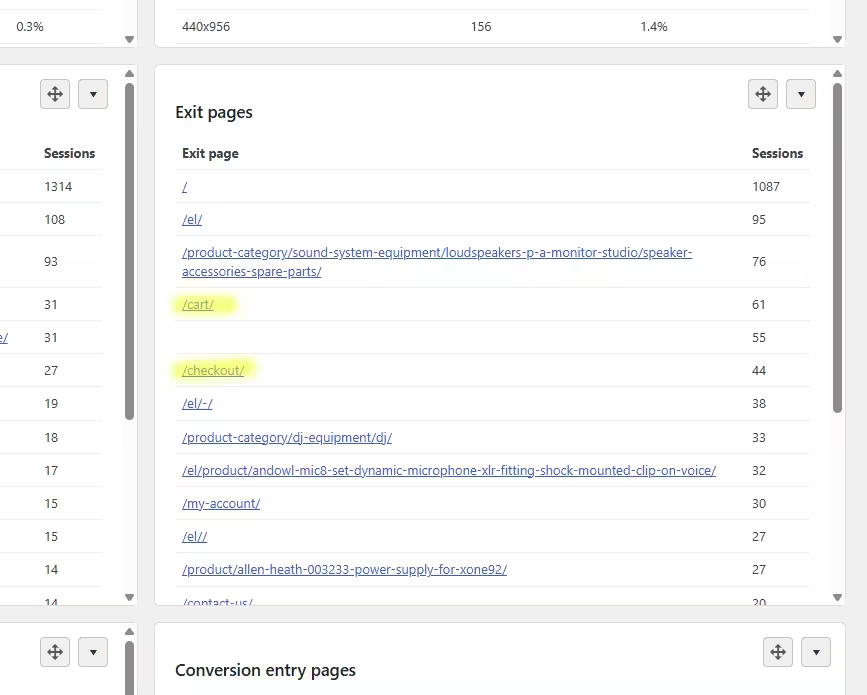
An exit page is the last page a visitor viewed before leaving the website.
It does not automatically explain why someone left, but it shows where administrators should start investigating.
For example, imagine that a WooCommerce store receives plenty of product views and customers regularly add products to their carts.
That sounds positive.
However, the analytics show an unusually high number of exits from the cart and checkout pages.
This changes the question from:
“Why aren’t people interested in our products?”
to:
“What is stopping interested customers from completing their purchases?”
The product and its initial price may have been attractive enough to move the customer toward checkout. The problem could instead be:
- Unexpected shipping costs
- Missing payment methods
- Delivery times that appear too long
- A complicated checkout process
- Required account registration
- Trust or security concerns
- Coupon-code distractions
- A technical problem on mobile devices
Exit data does not provide the final answer. It provides a strong signal about where to investigate.
The administrator can then test the checkout, review shipping rules, examine available payment gateways, compare mobile and desktop behavior, and simplify anything that creates unnecessary friction.
Without exit-page reporting, the store owner may continue spending money on advertising while the real problem remains inside the checkout process.
New versus returning visitors tells another story
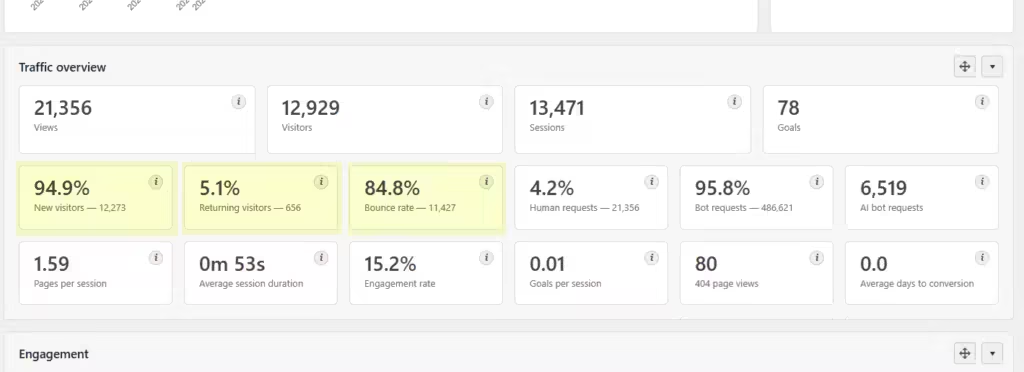
The number of visitors is useful, but the relationship between new and returning visitors provides more context.
A website that attracts many new visitors is successfully reaching new people.
But are those visitors coming back?
Returning visitors can indicate:
- Continued interest in the business
- Repeat purchasing behavior
- Useful or regularly updated content
- Strong brand recognition
- A longer buying-decision process
- Existing customers returning for support or additional services
A very low percentage of returning visitors is not automatically bad. Some websites naturally solve a one-time need.
However, for an online shop, membership website, publication, subscription service, or recurring service business, returning visitors can be an important sign of customer retention and long-term interest.
If a business continuously attracts new visitors but almost nobody returns, it may need to examine:
- Product or service satisfaction
- Content quality
- Customer support
- Follow-up communication
- Repeat-purchase incentives
- Website usability
- Whether the original traffic is properly targeted
It is also important to interpret this metric correctly. Returning-visitor reporting is browser-based. A person using another device, browser, or cleared browser storage may be counted as new again. It is an analytics indicator—not a permanent customer identity.
Metrics should lead to questions, not assumptions
Analytics cannot read a visitor’s mind.
A checkout exit does not prove that shipping was too expensive. A returning visitor does not necessarily represent a loyal paying customer.
The value of analytics is that it replaces broad guessing with focused investigation.
Instead of asking:
“Why are sales low?”
you can ask:
“Why do so many journeys end at checkout?”
Instead of asking:
“Do people like this website?”
you can ask:
“What percentage of visitors return, and how is that changing?”
Better questions lead to better tests—and better business decisions.
Why we built Amazing WP Analytics
Many website owners want useful analytics, but they do not want another heavy script affecting the visitor experience.
They may also prefer to keep analytics data inside WordPress instead of sending it to an external advertising or analytics platform.
Amazing WP Analytics was built as a lightweight, first-party WordPress analytics solution.
It helps administrators understand:
- Views and human visits
- New and returning visitors
- Landing and exit pages
- Goals and conversion routes
- Referrers and traffic channels
- Devices, countries, and browsers
- Human, traditional bot, and AI crawler activity
The objective is not to collect every possible data point.
It is to collect the information that helps website owners make decisions while protecting performance and keeping control of their data.
Because the most useful analytics dashboard is not the one with the largest number of reports.
It is the one that helps you discover where the website is losing opportunities—and what you should investigate next.
What would be more useful for your website today: knowing how many people visited, or knowing where and why the customer journey may be breaking?