












Official plugin guide
Amazing WooCommerce Coupons & Discounts
Create rule-driven discounts, automatically apply coupons, promote eligible offers in responsive cards and popups, reward customer spending, and measure coupon performance—while retaining WooCommerce’s native coupon foundation.
Requirements
| Component | Requirement |
|---|---|
| WordPress | 6.5 or newer |
| PHP | 7.4 or newer |
| WooCommerce | 8.5 or newer; coupons must be enabled |
| High-Performance Order Storage | Supported through WooCommerce CRUD APIs |
| Cart and Checkout | Classic templates and WooCommerce blocks are supported |
This commercial extension enhances native WooCommerce coupons instead of creating an incompatible discount database. WooCommerce’s own coupon restrictions and storage remain authoritative.
Installation and upgrade
- Back up the site, then upload the plugin ZIP under Plugins → Add New Plugin → Upload Plugin.
- Activate the plugin and confirm WooCommerce coupons are enabled.
- Open Amazing Coupons → License and activate the license.
- Configure global presentation and popup options under Amazing Coupons.
- Edit native coupons under Marketing → Coupons to add rules, display behavior, and popup targets.
Upgrading
Version 1.8.1 preserves existing rule groups, integration rules, analytics counters, popup targets, and coupon metadata. Back up a production site before upgrading.
License and updates
The license connects to the EDD download Amazing WooCommerce Coupons & Discounts at AmazingWPPlugins.com. An active license enables rules, automatic coupons, displays, popups, rewards, analytics, tools, and licensed updates.
Expired or invalid license
Premium runtime behavior stops, but saved coupon rules, popup targeting, and other settings are retained. Reactivating the license restores behavior without recreating the configuration.
Quick start
1
Configure globally
Choose card defaults, title text, and optional popup behavior under Amazing Coupons.
2
Edit a coupon
Use WooCommerce’s coupon editor, then add Amazing Coupon rules, locations, and optional popup targets.
3
Test as a shopper
Use a private window and verify email, country, cart, eligibility, and application changes.
Coupon cards and display modes
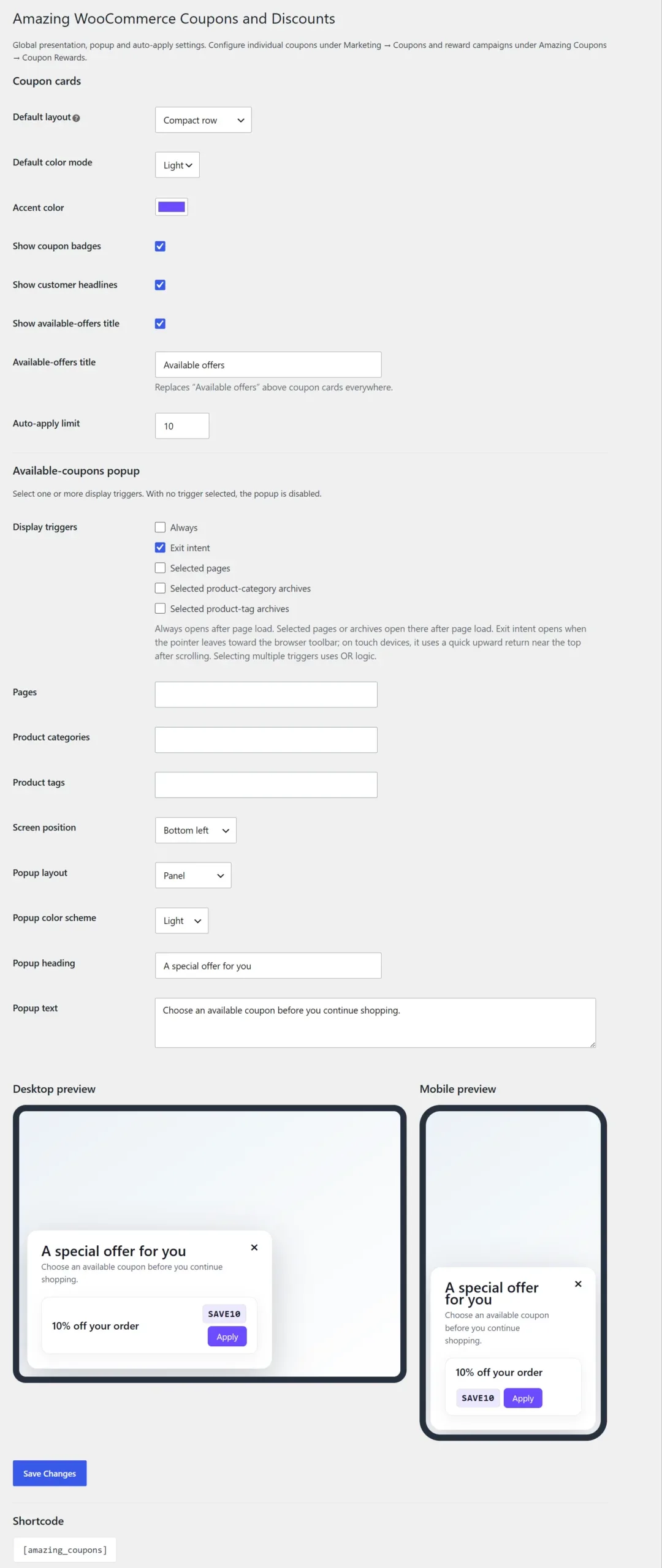
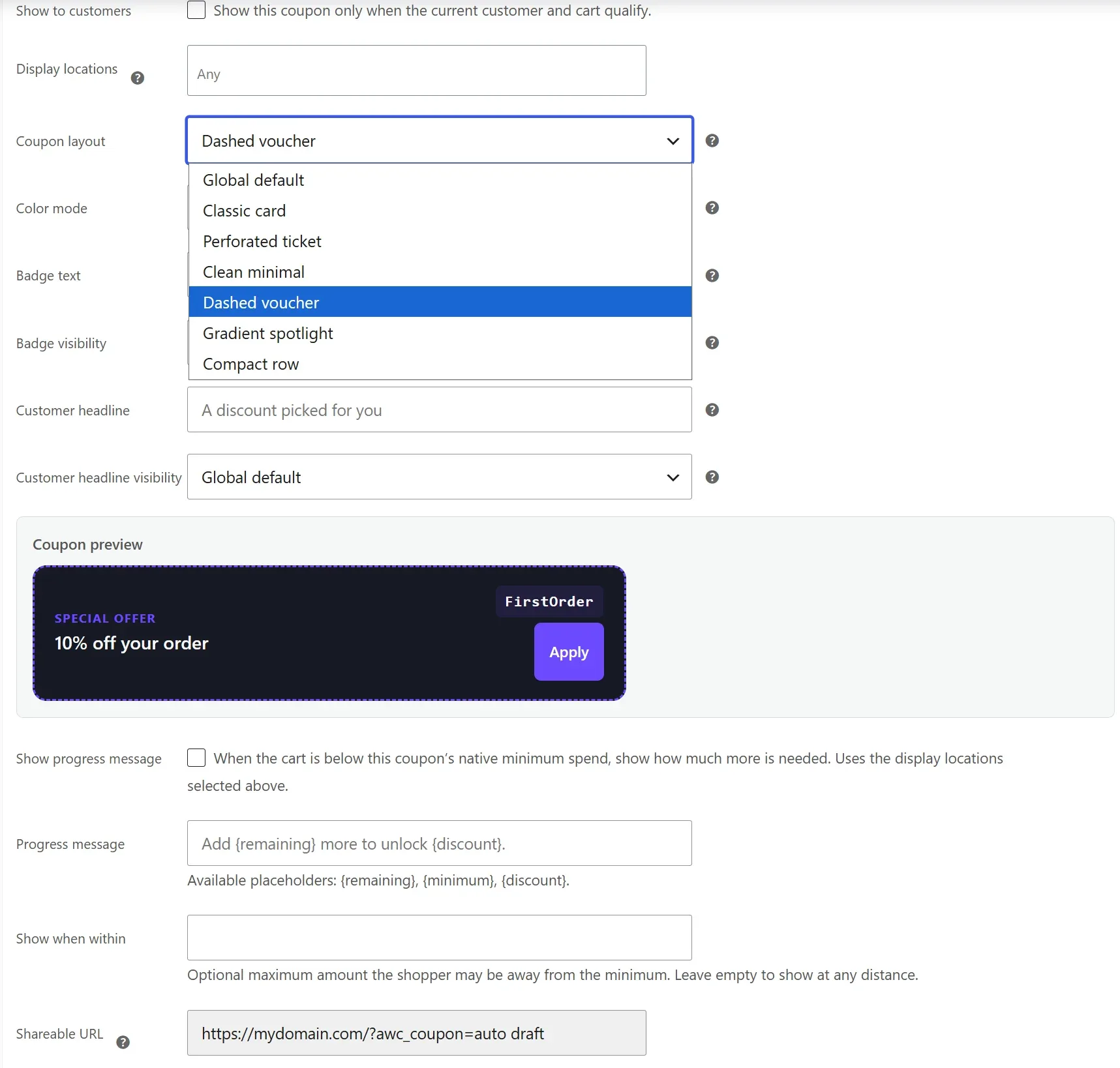
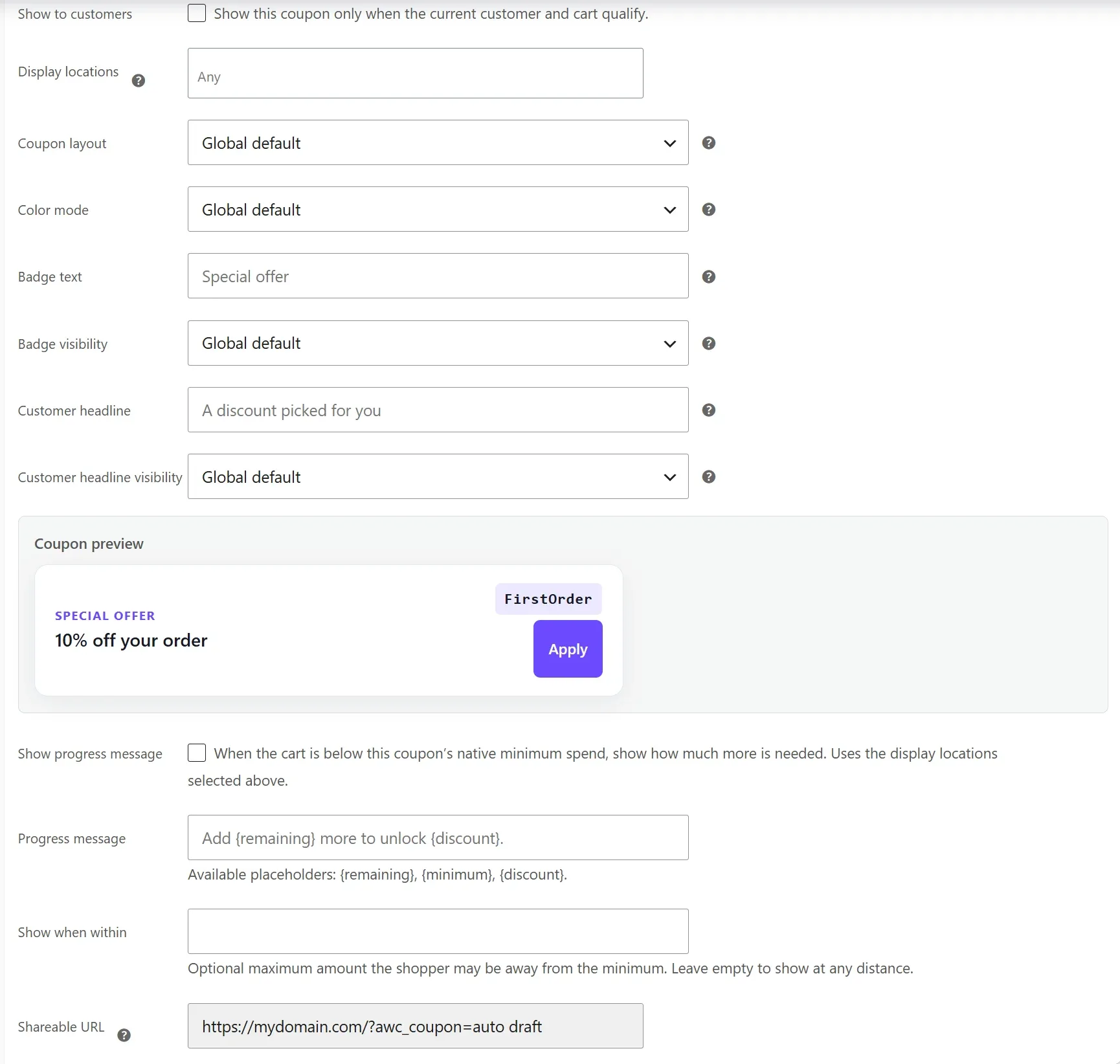
Coupon cards support Classic, Ticket, Minimal, Dashed, Gradient, and Compact layouts; light and dark modes; an accent color; optional badge and customer headline; and a customizable global Available offers title.
| Mode | Behavior |
|---|---|
| None | Default. Hide everywhere, including shortcode and popup. |
| Any | Show at all automatic locations: cart top, checkout top, and checkout sidebar. |
| Manually | Show only through [amazing_coupons]; excluded from popup. |
| Specific locations | Select one or more automatic locations. |
Show to customers checked means the card appears only after customer and cart eligibility passes. When unchecked, the card may be shown before eligibility, but redemption still requires every native and plugin rule to pass.
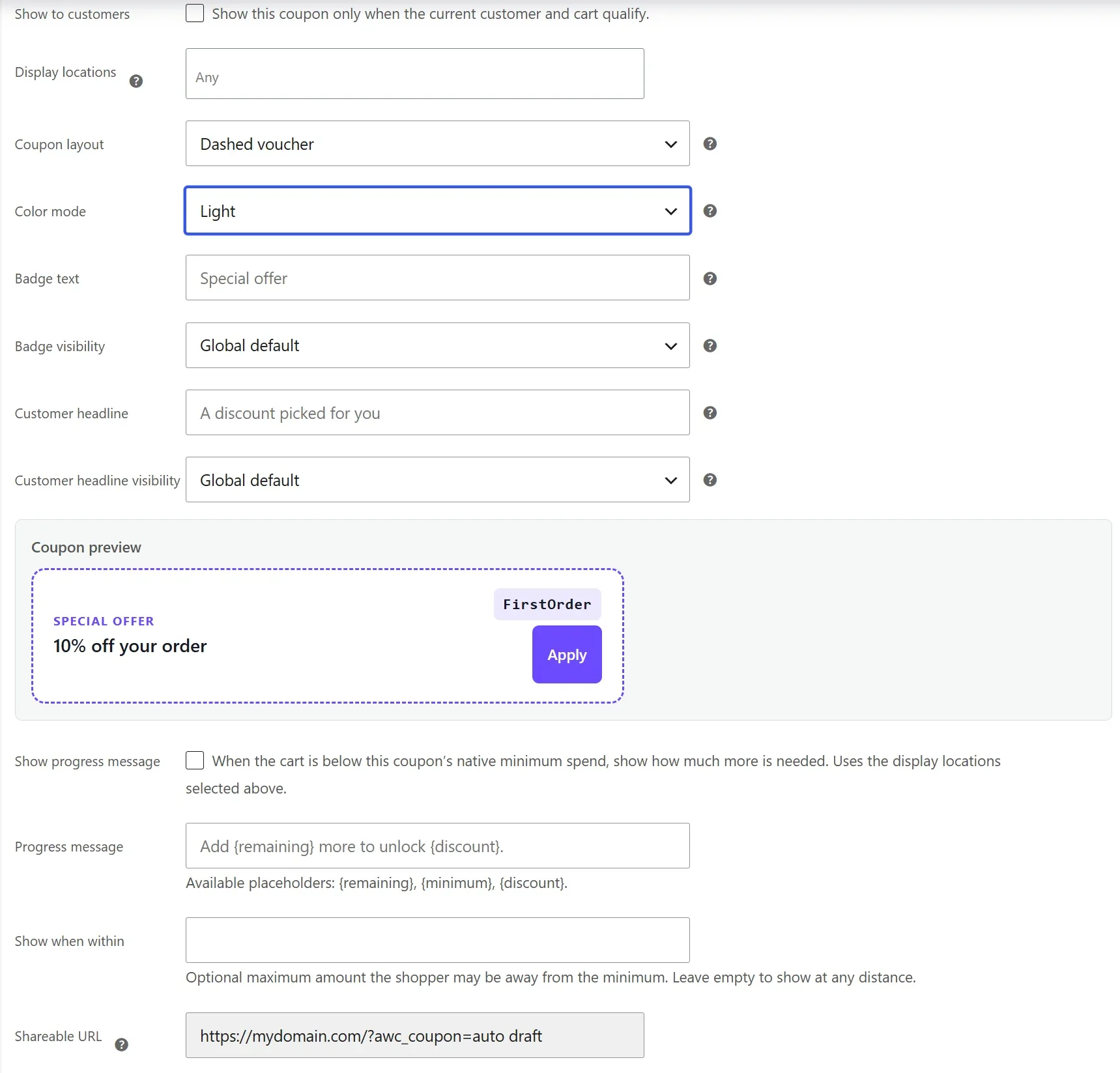
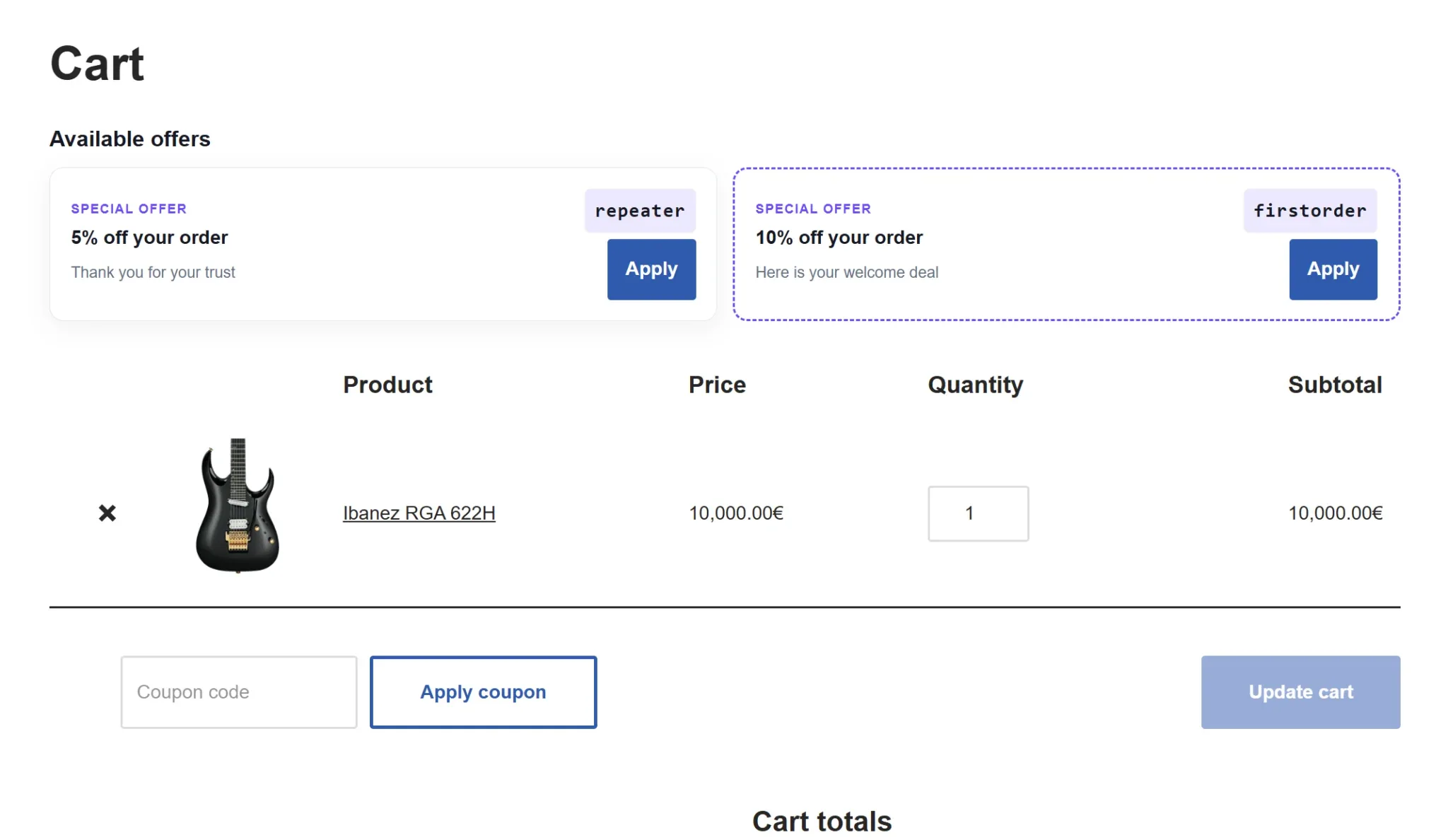
[amazing_coupons]
[amazing_coupons layout="ticket" theme="dark"]
Available-coupons popup
Configure the popup under Amazing Coupons → Available-coupons popup. With no display trigger selected it is disabled, and it never opens when no coupon is available.
Triggers and targeting
| Option | Behavior |
|---|---|
| Always | Open shortly after storefront page load. |
| Exit intent | Open when a desktop pointer leaves the top of the viewport toward browser controls. |
| Selected pages | Open after load on selected WordPress pages. |
| Product categories | Open on selected product-category archives. |
| Product tags | Open on selected product-tag archives. |
Multiple global triggers use OR logic. Per-coupon page, category, and tag targets override global page/archive targets for that coupon. Multiple per-coupon target types also use OR logic.
Appearance and content
- Six positions: top-left, top-center, top-right, bottom-left, bottom-center, and bottom-right.
- Panel, Banner, Floating, and Minimal layouts.
- Light, Dark, Brand, and Vibrant color schemes.
- Editable heading and supporting text.
- Live desktop and mobile previews using the selected default coupon layout and accent color.
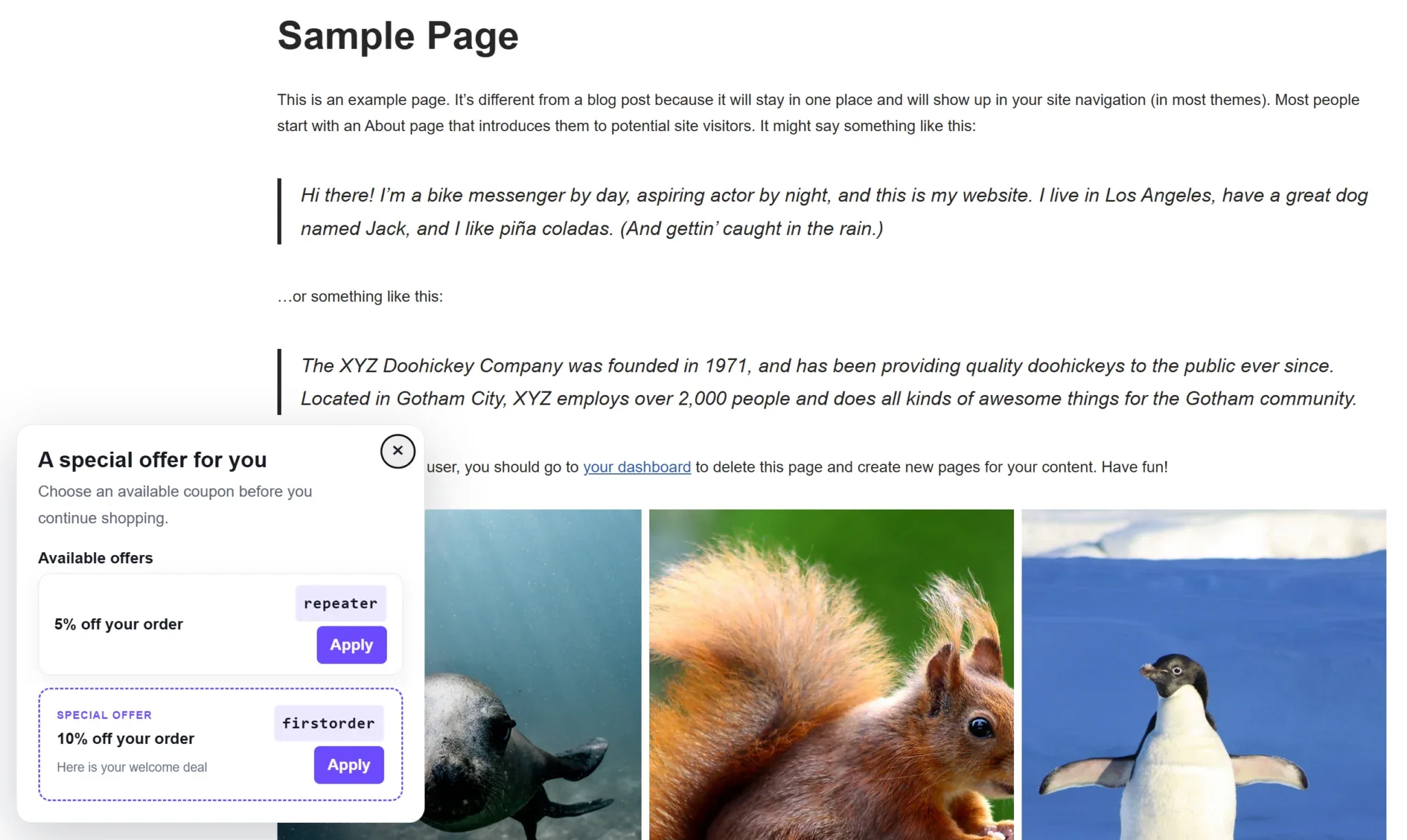
Accessible and usable
The popup uses a labelled dialog, keyboard Escape dismissal, a labelled Close button, and responsive sizing. Apply works from ordinary storefront pages as well as cart and checkout, and always runs validation.
Rules and eligibility
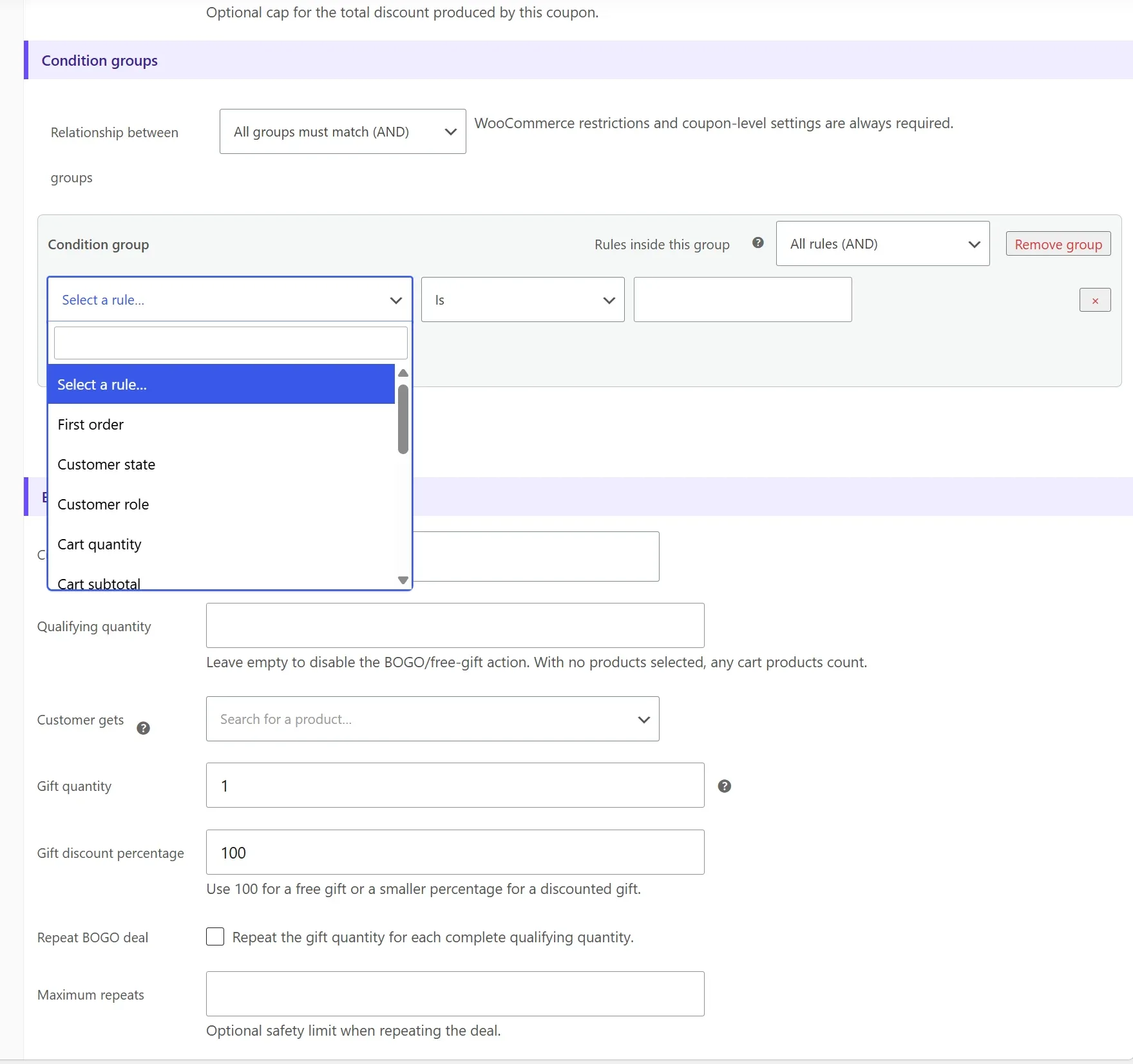
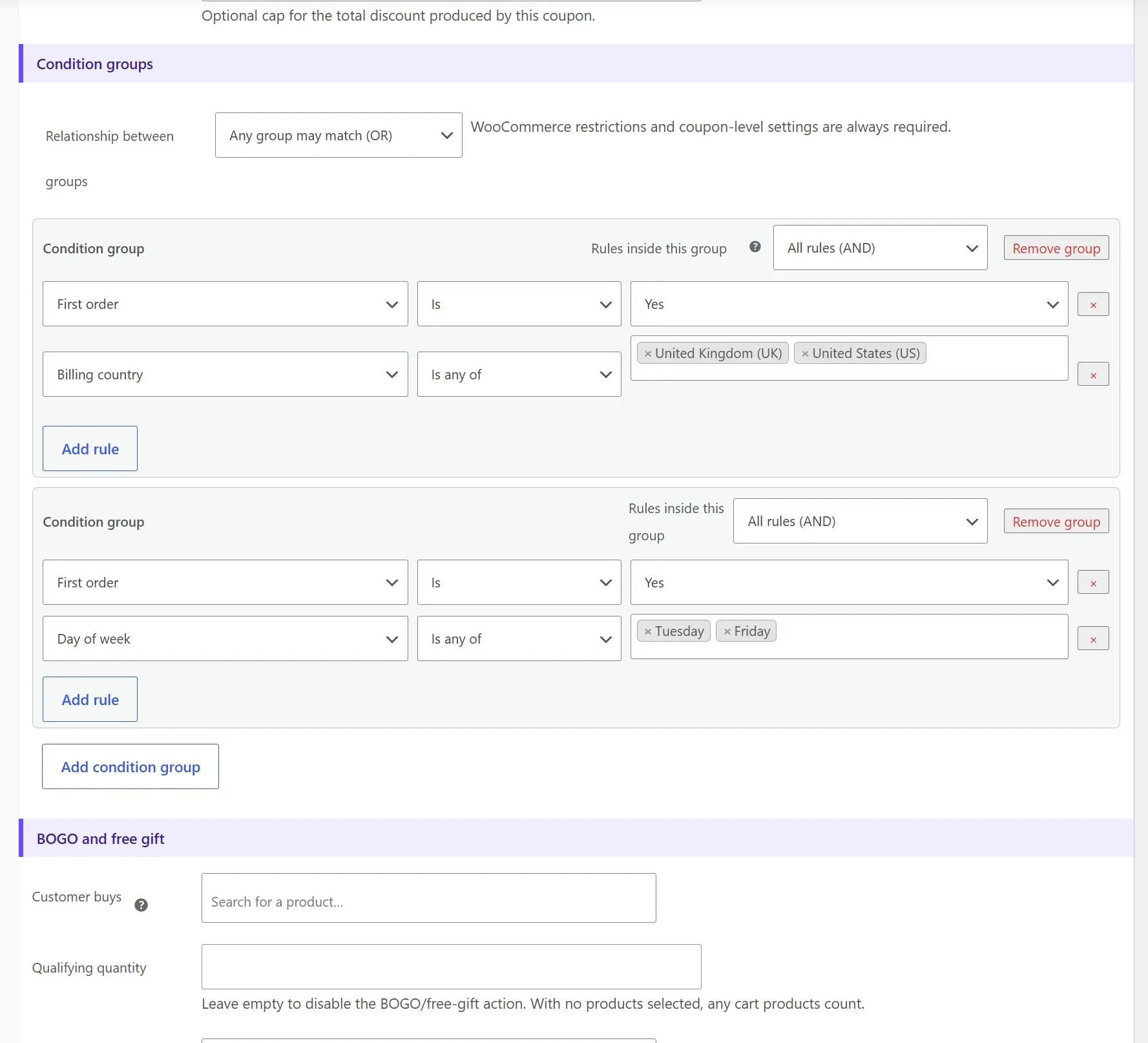
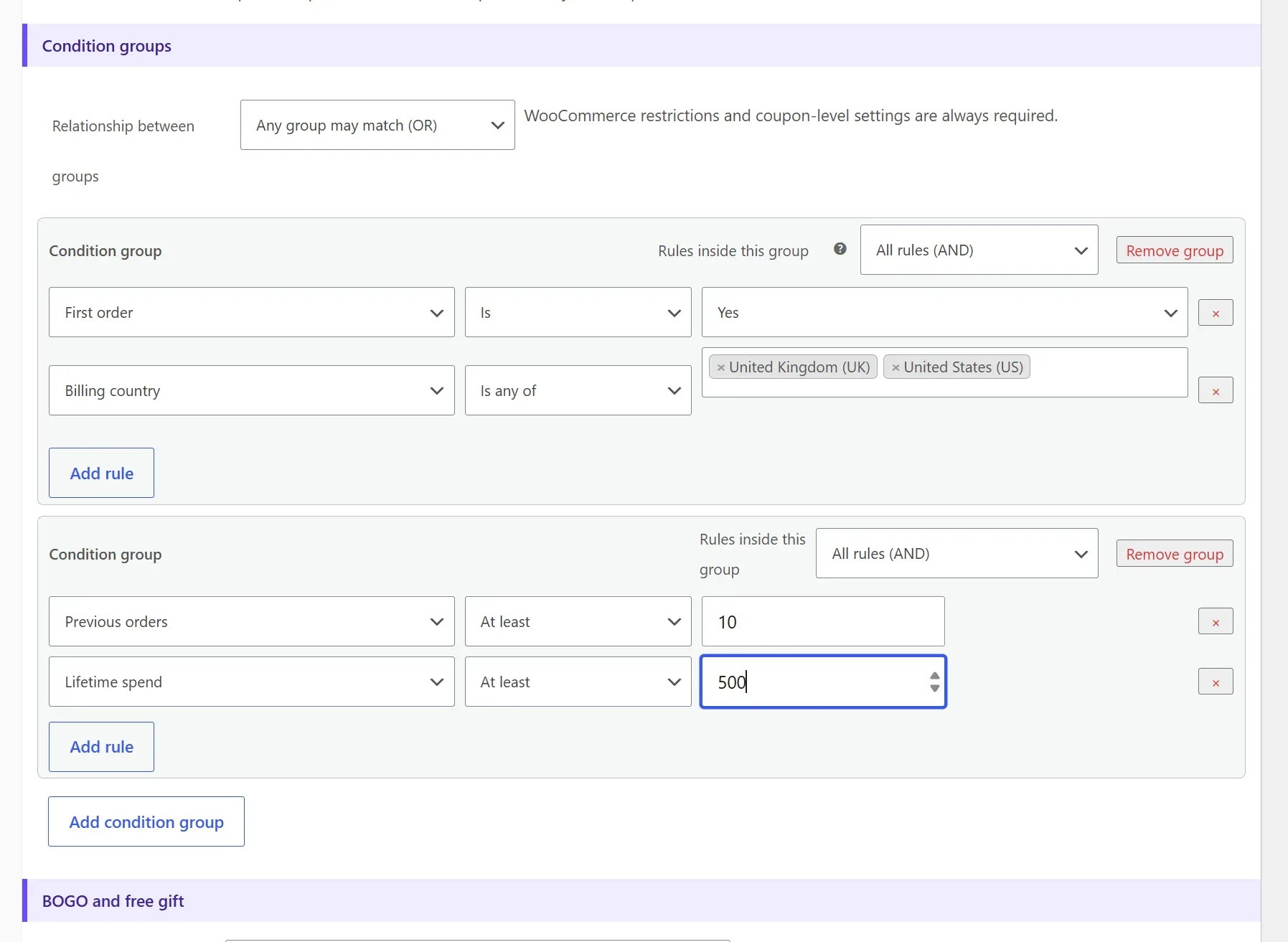
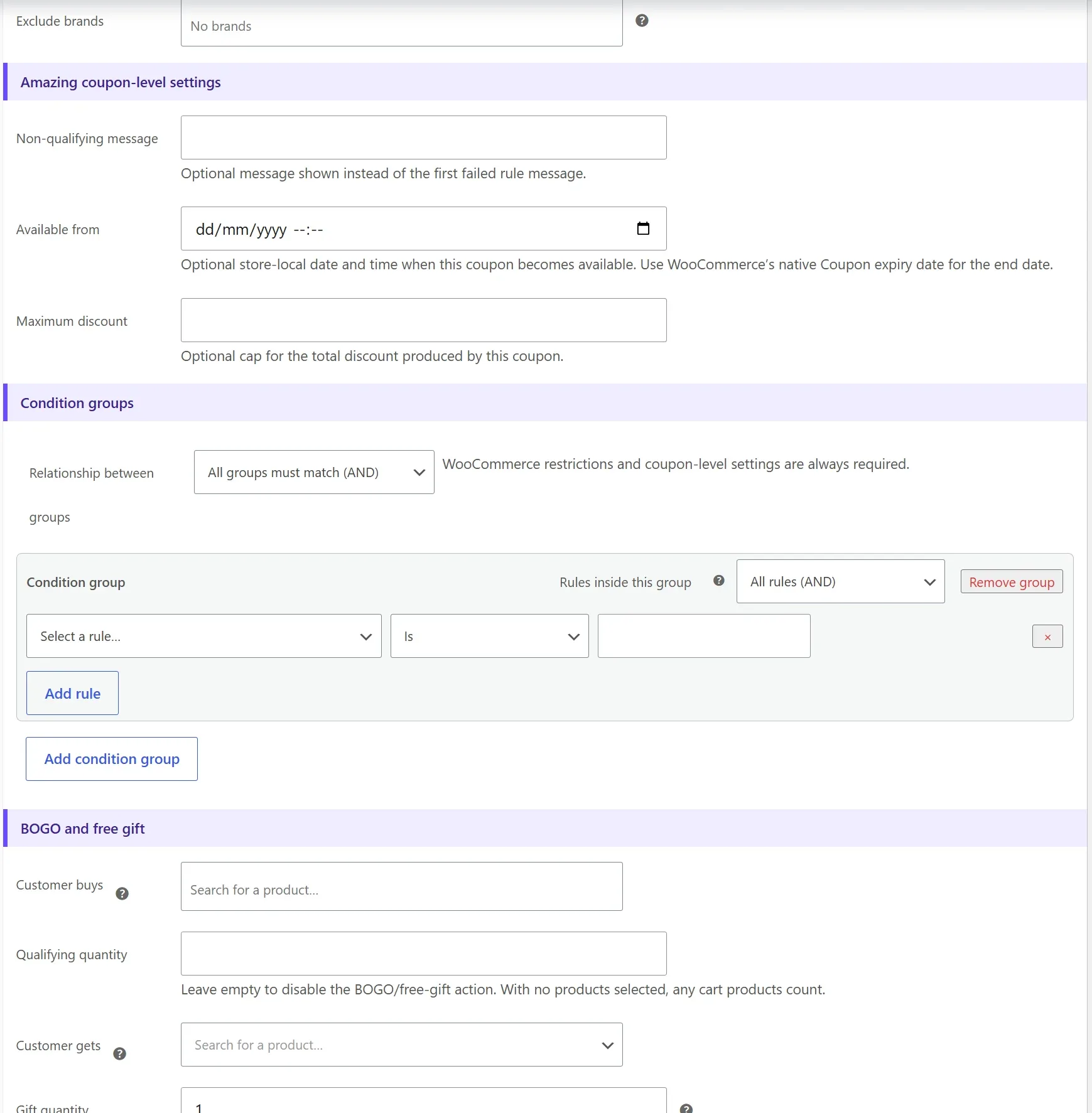
Create repeatable condition groups. Each group independently uses All rules (AND) or Any rule (OR); the groups themselves also have an All/Any relationship.
Customer and integration rules
First order, guest or logged-in state, role, order history, lifetime spend, billing country, and email domain. When installed, WooCommerce Subscriptions adds subscription-product and active-subscriber rules; WooCommerce Memberships adds active-member and membership-plan rules.
Cart, product, and taxonomy rules
Cart quantity and subtotal, searchable products and variations, sale items, payment, shipping, weekday, and time. Every registered product taxonomy—including categories, tags, brands, attributes, shipping classes, and third-party custom taxonomies—is discovered dynamically.
Native restrictions remain authoritative
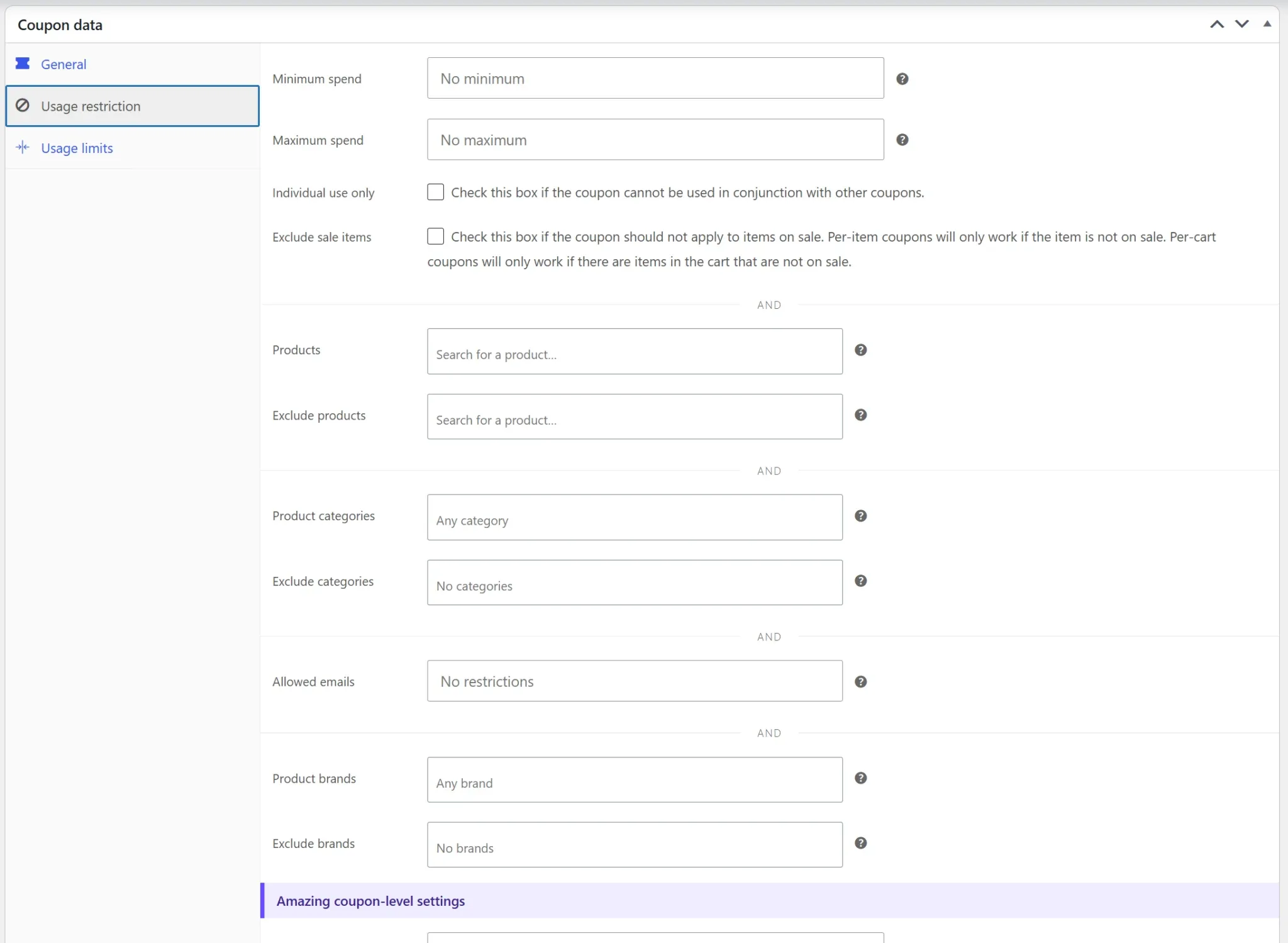
Advanced rule groups are added to WooCommerce’s native restrictions. They never replace or override native product, category, brand, email, spend, expiry, individual-use, or usage-limit settings.
Native and coupon-level restrictions
WooCommerce’s native expiry date is the coupon’s available-until control. Amazing Coupons adds an optional exact available-from time and maximum discount cap as coupon-level controls rather than repeatable group rules.
Automatic coupons and URLs
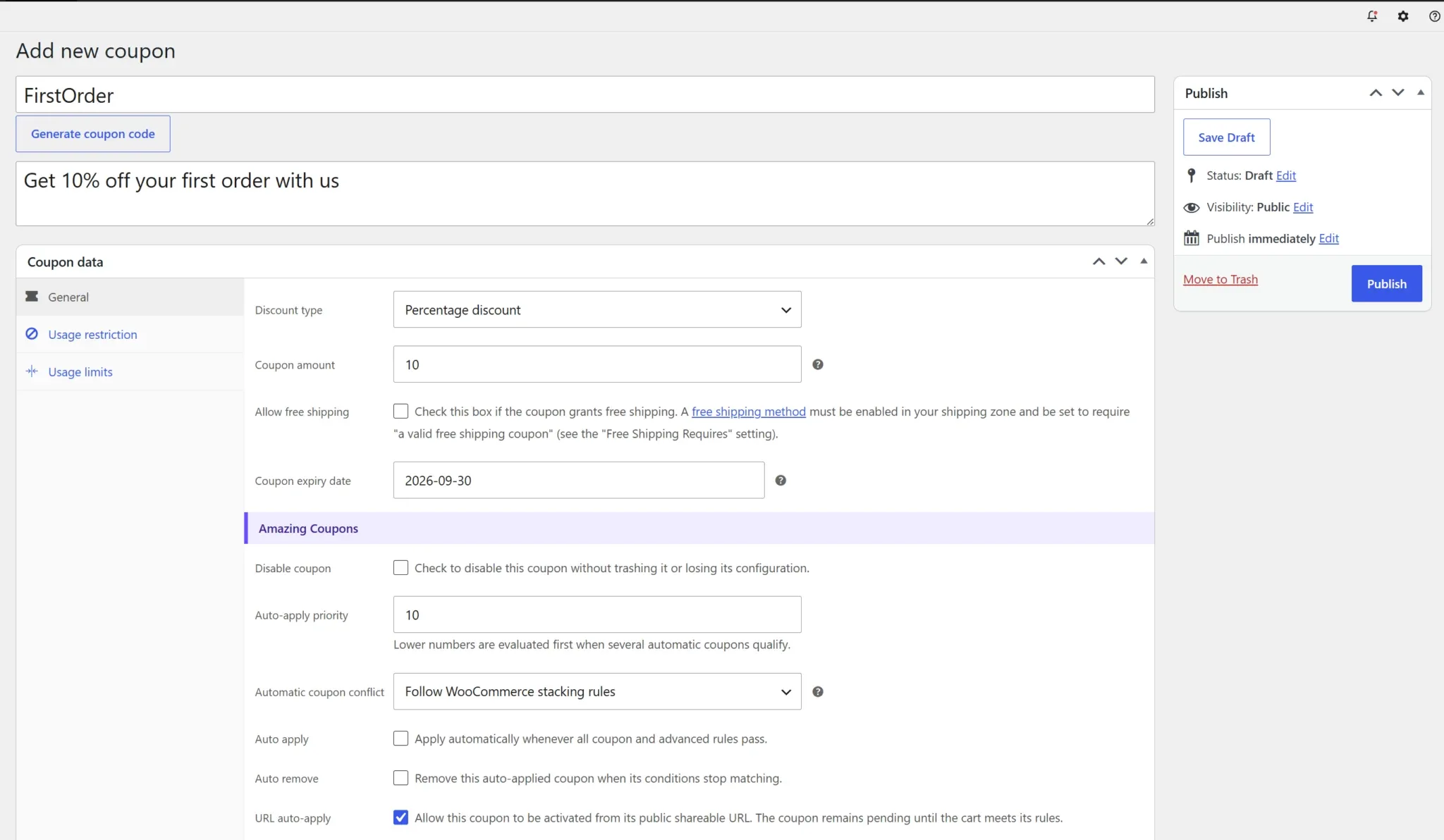
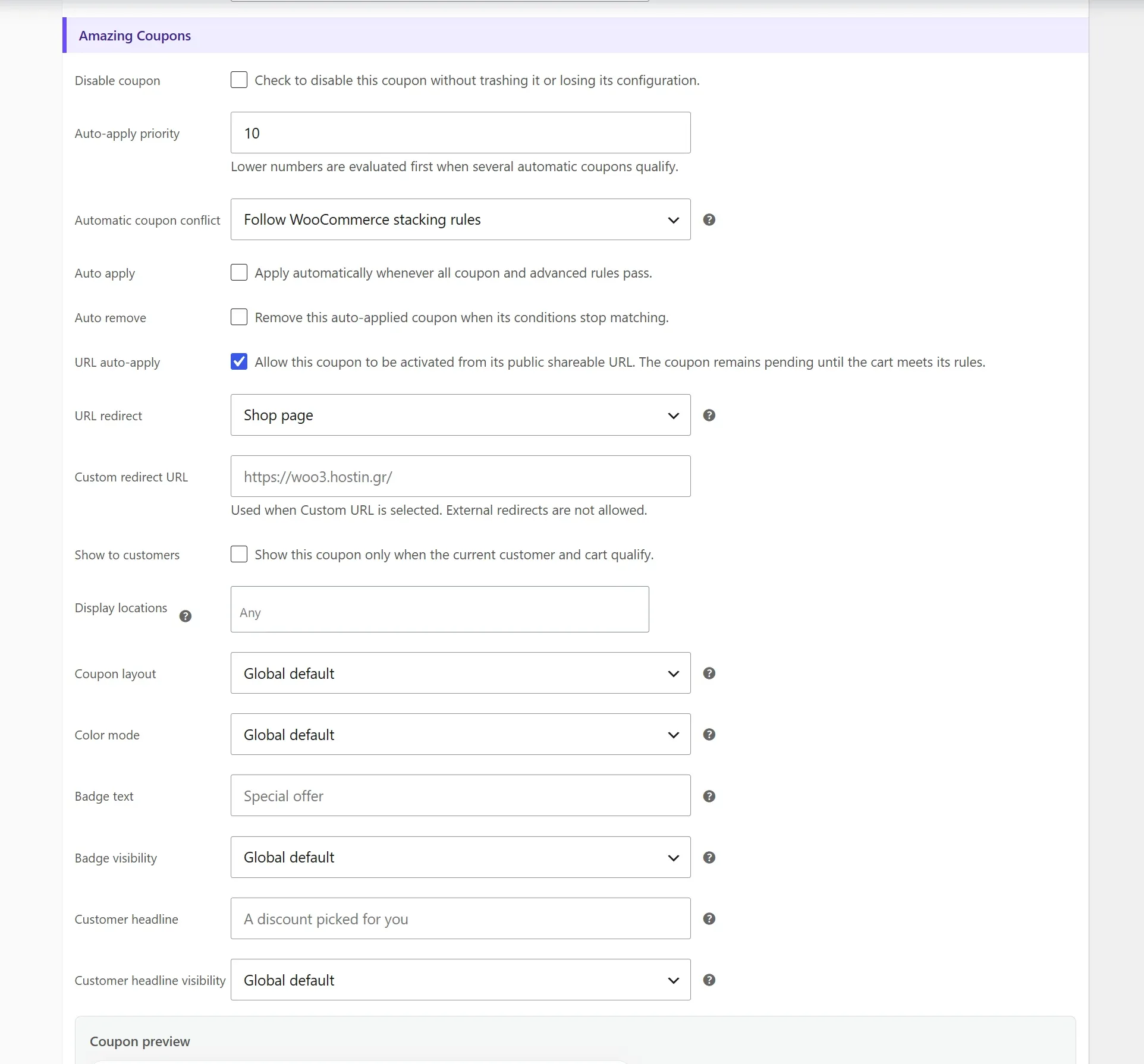
Auto apply evaluates eligible coupons by priority. Conflict behavior can follow WooCommerce stacking, skip when another coupon exists, or replace lower-priority automatic coupons. Auto remove removes an automatically applied coupon when it becomes invalid.
URL auto-apply uses ?awc_coupon=CODE, can redirect to the shop, cart, checkout, or a same-site custom URL, and stores a pending coupon in the WooCommerce session for up to seven days until the cart qualifies.
Disable without deleting
The unchecked-by-default Disable coupon control blocks manual redemption, automatic use, URL use, cards, popup, and progress messages while preserving all configuration.
Coupon rewards
Create next-purchase coupons after weekly, monthly, rolling-seven-day, or rolling-thirty-day spending goals. Configure reward type and amount, expiry, minimum spend, free shipping, and delivery through the qualifying order email, a separate WooCommerce email, or both.
Reward generation uses duplicate-safe locks. Separate mail is queued through Action Scheduler with WP-Cron fallback. Optional progress messages support {remaining}, {goal}, {reward}, and {period}.
Coupon analytics
Two native WooCommerce charts show daily coupon uses and discount amount. The last 30 days is the default; presets provide 7, 14, 30, and 90 days, with custom ranges up to 366 days. One date range and currency filter controls both charts, the daily table, coupon list, and CSV export.
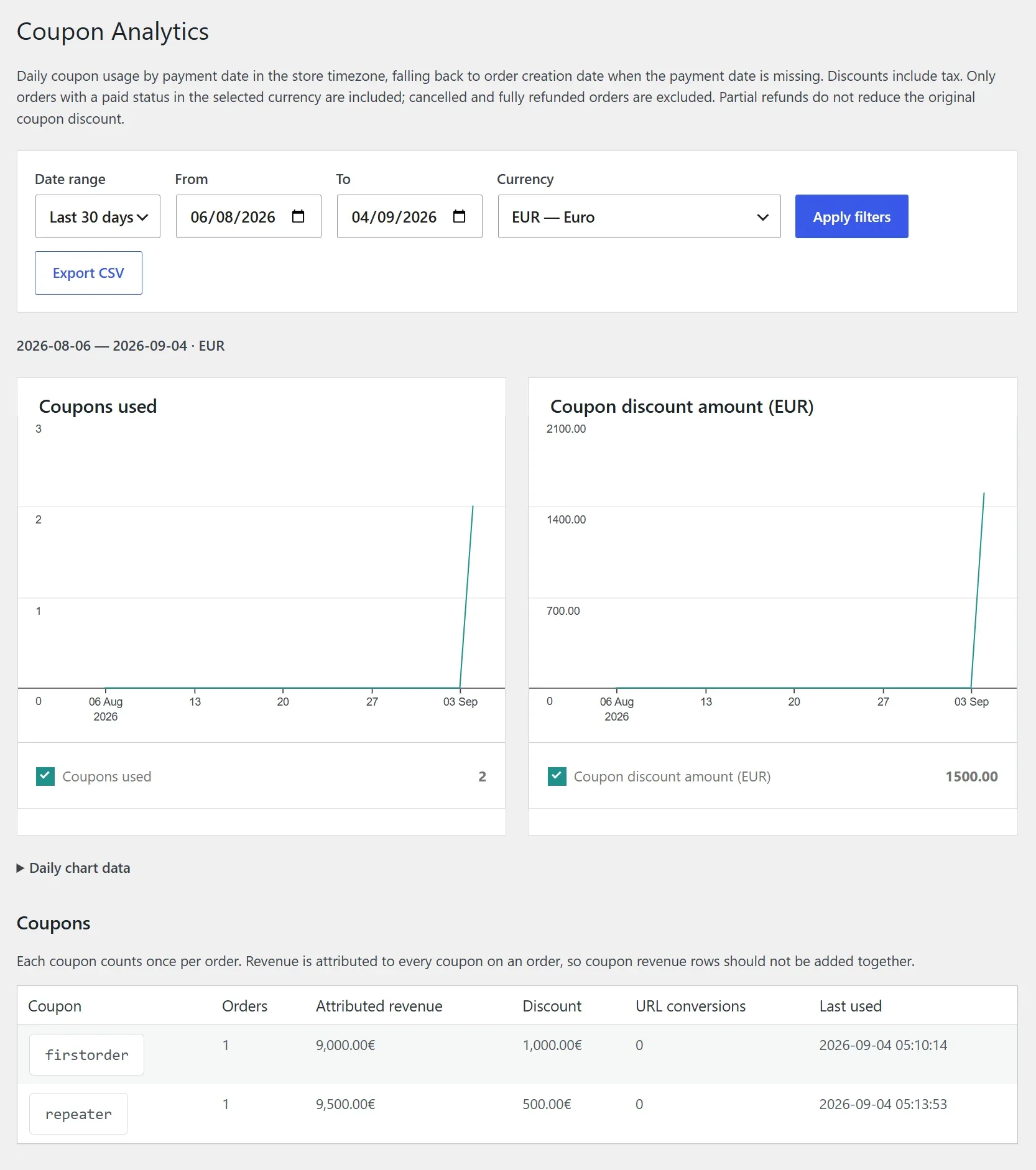
- Uses payment date in the store timezone, falling back to creation date for paid orders without a payment date.
- Includes historical paid orders through WooCommerce CRUD and HPOS without migration.
- Counts each coupon once per order; discount includes discount tax.
- Cancelled and fully refunded orders are excluded.
- Currency filtering prevents unlike currencies from being combined.
Attributed revenue
When an order has several coupons, its revenue is attributed to each coupon row. Do not add coupon revenue rows together.
Coupon tools and customer wallet
Coupon Tools supports bulk unique-code generation from a searchable template coupon plus complete CSV and XLSX imports and exports. Both formats contain native coupon fields, restrictions, usage data, structured native data, and every Amazing Coupons setting. CSV and XLSX files exported by Coupon Tools restore the complete configuration when imported, while legacy CSV exports remain supported. Logged-in customers can see eligible public and personal coupons in My Account → My Coupons.
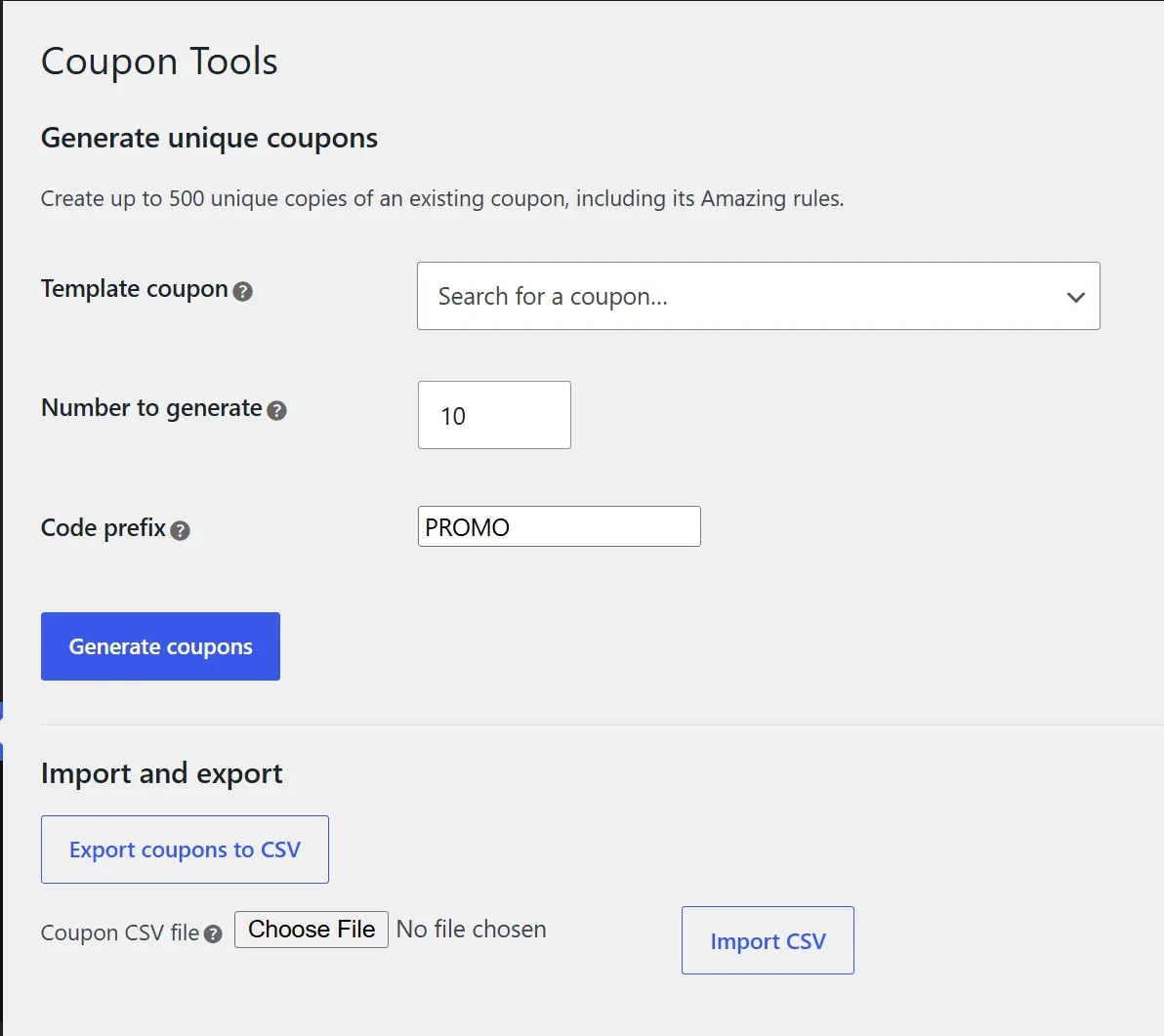
XLSX files open directly in Excel and compatible spreadsheet applications, with a frozen header row and filters. The importer reads the first worksheet and supports standard shared-string and inline-string workbooks. Generated and imported coupons remain native WooCommerce coupons. Review imports on staging first and keep a database backup.
Translations
The plugin ships with Italian, Spanish, Greek, Simplified Chinese, German, French, Turkish, Polish, Hungarian, Hindi, and Russian catalogs. Version 1.8.1 strings use the amazing-woocommerce-coupons text domain.
Developer hooks
Extend eligibility, display, automatic application, presentation, popup content, progress messages, and rewards without editing plugin files.
| Hook | Purpose |
|---|---|
awc_coupon_eligibility | Add custom eligibility logic |
awc_should_display_coupon | Control display for a coupon and location |
awc_should_auto_apply_coupon | Control automatic application |
awc_available_offers_title | Filter the global coupon-list title |
awc_popup_heading / awc_popup_text | Filter popup content |
awc_before_coupon_popup / awc_after_coupon_popup | Run code around popup output |
awc_coupon_layout / awc_coupon_theme | Change a card’s presentation |
awc_progress_messages | Adjust progress notices |
awc_should_create_reward | Approve or reject reward creation |
awc_reward_coupon_created | React after reward creation |
add_filter( 'awc_coupon_eligibility', function ( $eligible, $coupon, $context ) {
	// Return true, false, or WP_Error.
	return $eligible;
}, 10, 3 );
Troubleshooting
A coupon card or popup does not appear
Confirm the license is active, the coupon is published and not disabled, Display locations is not None or Manually for popup use, a popup trigger is enabled, the page matches its targeting, and eligibility permits display. The popup is omitted when it has no coupons.
First-order eligibility looks wrong
Guests must enter a valid billing email. The plugin checks paid guest orders by normalized billing email as well as account orders. Block Checkout refreshes after email and country changes.
Exit intent does not fire on mobile
Touch-only browsers provide no reliable pointer-exit event. Combine exit intent with selected pages or archives, or use Always when mobile visibility is required.
The popup Apply button fails
Application still enforces native WooCommerce restrictions and plugin rules. Check the failure message, cart state, dates, usage limits, and customer identity. Clear page and optimization caches after upgrading.
Analytics misses an order
The order must currently have a WooCommerce paid status and coupon line items. The selected date range and currency must match. A missing payment date falls back to the creation date.
Frequently asked questions
Does it replace WooCommerce coupons?
No. It extends native coupons and preserves WooCommerce restrictions and storage.
Do native and advanced product rules combine?
Yes. Native restrictions and Amazing Coupons rule groups must both pass. Leave native product fields empty when you want the advanced groups to provide all product and taxonomy logic.
Does it support Gutenberg Cart and Checkout blocks?
Yes. Displays refresh through WooCommerce Store API state and the native Checkout SlotFill.
Can popup triggers be combined?
Yes. Global triggers use OR logic. Per-coupon page and archive targets override global page and archive targeting for that coupon.
What happens if Subscriptions or Memberships is deactivated?
Saved integration rules remain stored and fail safely while their required extension is inactive, preventing accidental coupon eligibility.
What happens if the license expires?
Premium behavior stops, but rules and settings remain stored for later reactivation.
Changelog
Current version: 1.8.1. See readme.txt in the plugin package for the complete history.
1.8.1 Popup eligibility and location corrections
- Popup panels now require coupons to use the Popup or Any display location.
- Expired and globally exhausted coupons are no longer advertised, even when eligibility-only visibility is disabled.
1.8.0 Complete CSV and XLSX coupon transfers
- Complete coupon-data imports and exports in CSV and XLSX formats, including native fields, restrictions, usage data, and Amazing Coupons settings.
- CSV and XLSX imports restore the complete configuration while legacy CSV exports remain supported.
1.7.0 Product, taxonomy, Subscriptions, and Memberships rules
- Searchable cart-product and variation rules.
- Dynamic rules for every registered product taxonomy, including custom taxonomies.
- WooCommerce Subscriptions rules for cart products and active subscribers.
- WooCommerce Memberships rules for active members and selected plans.
- Additive native restriction behavior and fail-safe preservation of inactive integration rules.
1.6.0 Popup, analytics charts, and Block Checkout updates
- Available-coupons popup with combinable triggers and global or per-coupon page and archive targets.
- Six positions, four layouts, four schemes, editable content, and responsive previews.
- WooCommerce daily coupon charts with shared date and currency filtering.
- Explicit None, Any, and Manually display modes plus Cart and Checkout block refresh fixes.
1.5.0 Rule groups, rewards, BOGO, tools, and analytics
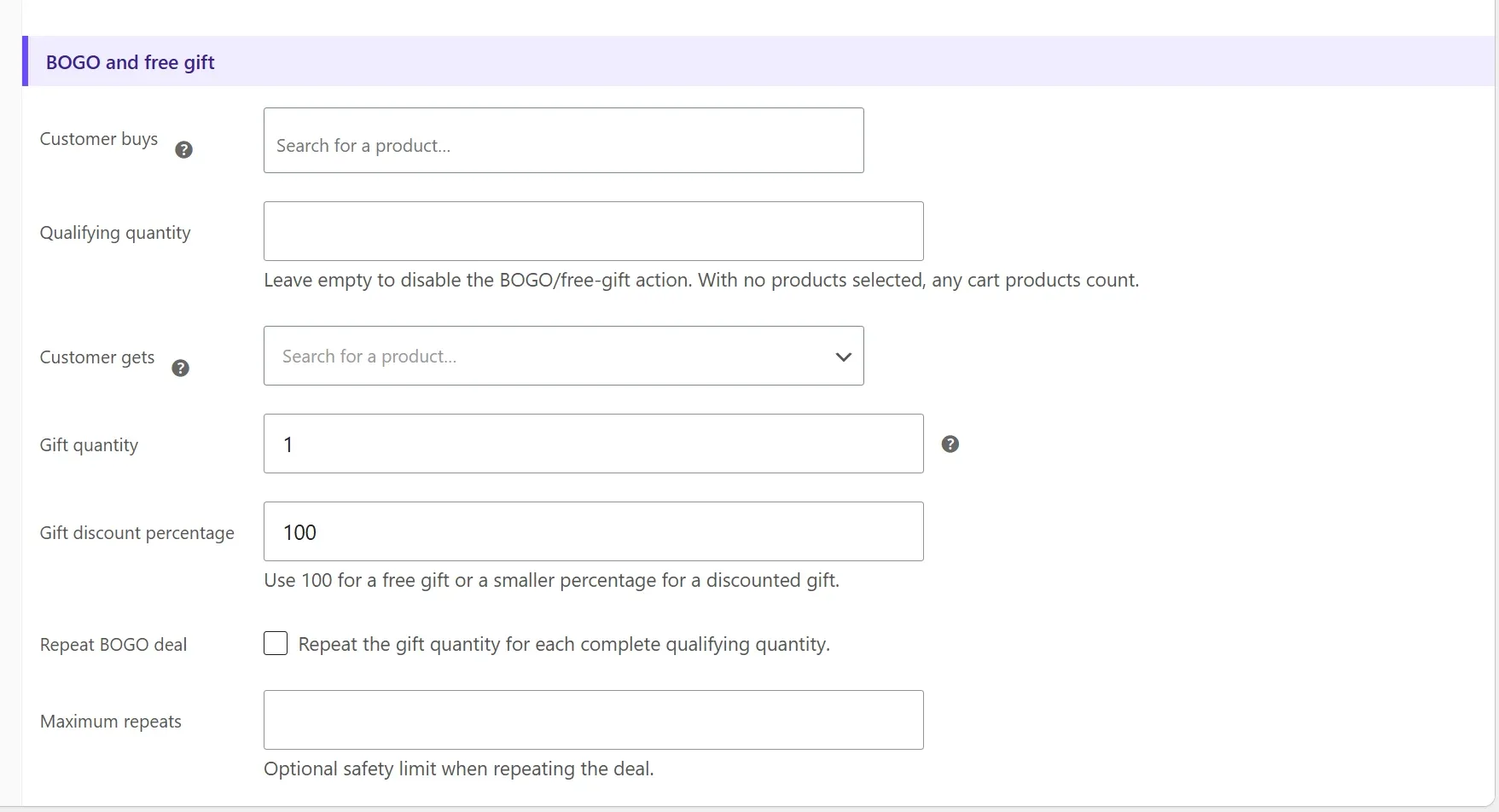
Added repeatable AND/OR groups, native expiry and individual-use integration, disable controls, BOGO and free gifts, coupon analytics, bulk tools, wallets, reward locks, and optimized customer statistics.
Get Amazing WooCommerce Coupons & Discounts
Turn native WooCommerce coupons into targeted, automatically applied, beautifully presented campaigns—with rewards, popups, analytics, and developer-ready extension points.