













Official plugin guide
Amazing WP Country Access Blocker
Control who can reach every part of your WordPress site by country. Lock wp-admin, logins and XML-RPC to the countries you trust, allow or block any page, post, category, URL or WooCommerce checkout per country, and ban attackers at the server level before they ever reach WordPress.
Requirements
| Component | Requirement |
|---|---|
| WordPress | 6.0 or newer |
| PHP | 7.4 or newer, with the zlib extension (used to unpack the country database) |
| Web server | Any. Server-level bans use .htaccess on Apache / LiteSpeed and an early PHP guard everywhere (including Nginx) |
| WooCommerce | Optional — only needed for the WooCommerce: placing orders rule and WooCommerce login / registration coverage. HPOS compatible |
| Outbound HTTPS | To download the free country database (weekly) and validate the license. No visitor data is sent unless you enable a remote lookup fallback |
The plugin works with any theme and page builder. On the front end it loads no CSS or JavaScript, and when no rule applies to a request it adds no database queries.
Installation and upgrade
- Upload the plugin ZIP through Plugins → Add New Plugin → Upload Plugin, then activate it.
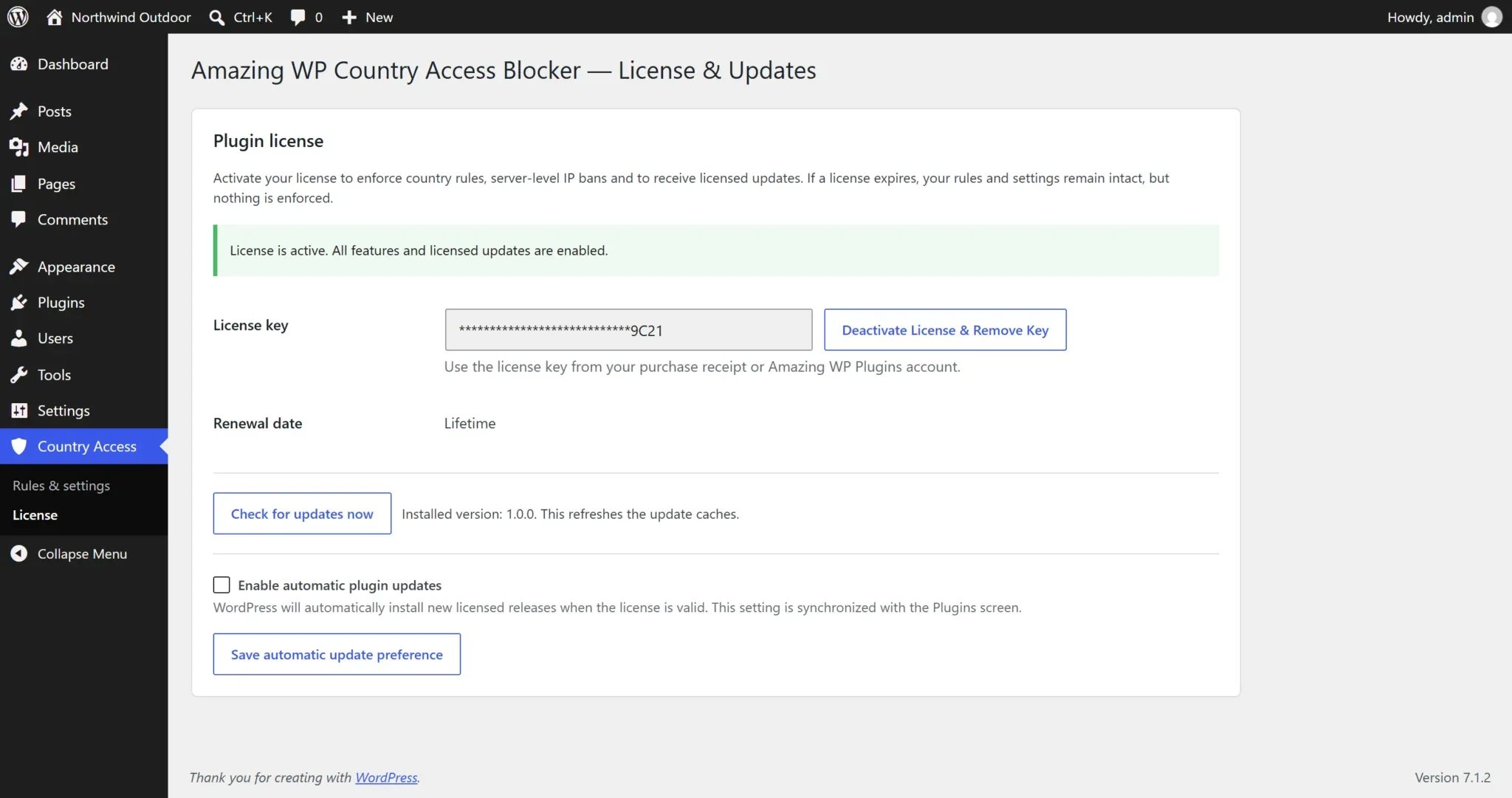
- Open Country Access → License and activate your license key.
- The free DB-IP country database downloads automatically in the background a few seconds after activation (check Country Access → Geolocation).
- Create your rules under Country Access → Rules & settings — or start from a preset.
A valid license is required
Without an active license the plugin keeps your rules and settings (they stay editable) but enforces nothing, and any server-level ban files are removed. Everything switches back on automatically as soon as a valid license is activated.
Upgrades keep all rules, settings, logs and bans. Database changes are applied automatically the next time an administrator opens wp-admin.
License and updates
Go to Country Access → License, paste the key from your Amazing WP Plugins receipt and select Activate License. The page shows the activation state and renewal date, a Check for updates now button and an automatic-updates toggle. Licensed sites receive updates in the normal Plugins screen.
What the license gate does
While the license is inactive, no country rule is enforced and server-level bans are lifted (the files are removed). An admin notice explains this on every screen. Activating restores protection instantly — including the ban files.
What is transmitted
License and update requests include only the license key, the site URL, the product name and update metadata. Never visitor IPs, logs or rules. The license is re-checked once a day; a temporary store outage does not deactivate a valid license.
Quick start
The most common goal — “only my team’s countries may log in to wp-admin” — takes under a minute.
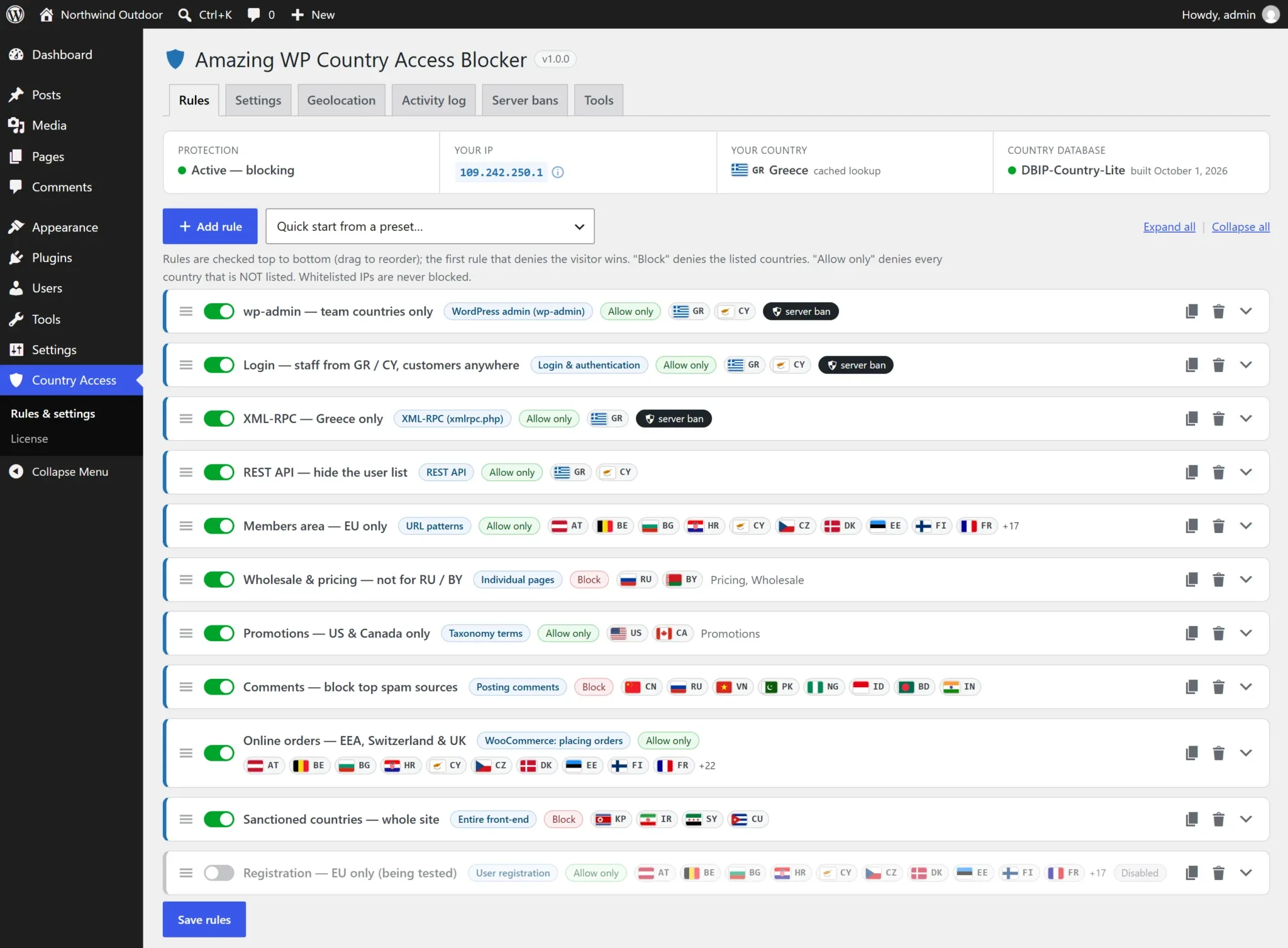
- Open Country Access → Rules & settings. The status bar shows your IP and detected country.
- Choose Quick start from a preset… → Allow wp-admin + login only from my country. Two Allow only rules are added with your country and a 1-day server ban.
- Add any other countries your team logs in from (or use a group such as EU (27)).
- Optional: add your office / VPN IPs under Settings → Always allow these IPs as a safety net.
- Select Save rules. Done — visitors from any other country now get a block page on wp-admin and a refusal on login.
Test first if you prefer
Switch on Monitor mode (Settings) to log what would be blocked without blocking anyone, check the Activity log for a day, then switch it off.
How rules work
A rule combines where (a website section and, for some sections, specific targets), who (a list of countries) and what happens (block page, redirect or 404 — plus optional server ban).
Block the selected countries
Visitors from the listed countries are denied. Everyone else is allowed. Ideal for blocking known spam or attack sources.
Allow only the selected countries
Visitors from every country that is not listed are denied. Ideal for wp-admin, login and XML-RPC.
- Order matters: rules are checked top to bottom; the first rule that denies the visitor decides the response. Drag rules by the handle to reorder.
- A rule with no countries is inactive (shown with a warning), so a half-finished rule never blocks anyone.
- Use the switch to disable a rule without deleting it; duplicate it to create variations.
- Always-allow IPs bypass every rule; always-block IPs are refused everywhere.
- If a visitor’s country can’t be determined (private IP, lookup failure) the Unknown country setting decides — allowed by default.
Website sections
Every rule targets one section. Some sections let you pick specific targets.
| Section | Targets | What it covers |
|---|---|---|
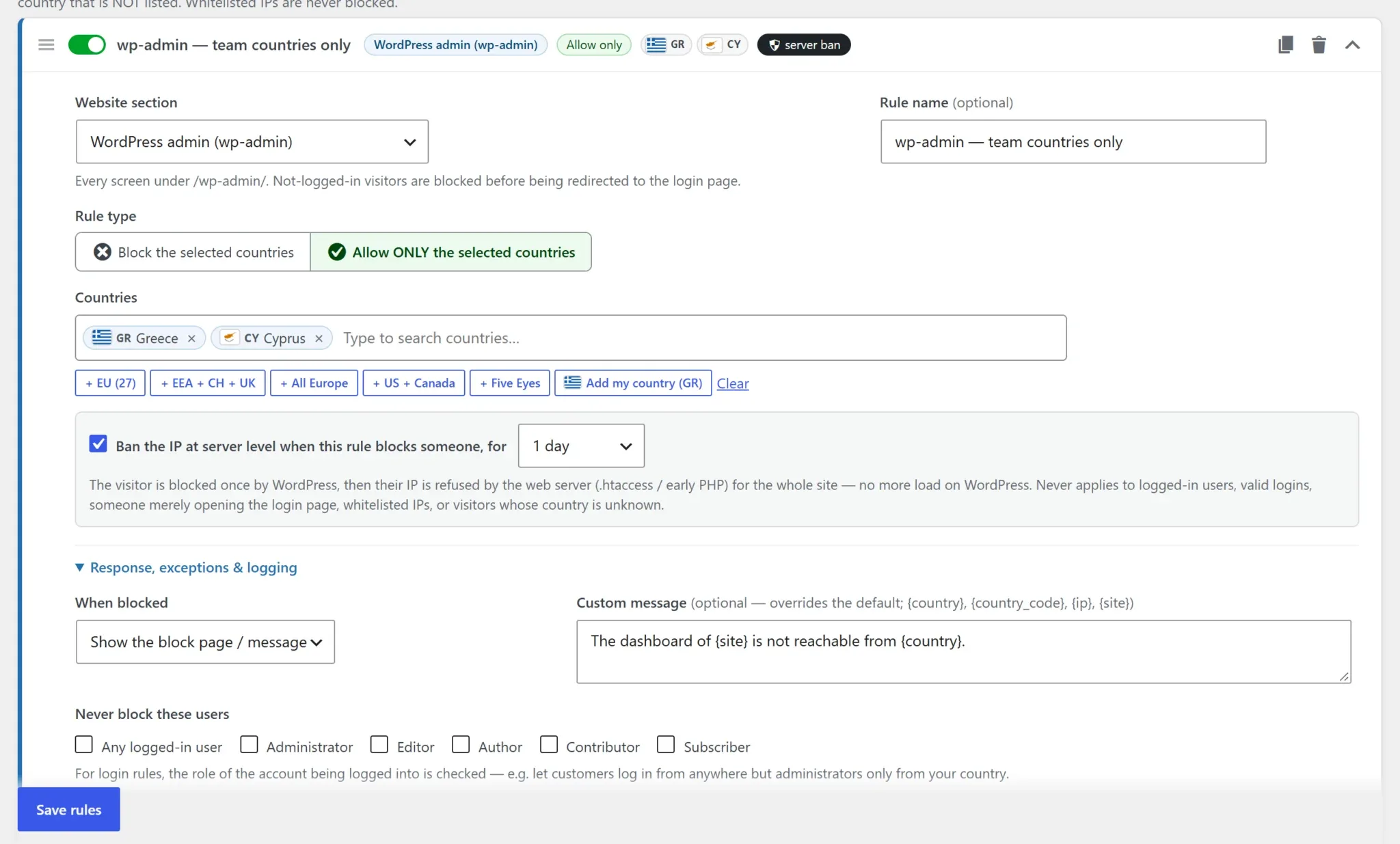
| WordPress admin (wp-admin) | — | Every screen under /wp-admin/. Not-logged-in visitors are blocked before the redirect to the login page. Front-end AJAX stays available (see wp-admin & login). |
| Login & authentication | — | wp-login.php (login, lost/reset password) and every authentication: WooCommerce My Account, XML-RPC and application-password logins. Works with custom login URLs. |
| User registration | — | wp-login.php?action=register and WooCommerce account registration. |
| XML-RPC | — | All requests to xmlrpc.php (pingbacks, remote publishing, brute-force system.multicall). |
| REST API | Routes (optional) | The whole REST API, or only route prefixes such as wp/v2/users (one per line, * wildcard). |
| Entire front-end | — | Every public page (wp-admin and login have their own sections). |
| Individual pages | Pages | Selected pages, optionally with their child pages. Also the posts page and the WooCommerce shop page. |
| Individual posts / products / CPT items | Items | Selected single items of any public post type. |
| Post types | Post types | All single items and the archive of the selected post types. |
| Taxonomy terms | Terms | Archives of selected categories / tags / product categories / custom terms; optionally child terms and every item assigned to them. |
| URL patterns | Patterns | Paths relative to the site root, one per line, * wildcard (e.g. /members/*, /downloads/*.zip). Add ? to also match the query string. |
| Site search | — | Search result pages. |
| RSS / Atom feeds | — | All feeds. |
| Posting comments | — | Comment submissions (form and REST). Reading comments is unaffected. |
| WooCommerce: placing orders | — | Classic and block checkout. Visitors can browse and fill the cart; the order is refused. |
Countries & groups
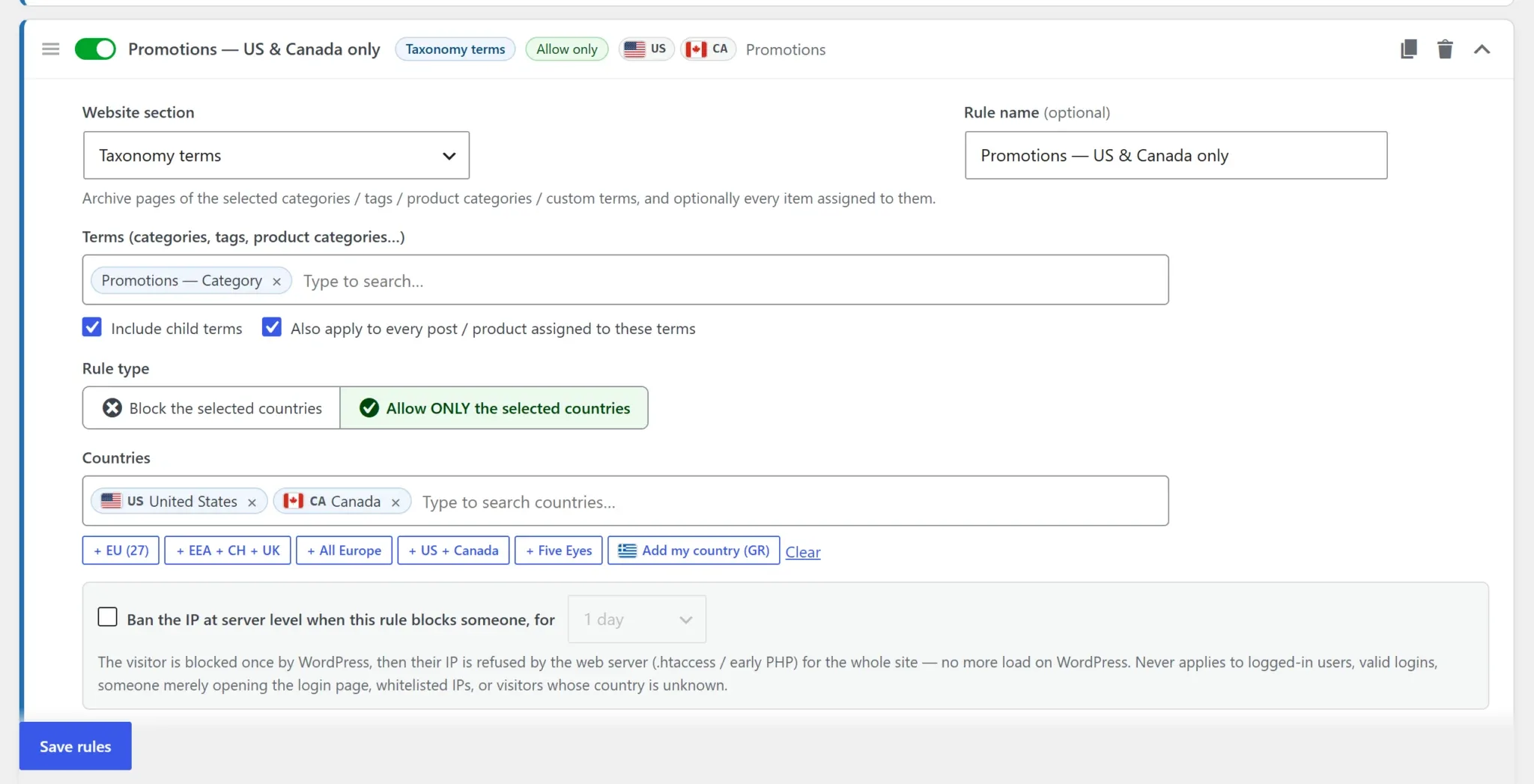
Type in the country field to search by name or ISO code; each country is shown with its flag and two-letter code. Press Enter to add the highlighted one, Backspace to remove the last.
One-click groups: EU (27) EEA + CH + UK All Europe US + Canada Five Eyes, plus Add my country and Clear. Developers can add their own groups with the awcab_country_groups filter.
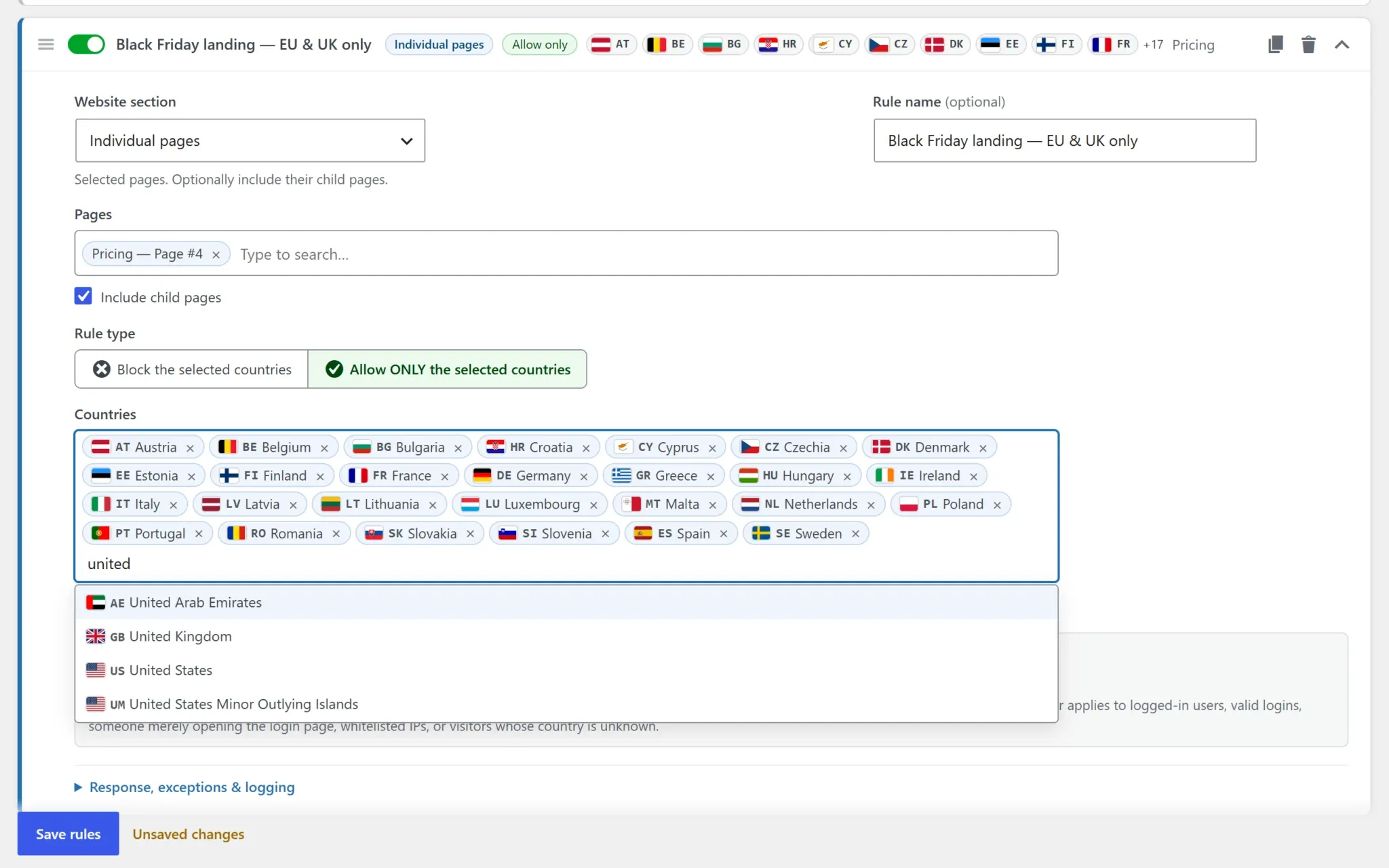
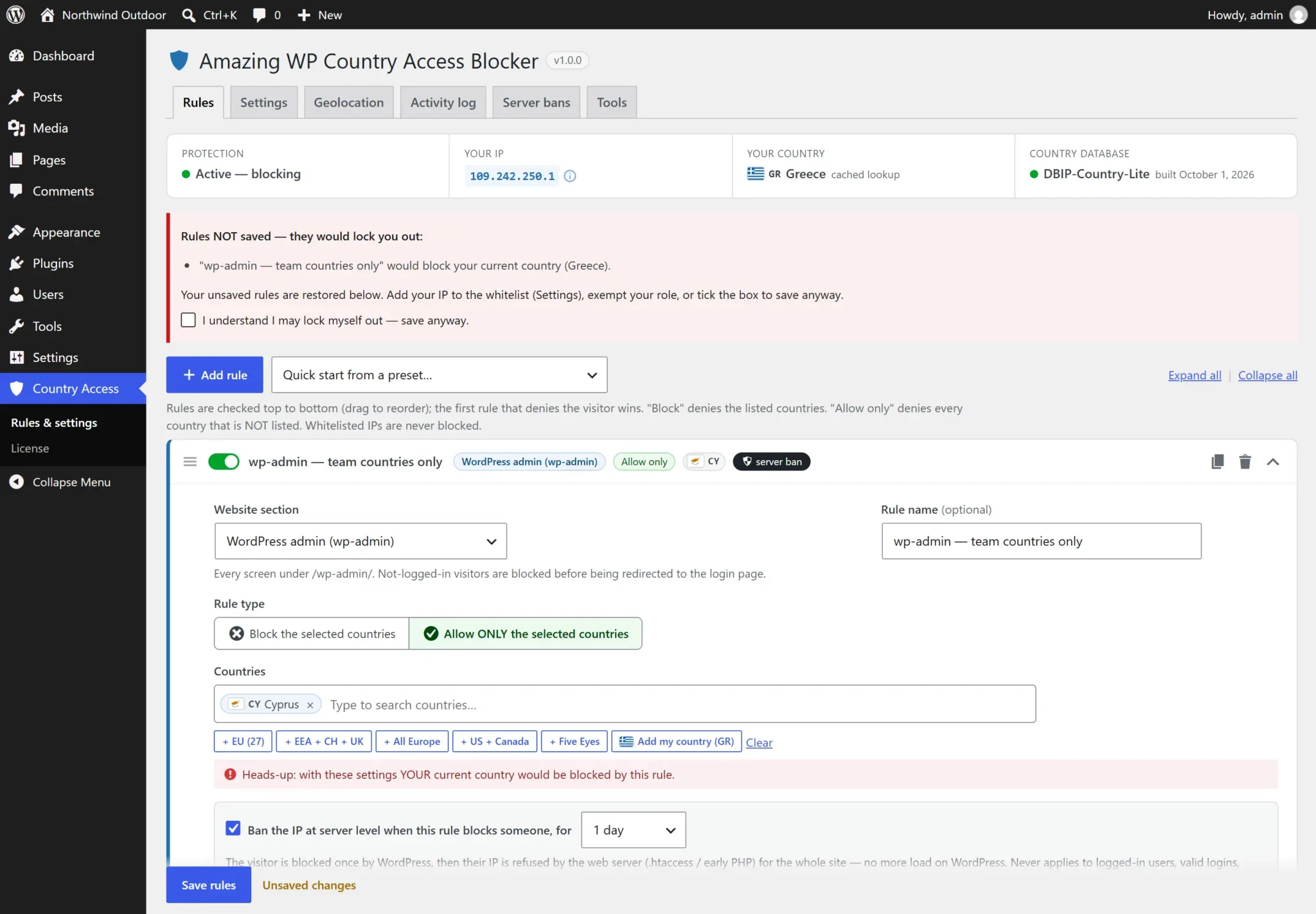
“Your current country would be blocked”
When a wp-admin or login rule would deny the country you are browsing from, a red warning appears inside the rule card — before you save. See also Lockout protection.
Response & messages
Under Response, exceptions & logging each rule chooses what a blocked visitor gets:
| When blocked | Behavior |
|---|---|
| Show the block page / message | A clean, theme-independent page with your title and message (HTTP status from Settings: 403, 451, 404, 410 or 503) |
| Redirect to a URL | 302 redirect, e.g. to a regional site or an “unavailable in your country” page |
| Pretend it does not exist (404) | On content sections the theme’s own 404 template is shown |
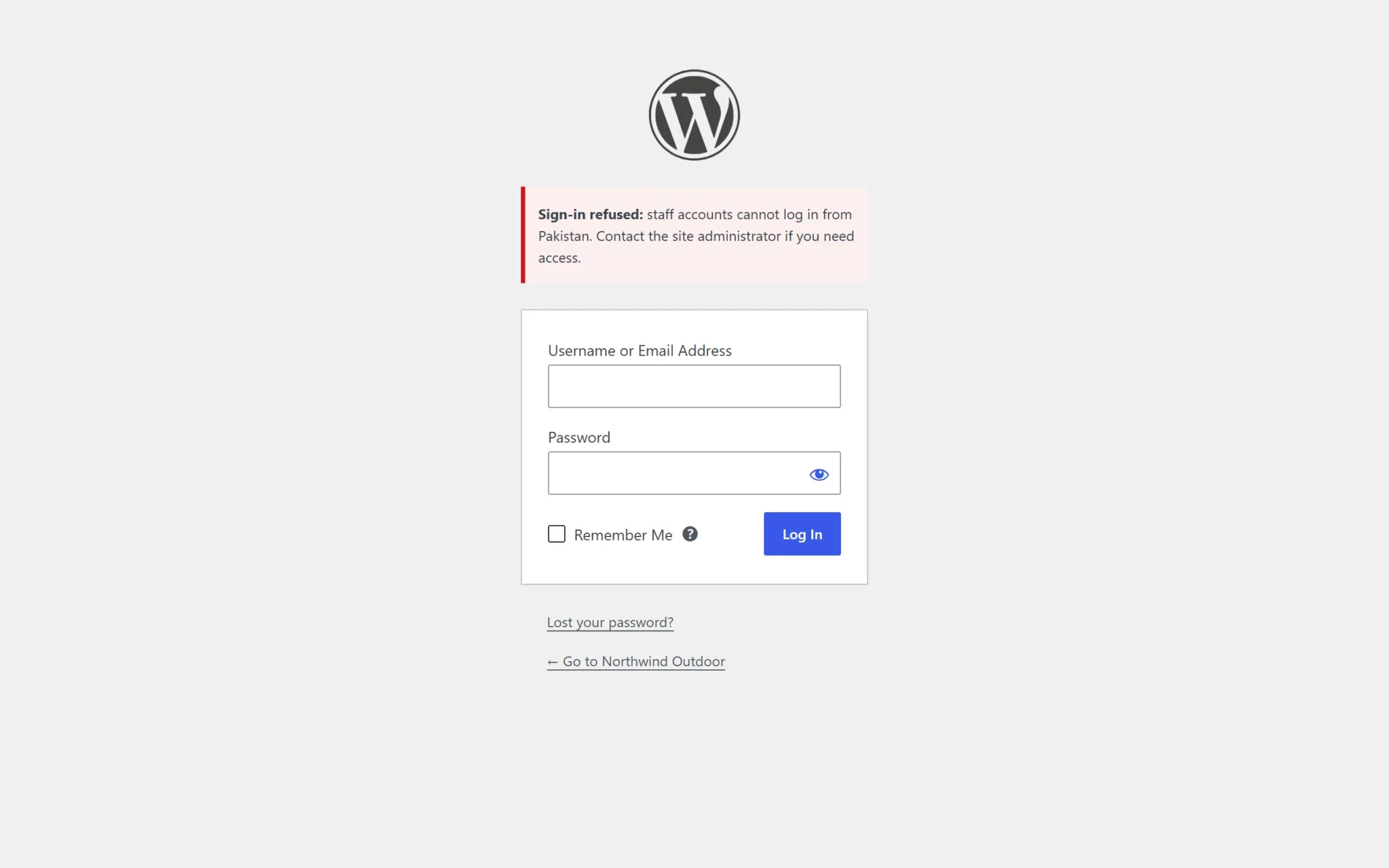
Login, registration, comments, checkout, REST and XML-RPC can’t show a page, so they answer with an inline error using the same message. Messages accept basic HTML and the placeholders {country}, {country_code}, {ip} and {site}; a rule’s custom message overrides the default from Settings.
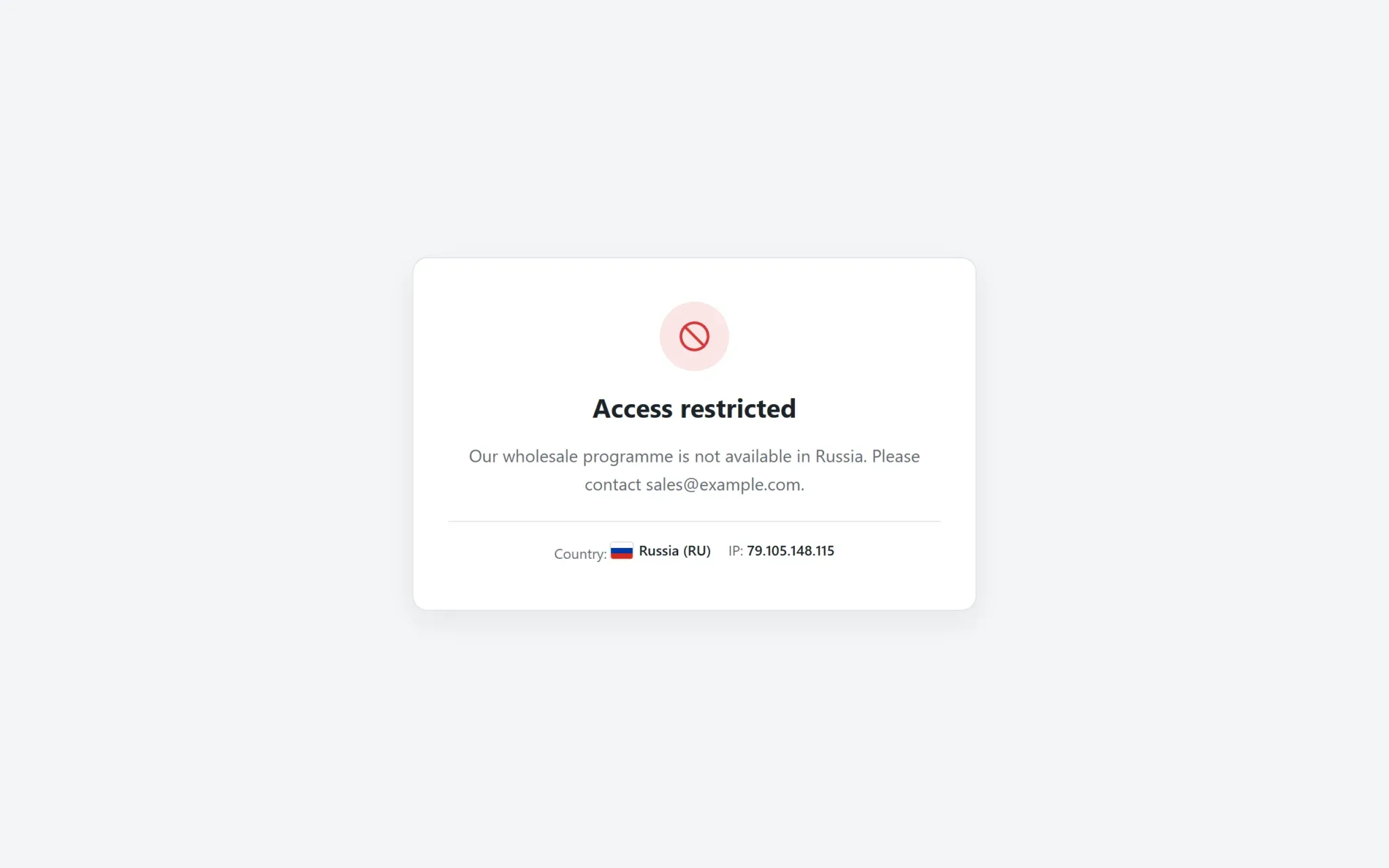
Restyle the block page
Copy templates/blocked.php from the plugin to your theme as awcab-blocked.php , or point to any template with the awcab_block_template filter.
Exceptions & roles
Never block these users exempts selected roles — or any logged-in user — from a rule. On login rules the plugin checks the role of the account being logged into, so you can let customers sign in from anywhere while administrators and editors can only sign in from your country.
How login rules with role exceptions behave
The login page itself stays reachable (the plugin can’t know who is logging in yet). The decision happens at authentication: an exempt account logs in normally; any other account is refused with your message.
Other exceptions: always-allow IPs (Settings), verified search-engine crawlers on content rules (Settings), and per-request logic via the awcab_user_is_exempt and awcab_is_whitelisted filters.
wp-admin & login protection
Most brute-force and credential-stuffing traffic comes from countries your team never logs in from.
1
wp-admin
Allow only your team’s countries. Unauthenticated visitors are stopped before WordPress redirects them to the login page.
2
Login
Covers wp-login.php and every login route, including WooCommerce, XML-RPC and application passwords — and custom login URLs.
3
Server ban
Turn on a server-level ban so a refused attacker can’t keep hammering the site.
Front-end AJAX keeps working
admin-ajax.php and admin-post.php serve front-end features (carts, filters, forms) and are excluded from wp-admin rules by default. WooCommerce’s wc-ajax and the REST API are not affected either. Enable Apply wp-admin rules to admin-ajax.php and admin-post.php in Settings only if you need it.
XML-RPC & REST API
XML-RPC is a favourite brute-force target (one request can try hundreds of passwords). An Allow only XML-RPC rule — the preset Block XML-RPC for every country except mine — answers everyone else with an XML-RPC fault and a 403, plus a 7-day server ban in the preset.
For the REST API, leave the routes empty to cover the whole API, or protect specific routes such as wp/v2/users to stop user enumeration. Keep in mind that the block editor and many plugins use the REST API, so prefer route-specific rules.
Pages, posts & terms
Content rules run when WordPress decides what to show, so they understand your site’s structure:
- Pages — with child pages, the posts page and the WooCommerce shop page.
- Posts / products / CPT items — any public post type.
- Post types — singles and archives.
- Terms — category, tag, product-category or custom-taxonomy archives, with child terms, and optionally every item assigned to them.
- URL patterns — anything WordPress serves, matched very early (e.g. downloads, landing pages, custom endpoints).
Combine with Pretend it does not exist (404) to hide region-specific promotions completely.
WooCommerce checkout
A WooCommerce: placing orders rule lets visitors from anywhere browse and add to cart, but refuses the order from countries you don’t sell to — on the classic checkout and the block (Store API) checkout. The visitor sees your message as a checkout error.
Connection country, not billing country
The rule checks where the visitor connects from. To restrict by billing or shipping address, use WooCommerce’s own “Selling location(s)” and “Shipping location(s)” settings.
Server-level bans
Turn a rule violation into a ban: the attacker is refused by the web server for the whole site, before WordPress or PHP even starts.
Switch on Ban the IP at server level when this rule blocks someone, for [1 hour … permanently] in any rule (recommended for wp-admin, login, XML-RPC and registration). The first request is blocked by WordPress; from then on the IP is refused by:
.htaccess (Apache / LiteSpeed)
A managed block written at the top of .htaccess, matching the same IP header the plugin uses (works behind Cloudflare). A backup of the previous file is kept before every change.
Early PHP drop-in (any server)
A tiny generated must-use plugin that refuses banned IPs before any plugin or theme loads — the method used on Nginx, or when .htaccess is ignored.
Automatic (the default method) uses both where possible. Bans expire on schedule (hourly cleanup), the list is capped (default 2,000 IPs, oldest first), and the files are removed when the plugin is deactivated and restored on reactivation.
Never banned
Logged-in users · valid logins (a real user abroad) · someone merely opening the login page · always-allow and private IPs · Cloudflare edge IPs · visitors whose country is unknown · your own IP when banning manually.
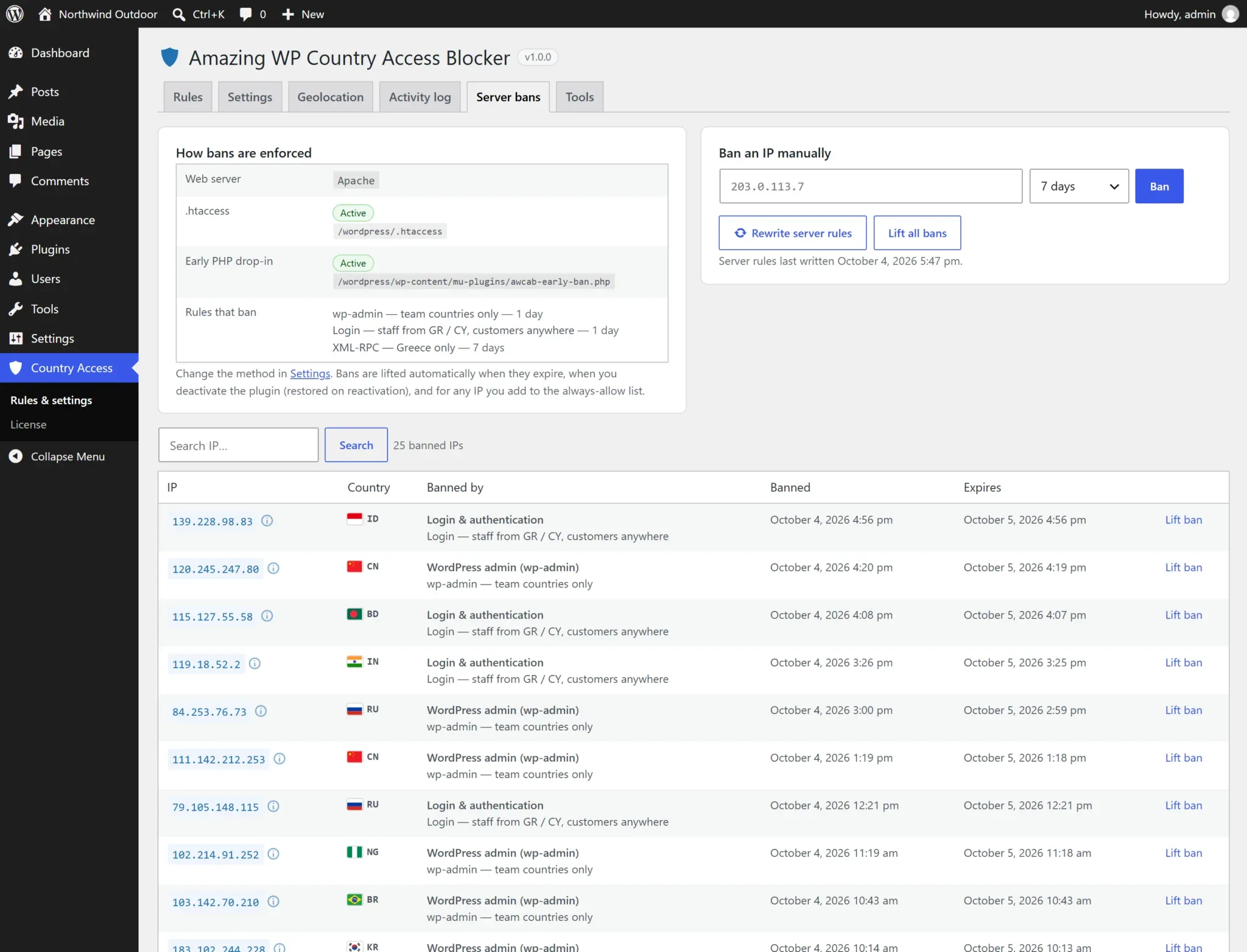
Always allow / always block IPs
Under Settings, two lists accept single IPs, CIDR ranges (IPv4 and IPv6) and wildcards (10.0.*.*), one per line, with # comments:
- Always allow — bypasses every rule and every ban. Add your office, VPN, uptime monitors and payment-gateway callbacks. Adding an IP here also lifts its server ban.
- Always block — refused everywhere (front end, wp-admin and APIs) regardless of country.
Both lists can also be managed from the IP details popup with one click.
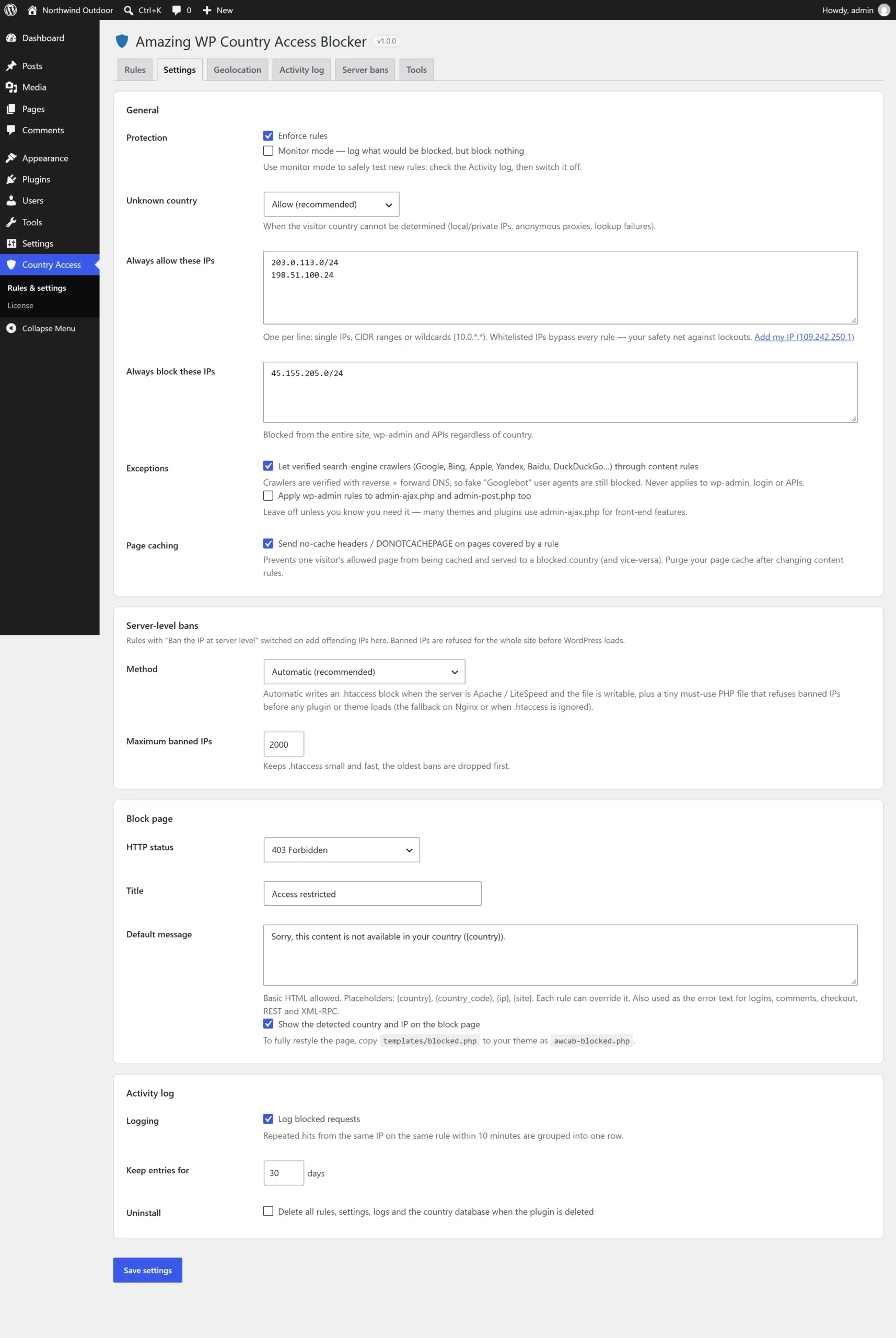
Settings
| Section | Controls |
|---|---|
| General | Enforce rules; Monitor mode; unknown-country behavior; always-allow / always-block IPs; search-engine crawler exception; admin-ajax coverage; no-cache headers on protected pages |
| Server-level bans | Method (automatic, .htaccess + PHP, .htaccess only, PHP only) and maximum number of banned IPs |
| Block page | HTTP status, title, default message, show the visitor’s country and IP |
| Activity log | Logging on/off, retention days, delete all data on uninstall |
Geolocation
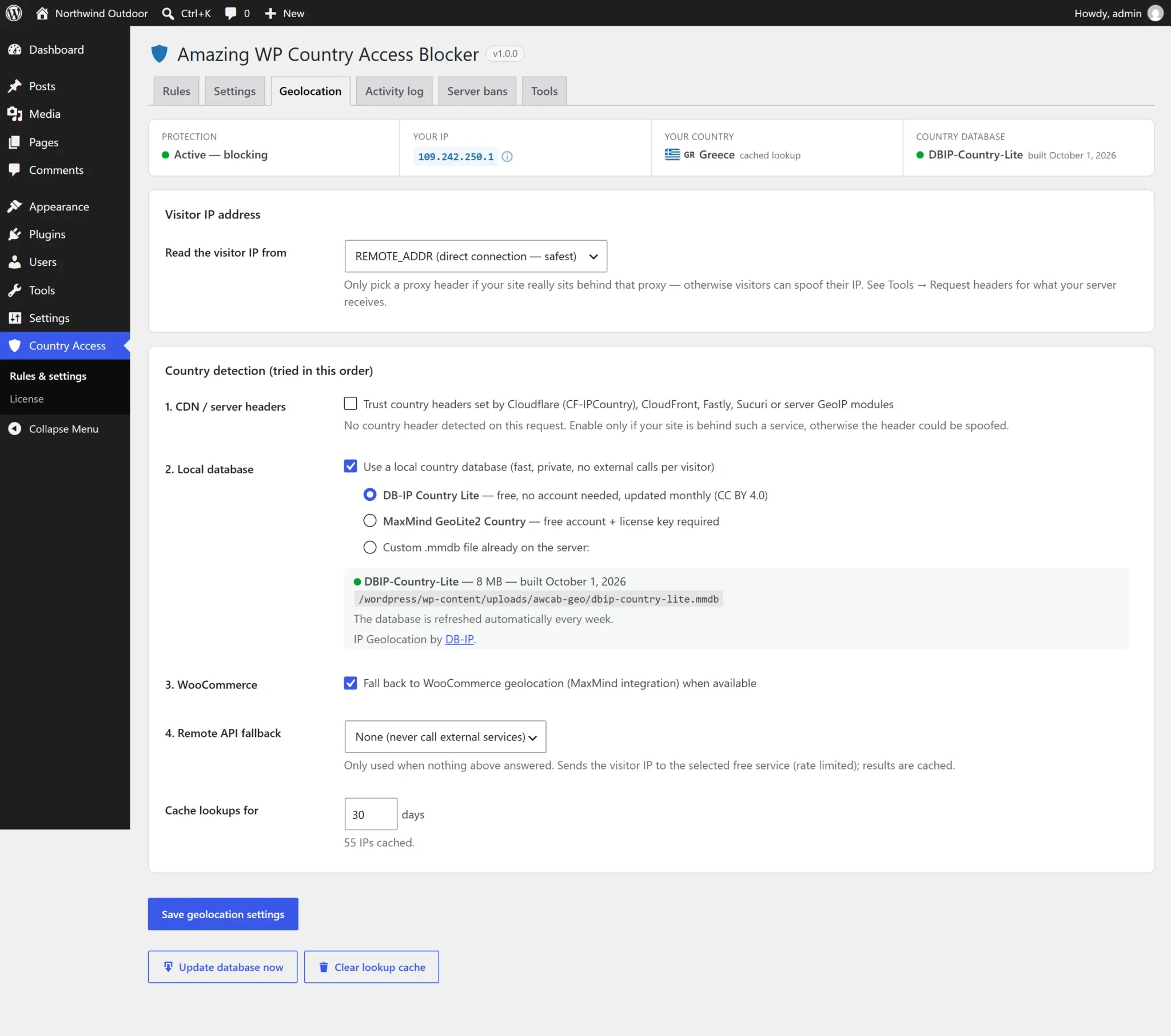
The country is detected in layers and cached per IP:
- CDN / server headers (optional) — Cloudflare
CF-IPCountry, CloudFront, Fastly, Sucuri or server GeoIP modules. Fastest; enable only if your site really is behind such a service. - Local database — DB-IP Country Lite (free, no account, downloaded and refreshed weekly), MaxMind GeoLite2 Country (free account + license key) or any custom
.mmdbfile. Read by a built-in reader — no extra PHP extensions. - WooCommerce geolocation (if active).
- Remote API fallback (optional) — country.is, ipwho.is, ipapi.co or ipinfo.io, only for IPs nothing else could place. Choose None to never contact an outside service.
Visitor IP source
Choose where the visitor IP is read from: REMOTE_ADDR (direct connection, safest), CF-Connecting-IP (Cloudflare), X-Forwarded-For, X-Real-IP, True-Client-IP, X-Sucuri-ClientIP or a custom header. Tools → Request headers shows what your server receives.
Behind a proxy or CDN?
If your site is behind Cloudflare or a load balancer and the IP source is left on REMOTE_ADDR, every visitor appears to come from the proxy. Set the matching header — server-level bans use the same setting, and Cloudflare edge IPs are never banned.
IP geolocation by DB-IP (CC BY 4.0). Country flags by flag-icons (MIT).
Page caching & SEO
Page caching
A page cache serves stored copies without running WordPress, so a page cached for an allowed visitor could be served to a blocked one (or vice versa). With Send no-cache headers / DONOTCACHEPAGE on (default), pages covered by a content rule tell WP Rocket, LiteSpeed Cache, W3 Total Cache, WP Super Cache and others not to cache them. Purge your page cache after adding a content rule so older copies are cleared. Server-level caches (Varnish, Cloudflare APO) may need these URLs excluded.
wp-admin, login, XML-RPC, REST, comments and checkout are never page-cached, so their rules are unaffected.
Search engines
With Let verified search-engine crawlers through content rules on, Google, Bing, Apple, Yandex, Baidu, DuckDuckGo and others can index country-restricted content. Crawlers are verified by reverse + forward DNS, so fake “Googlebot” user agents are still blocked. Login, admin and API rules always apply to everyone.
Activity log
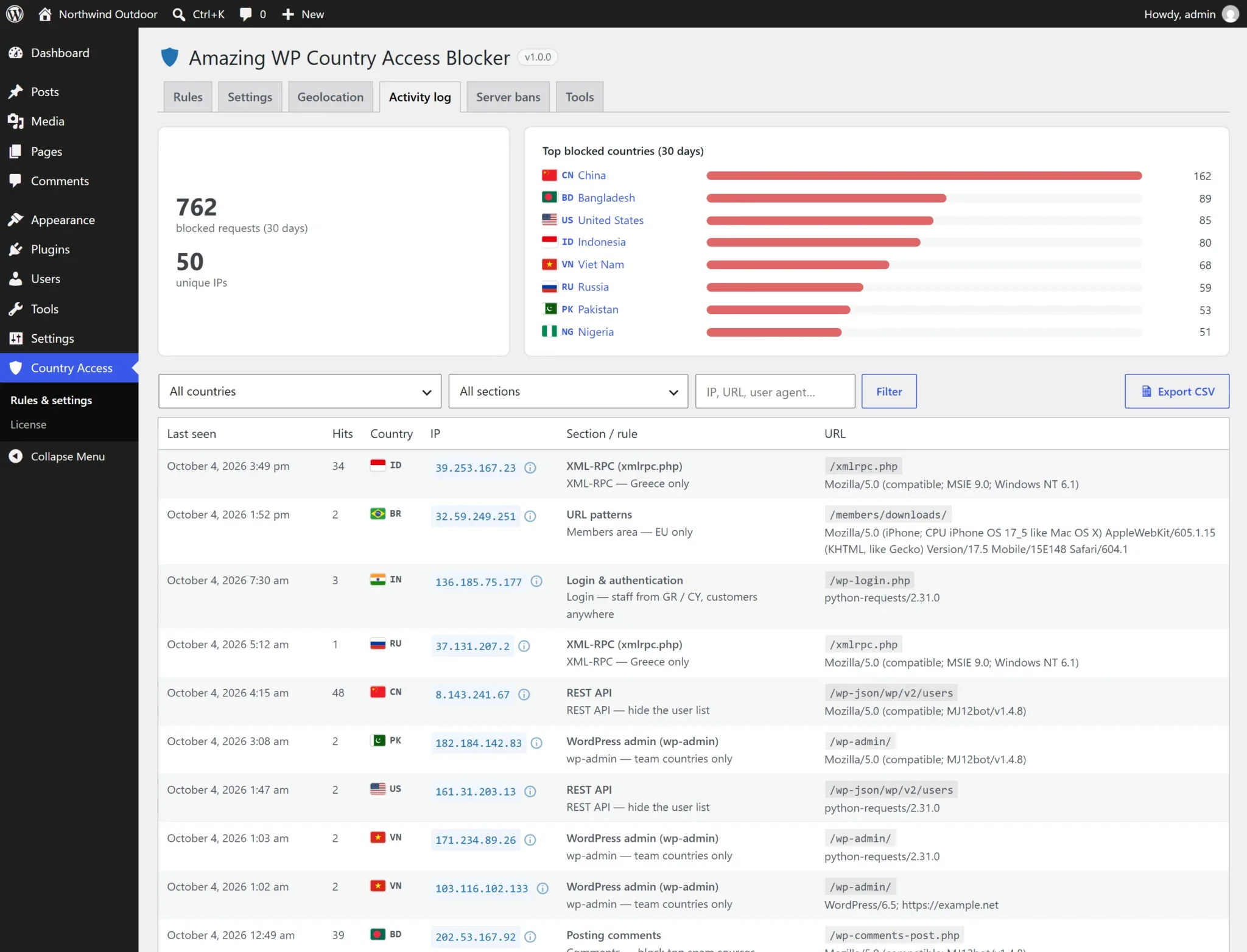
Every block is logged with time, country, IP, section and rule, URL and user agent. Repeated hits from the same IP on the same rule within 10 minutes are grouped into one row with a hit counter, so floods don’t bloat the table. The top shows totals and the top blocked countries for the last 30 days; click a country to filter.
Filter by country, section or text (IP, URL, user agent), Export CSV, or Clear log. Entries older than the retention period (default 30 days) are pruned daily. In monitor mode, entries are tagged monitor.
IP details popup
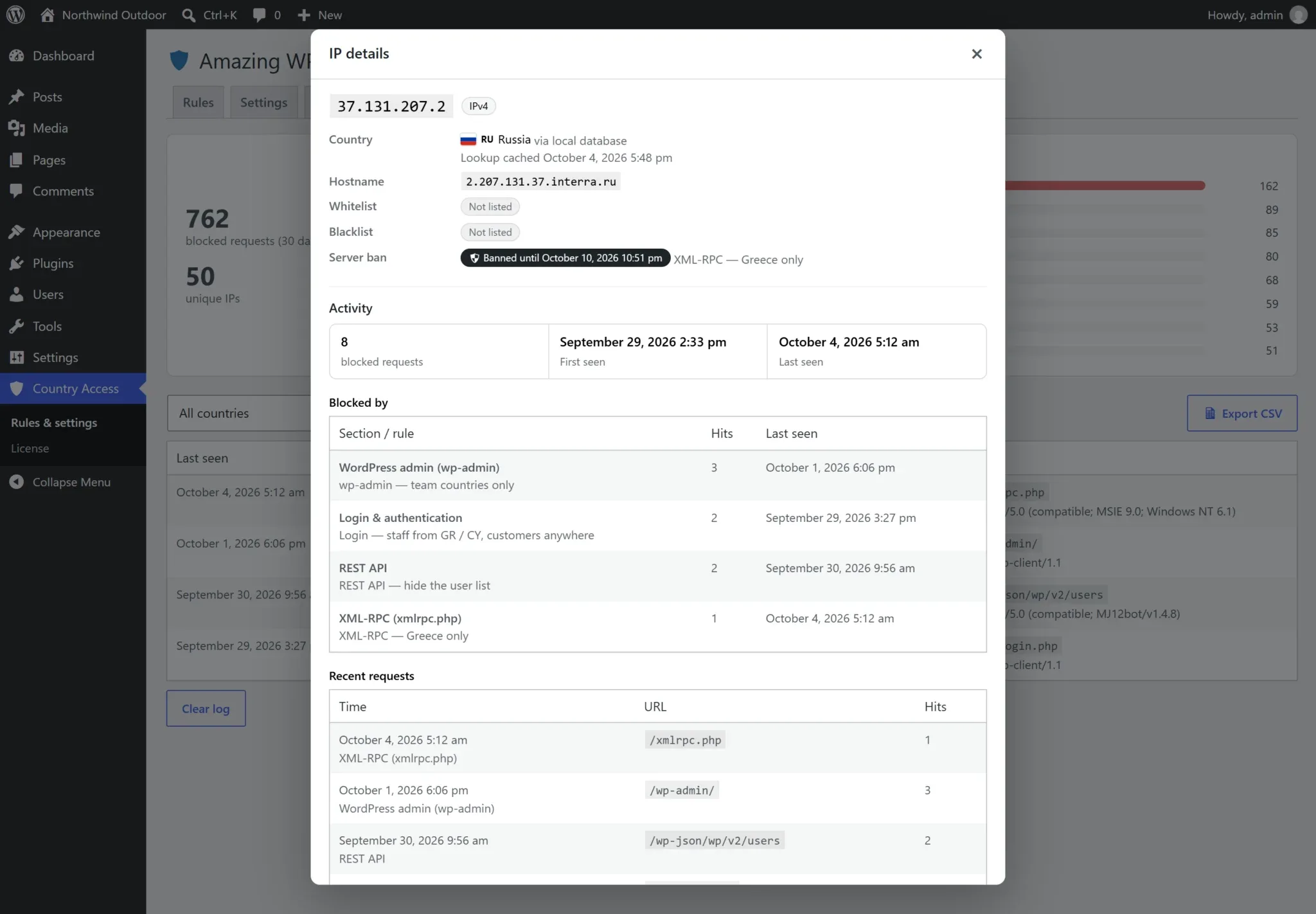
Click any IP — in the log, the server bans list, the status bar or the IP tester — to open its details: country (flag + ISO code) and lookup source, reverse-DNS hostname, list and ban status, total blocks with first / last seen, which rules blocked it, recent requests and user agents.
Act right there: Always block this IP, Always allow this IP, Ban at server level (choose a duration) or Lift server ban, jump to the IP in the activity log, or look it up on whatismyipaddress.com in a new tab.
Tools
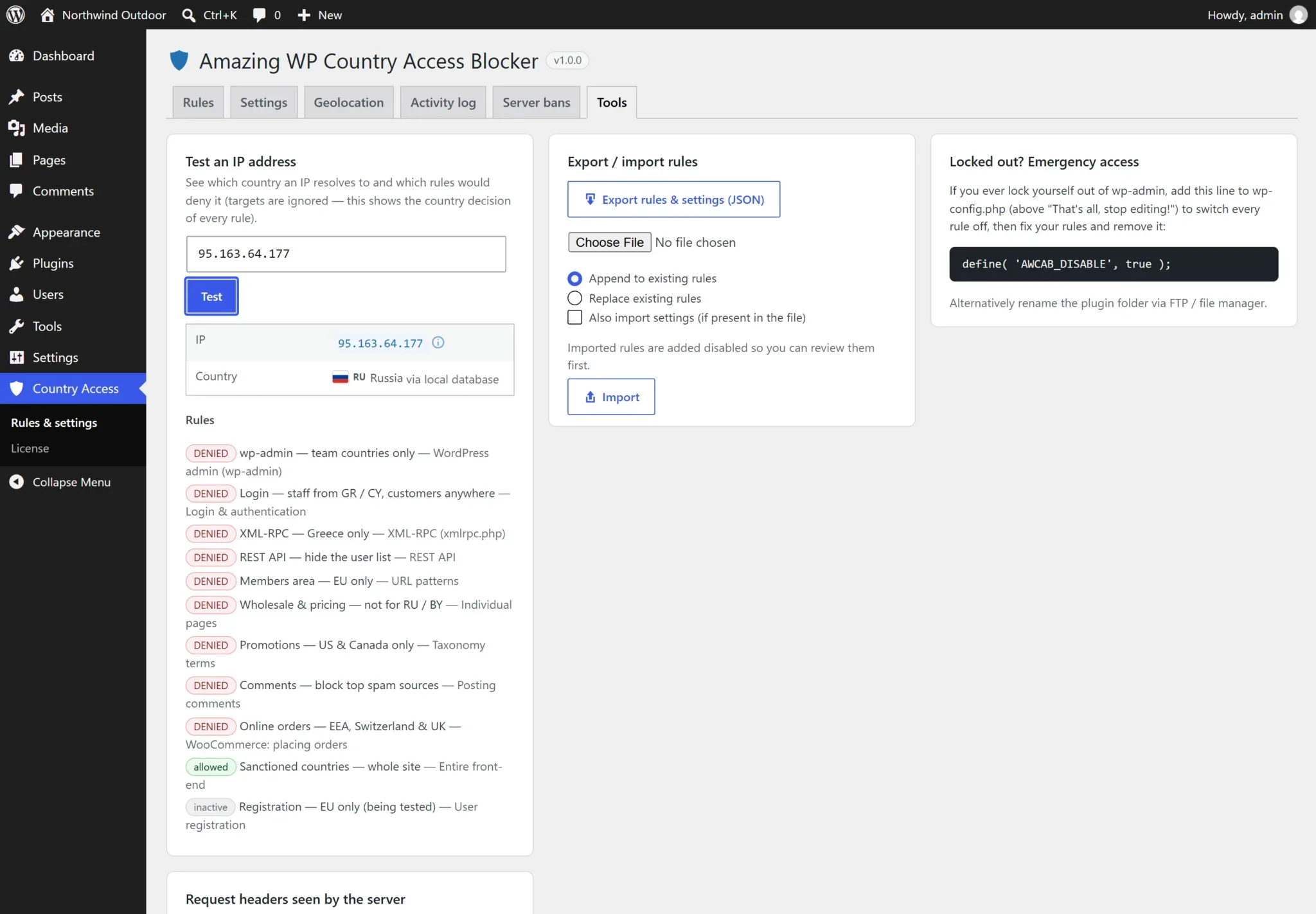
Test an IP address
See the country of any IPv4 / IPv6 address and the decision of every rule — DENIED, allowed or inactive.
Export / import
Export rules and settings as JSON (MaxMind credentials excluded) and import them on another site. Imported rules arrive disabled for review; append or replace.
Emergency access
The exact line to add to wp-config.php if you ever lock yourself out.
Request headers
The IP and country headers your server receives — to choose the right IP source.
Lockout protection & emergency access
Before saving rules or settings, the plugin simulates your own access. If a wp-admin or login rule — or the always-block list — would block your current IP or country, nothing is saved: you get a clear explanation, your unsaved rules are restored, and you can fix them, whitelist your IP, exempt your role, or tick I understand I may lock myself out — save anyway.
If you are locked out anyway
Add this line to wp-config.php (above “That’s all, stop editing!”), log in, fix the rules (or whitelist your IP), then remove it:
define( 'AWCAB_DISABLE', true );It switches off all rules and the early-ban drop-in. If a server-level ban in .htaccess is blocking you, remove the block between # BEGIN Amazing WP Country Access Blocker and # END Amazing WP Country Access Blocker, or rename the plugin folder via FTP.
Performance
Loads on demand
Classes are autoloaded; with no active rules the plugin registers no hooks and runs no queries. Hooks are added only for the sections your rules use.
Geolocate only when needed
The country is looked up only when a rule applies to the request — then cached per IP in the database and in Redis / Memcached if available.
No front-end assets
No CSS or JavaScript on the front end. Admin assets load only on the plugin’s own screens.
On a test site a typical page that no rule targets loaded five small plugin files and ran zero plugin queries.
Developer hooks
Extend the plugin without touching its code. All extension points use the awcab_ prefix — 48 in total.
Filters
| Hook | Purpose |
|---|---|
awcab_rules | Add or change rules in code at runtime (never saved) |
awcab_sanitize_rule | Keep extra rule fields added by an extension |
awcab_scopes / awcab_rule_matches | Register a custom website section / decide when it matches |
awcab_deny | Final say on a denial: ( bool $deny, array $rule, array $visitor, array $ctx ) |
awcab_is_whitelisted / awcab_user_is_exempt | Dynamic allow-lists / custom exemptions |
awcab_skip_request | Return true to skip all checks for a request |
awcab_block_message / awcab_block_title / awcab_block_status_code / awcab_redirect_url / awcab_block_template | Customize the response |
awcab_should_server_ban / awcab_ban_duration / awcab_ban_protected_reason / awcab_cdn_ranges | Control server-level bans |
awcab_htaccess_path / awcab_htaccess_lines | Where / what the .htaccess block writes |
awcab_log_entry | Change a log entry or return false to skip it |
awcab_client_ip / awcab_geolocate / awcab_country_header_keys / awcab_remote_timeout | IP and country detection |
awcab_search_bots / awcab_countries / awcab_country_groups | Crawler list, country list, quick-add groups |
awcab_storage_dir / awcab_dbip_download_url | Database location / download mirror |
awcab_setting | Force any setting at read time, e.g. per environment |
awcab_lockout_problems | Adjust the lockout check |
awcab_admin_tabs / awcab_ip_lookup_url | Add admin tabs / change the external IP-lookup link |
awcab_license_store_url / awcab_license_item_name | Licensing endpoints |
Actions
awcab_blocked
awcab_before_block_response
awcab_enforcer_booted
awcab_ip_banned
awcab_ip_unbanned
awcab_bans_synced
awcab_log
awcab_rules_saved
awcab_settings_saved
awcab_geo_database_updated
awcab_admin_tab_{key}
awcab_license_status_changed
awcab_auto_updates_changed
Define a rule in code
add_filter( 'awcab_rules', function ( $rules ) {
	$rules[] = array(
		'id'           => 'code-xmlrpc',
		'scope'        => 'xmlrpc',
		'mode'         => 'allow',
		'countries'    => array( 'GR', 'CY' ),
		'server_ban'   => true,
		'ban_duration' => WEEK_IN_SECONDS,
	);
	return $rules;
} );
Notify Slack (or a SIEM) on every block
add_action( 'awcab_blocked', function ( $rule, $visitor, $monitor_only ) {
	wp_remote_post( 'https://hooks.slack.com/services/XXX', array(
		'blocking' => false,
		'body'     => wp_json_encode( array(
			'text' => sprintf( 'Blocked %s (%s) — %s', $visitor['ip'], $visitor['country'], $rule['scope'] ),
		) ),
	) );
}, 10, 3 );
Mirror server bans to your firewall
add_action( 'awcab_bans_synced', function ( $ips, $status ) {
	// $ips = array( '203.0.113.7' => 1791234567, ... ) — expiry timestamp, 0 = permanent.
	my_firewall_sync( array_keys( $ips ) );
}, 10, 2 );
Always allow your uptime monitor
add_filter( 'awcab_is_whitelisted', function ( $allowed, $ip ) {
	return $allowed || in_array( $ip, my_uptime_monitor_ips(), true );
}, 10, 2 );
Emergency constant
define( 'AWCAB_DISABLE', true ); in wp-config.php switches all protection off.
Troubleshooting
Nothing is being blocked
Check the status bar on the Rules tab: Protection must read Active — blocking. Common causes: no valid license, Monitor mode on, “Enforce rules” off, the rule has no countries or is disabled, your IP is on the always-allow list, or the country can’t be detected (see the IP tester). For content rules, purge your page cache.
Every visitor shows the same country or IP
Your site is behind a proxy or CDN. Set the correct IP source on the Geolocation tab — Tools → Request headers shows which header carries the real visitor IP.
The country database didn’t download
Open Geolocation and select Download database now; any error is shown there. The server needs outbound HTTPS to download.db-ip.com (or MaxMind) and the PHP zlib extension. Until then, WooCommerce or a remote API fallback can be used.
.htaccess shows “Not written” on the Server bans tab
The file isn’t writable by PHP. Fix its permissions and select Rewrite server rules — the early PHP drop-in keeps enforcing bans in the meantime.
I banned myself / a colleague
Lift the ban on the Server bans tab or the IP popup. If you can’t reach wp-admin, use AWCAB_DISABLE (see Lockout protection) or remove the plugin’s block from .htaccess.
A front-end feature stopped working after blocking wp-admin
Make sure Apply wp-admin rules to admin-ajax.php and admin-post.php is off (the default) in Settings.
Frequently asked questions
Will I lock myself out of my own site?
Very unlikely: saving is refused when a rule or setting would block your current IP or country, unless you explicitly confirm. If it ever happens, add define( 'AWCAB_DISABLE', true ); to wp-config.php.
How accurate is the country detection?
Country-level IP geolocation is very accurate (typically well above 95%). The free DB-IP database is refreshed weekly; MaxMind GeoLite2 and CDN headers (e.g. Cloudflare) are available too. VPN and proxy users appear in the VPN’s country.
Does it work behind Cloudflare?
Yes. Set the IP source to CF-Connecting-IP and optionally trust Cloudflare’s country header. Server-level bans read the same header and Cloudflare edge IPs are never banned.
Does it work on Nginx?
Yes. Country rules work on any server. Server-level bans on Nginx use the early PHP drop-in, which stops banned IPs before plugins and the theme load.
Will blocking wp-admin break AJAX on my site?
No — admin-ajax.php and admin-post.php are excluded by default, and wc-ajax and the REST API are unaffected.
Can customers log in from anywhere while admins are restricted?
Yes. In a login rule, tick the customer / subscriber roles under Never block these users. The role of the account being logged into is checked.
Will it hurt my SEO?
Not if you enable the verified search-engine crawler exception (on by default). Crawlers are DNS-verified, so fakes are still blocked.
Does it send visitor data to third parties?
No, by default lookups use the local database. Only if you choose a remote API fallback are IPs the local database couldn’t place sent to that service, and results are cached.
What happens if my license expires?
Rules, settings and logs are kept, but nothing is enforced and server-level bans are removed until a valid license is activated again.
Does uninstalling remove my data?
Only if you enable Delete all rules, settings, logs and the country database when the plugin is deleted in Settings. Server-ban files are always removed on deactivation.
Changelog
Current version: 1.0.0. See readme.txt in the plugin package for the complete history.
1.0.2 Stricter Googlebot verification
- Security: Googlebot verification no longer accepts
*.googleusercontent.comhostnames — those belong to every Google Cloud customer server, so an attacker there faking a Googlebot user agent could have avoided server-level bans. Real Googlebot is verified viagooglebot.com/google.comonly.
1.0.1 Smarter server-level bans
- XML-RPC rules no longer server-ban plain GET requests — e.g. search engines and the Internet Archive following the
xmlrpc.php?rsddiscovery link WordPress adds to every page. They are still blocked; only POSTs (real XML-RPC calls) are escalated to a ban. - Verified search-engine crawlers are never server-banned, on any rule.
- The Internet Archive crawler (
archive.org_bot) is recognised as a verified crawler. - Fixed rule-card warnings and tips appearing on rules they did not apply to. 1
- 7 additional developer hooks (48 in total), including
awcab_rulesto define rules in code.
1.0.0 Initial release
- Rules with per-rule countries for wp-admin, login & authentication, registration, XML-RPC, REST API, entire front-end, pages, posts / CPT items, post types, taxonomy terms, URL patterns, search, feeds, comments and WooCommerce checkout.
- Block or allow-only modes, drag-and-drop ordering, presets, country groups, role exemptions, block page / redirect / 404 responses and custom messages.
- Server-level IP bans via .htaccess and an early PHP drop-in, with expiry, caps and safety exclusions.
- Built-in MMDB reader with automatic DB-IP Lite downloads, MaxMind GeoLite2, CDN headers, WooCommerce and remote API fallbacks.
- Activity log with grouping, top countries and CSV export; IP details popup with reverse DNS and one-click actions.
- Lockout protection, monitor mode, always-allow / always-block IP lists, verified crawler exception, page-cache awareness.
- 48 developer hooks, JSON export / import, flag-icons, full translation support, EDD licensing with automatic updates.