










Official plugin guide
Flexible product exports that keep working after you close the tab.
Build XLSX, ODS, or CSV files from WooCommerce products and variations, filter by any product taxonomy, automate recurring exports, and securely manage the results.
Requirements
WooCommerce Export Products to XLS runs inside the WordPress administration area and requires the following environment.
| Component | Requirement | Notes |
|---|---|---|
| WordPress | 6.9 or newer | A current, supported WordPress installation is recommended. |
| PHP | 8.3 or newer | The code and spreadsheet library are compatible with PHP 8.5. |
| WooCommerce | Active | Provides product data and, normally, Action Scheduler. |
| License | Active EDD license | Required to open and manage the Export, Saved settings, Scheduled jobs, and Saved files tabs. |
| PHP extensions | dom, fileinfo, libxml, xmlreader, zip | WordPress shows an administrator notice when an extension is missing. |
| Permissions | manage_woocommerce | Required to configure, run, download, preview, share, or delete exports. |
Large catalogs are supported.
Exports stream rows to disk in batches instead of assembling the complete workbook in PHP memory.
Installation & upgrade
Install the distributable ZIP
- In WordPress, open Plugins → Add New Plugin → Upload Plugin.
- Select the plugin ZIP, choose Install Now, then activate it.
- Open WooCommerce → Export Products.
- Open the License tab, enter the key from your purchase receipt or Amazing WP Plugins account, and choose Activate License.
Upgrade from 0.6.x or older
Activate version 1.0.0 normally. Existing current settings and templates stored by older releases are converted to the new settings model on upgrade. Category selections become product-category taxonomy filters. New settings that did not previously exist use safe defaults.
Back up before a major upgrade.
Use your normal database and files backup process before replacing an older plugin release. Version 1.0.0 has a new job, schedule, and protected-file architecture.
License activation
WooCommerce Export Products to XLS uses Easy Digital Downloads Software Licensing through Amazing WP Plugins. The License tab is always available to users with the manage_woocommerce capability.
- Open WooCommerce → Export Products → License.
- Paste the license key from your purchase receipt or Amazing WP Plugins account.
- Select Activate License. A successful activation unlocks every plugin tab and licensed WordPress updates.
When active, the License tab shows the masked key and renewal date. Licensed releases are delivered through the normal WordPress Plugins update screen. When inactive, export settings, saved settings, schedules, and saved-file management are locked, and a WordPress administrator notice links directly to the License tab.
Background work is not interrupted.
If a license becomes inactive, an export that was already queued or running can continue in the background. New settings access and administrator export actions remain locked until the license is valid again.
To move a license to another site, choose Deactivate License & Remove Key before activating it on the replacement site. The plugin rechecks the saved license daily with the Amazing WP Plugins licensing server.
Quick start
1
Choose fields
2
Set filters
3
Save changes
4
Start export
5
Download the file
1
Configure
On the Export tab, choose an output format, product fields, product types, content options, filename, and taxonomy terms.
2
Save
When a setting changes, the Start export button is disabled and Save settings is highlighted. Save before exporting so the job receives the intended configuration.
3
Export
Select Start export. The new job shows as running or queued. Track it in the bottom-right progress panel or on Saved files.
The filtered product count updates automatically after settings stop changing. This short delay prevents unnecessary count requests while you are making several selections.
You may leave the page.
The export continues in the background. Keeping the plugin page open can finish it sooner because the browser requests the next available batch immediately.
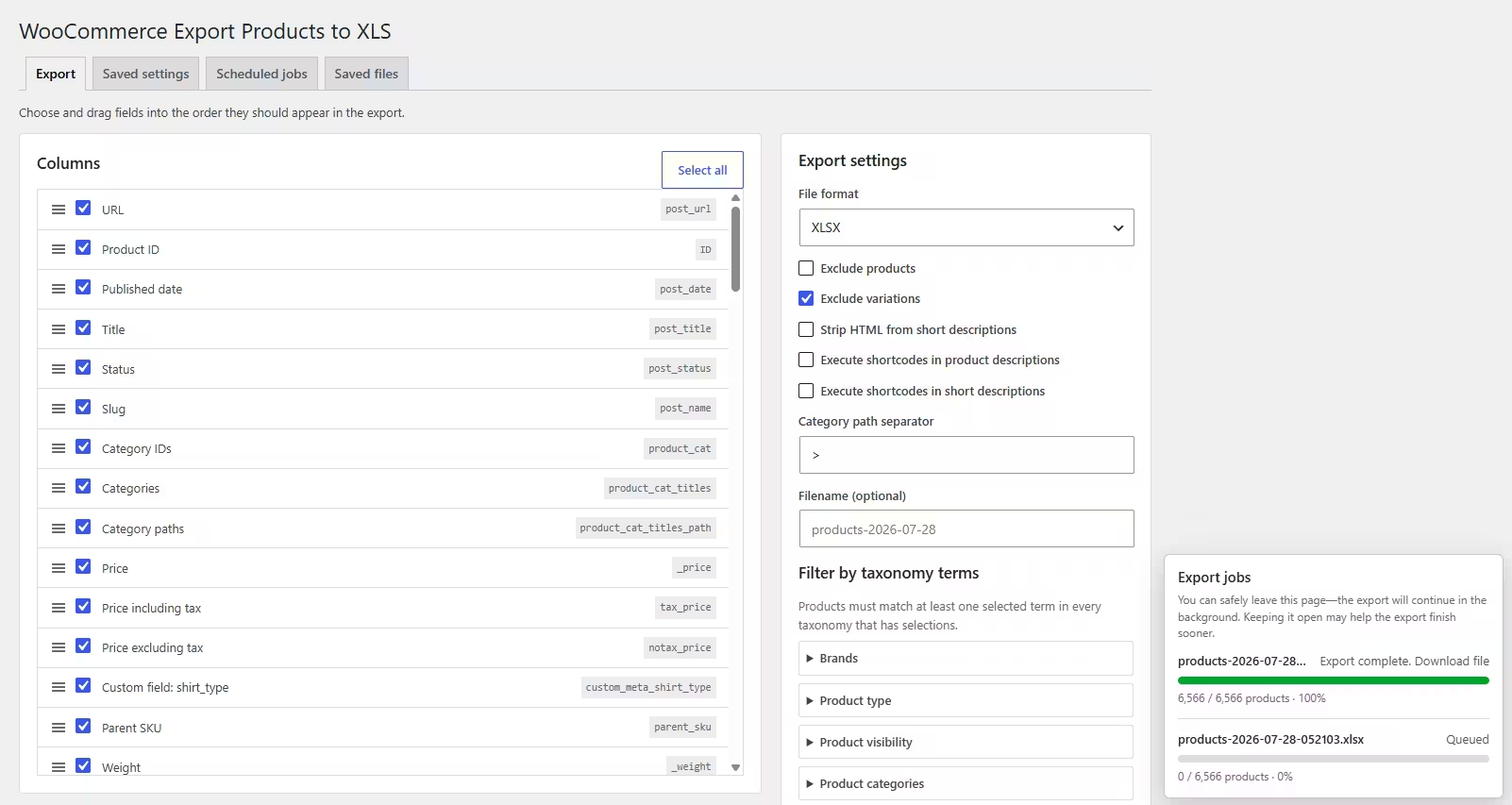
Export settings
| Setting | Purpose |
|---|---|
| Format | Creates an XLSX, ODS, or CSV file. |
| Fields | Selects and orders the columns written to every row. Drag fields to change column order. |
| Exclude products | Omits product posts while still allowing variations when variations are enabled. |
| Exclude variations | Omits product variation rows. |
| Strip HTML from excerpt | Converts short descriptions to plain text. |
| Execute shortcodes | Runs shortcodes independently in full descriptions and short descriptions before export. |
| Category separator | Controls the separator in hierarchical category path values. The default is > . |
| Filename | Sets the base filename. Unsafe characters and an entered extension are removed before the selected format extension is added. |
| Taxonomy filters | Restricts product posts to selected terms from any taxonomy registered to products. |
Unsaved changes are visible.
Changing the form disables Start export and changes the Save settings button color. Save the form to make the export button available again.
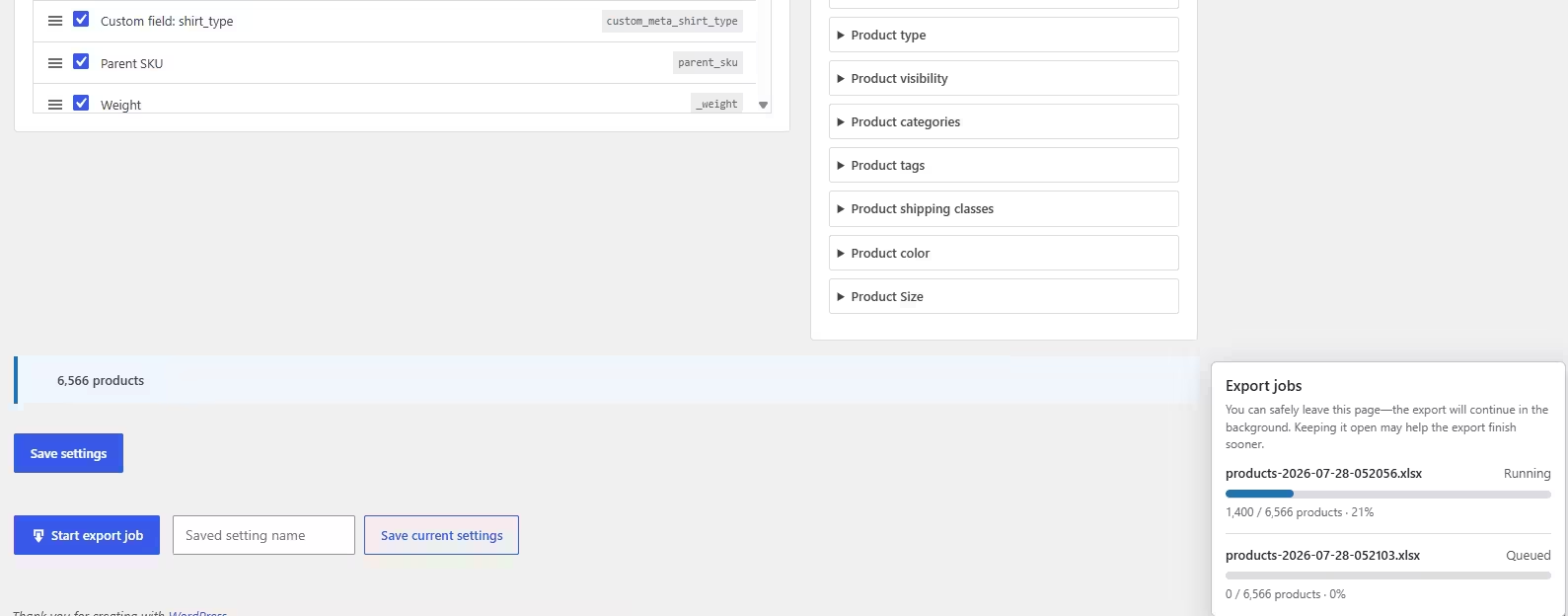
Fields & columns
The field picker combines core WordPress data, WooCommerce product data, taxonomies, plugin integrations, custom product meta, and detected ACF fields. Selected fields become columns in the same order shown in the interface.
Product identity
ID, type, SKU, title, slug, status, product URL, dates, parent information, language, vendor, and brand data where available.
Commerce data
Regular and sale prices, prices with or without tax, stock status and quantity, dimensions, weight, tax class, purchase note, attributes, and variation data.
Content & media
Full description, short description, featured image URL, gallery image URLs, and category paths.
SEO & extensions
Supported Yoast SEO metadata, WC Vendors information, role-based pricing integration values, custom meta, taxonomies, and ACF fields when those integrations are available.
Descriptions and shortcodes
Shortcode execution is off by default. Enable it separately for the full description or short description when you want the rendered shortcode output in the file. Only enable this for trusted shortcode providers; rendering can add processing time or trigger shortcode side effects.
Structured values
Values that remain arrays or objects after field processing are serialized as compact JSON. Boolean and numeric values retain their scalar type where the file format permits it.
Advanced Custom Fields
When ACF is active, top-level fields found in ACF field groups appear in the export field picker. The exporter reads both formatted and raw values and converts each supported type into a useful spreadsheet value.
| ACF type | Exported value |
|---|---|
| Image | The full attachment URL. |
| File | The file URL. |
| Gallery | All image URLs, comma-separated. |
| Post Object, Relationship, Page Link | Each related post title followed by its permalink in parentheses. |
| Taxonomy | Term names, comma-separated. |
| User | Display name followed by email address in parentheses. |
| Link | The link URL. |
| Google Map | Address followed by latitude and longitude when available. |
| Repeater, Flexible Content, Group | JSON preserving rows, keys, and recursively normalized subfield values. |
| Other array values | Normalized items joined with commas. |
| Scalar fields | The formatted ACF value. |
Return format does not break media exports.
Whether an ACF image or file is configured to return an ID, array, or URL, the exported value is resolved to its URL.
Product filters
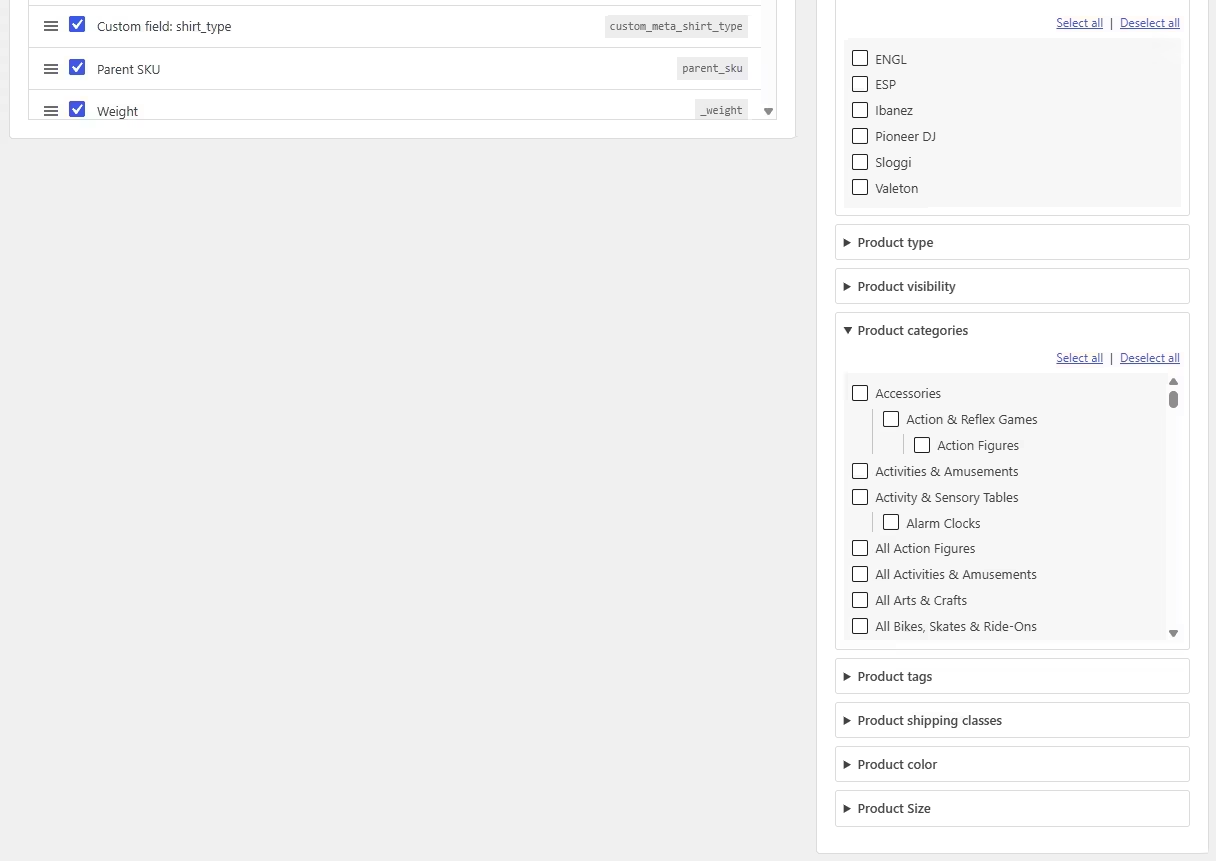
The Export tab shows every public taxonomy assigned to the product post type, including product categories, tags, attributes, brands, and taxonomies registered by other plugins.
- Terms are checkboxes, making the active selection visible without opening a multi-select control.
- Hierarchical taxonomies retain their parent and child indentation.
- Each taxonomy has Select all and Deselect all controls.
- Multiple selected terms within one taxonomy are matched with OR.
- Selections in different taxonomies are combined with AND.
Filters apply to parent products.
When variations are included, qualifying variation rows are selected from the parent products that match the taxonomy filters.
The product count beside the settings reflects both the product and variation inclusion choices. It is recalculated through a throttled AJAX request after the form becomes idle.
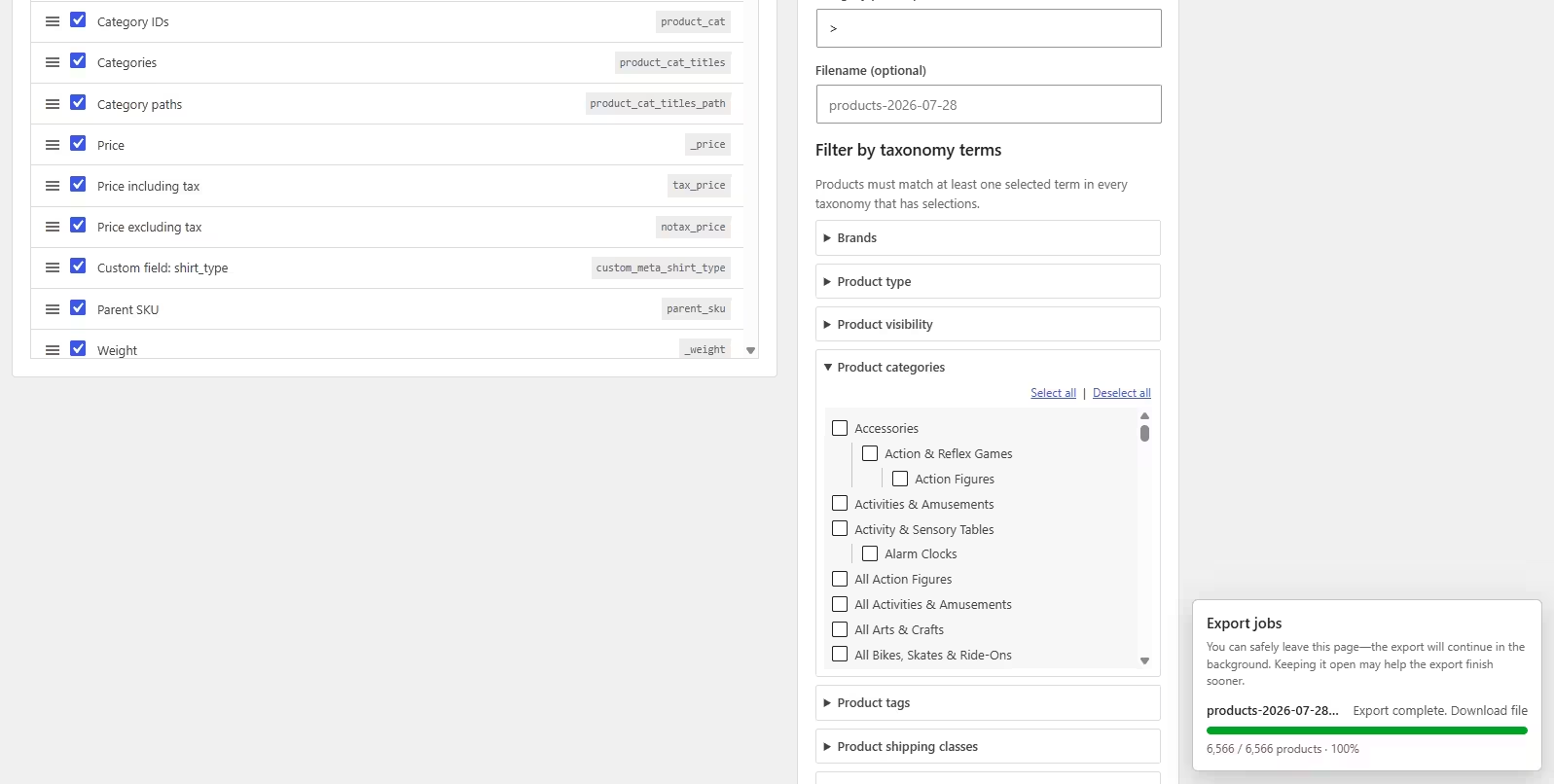
Background jobs
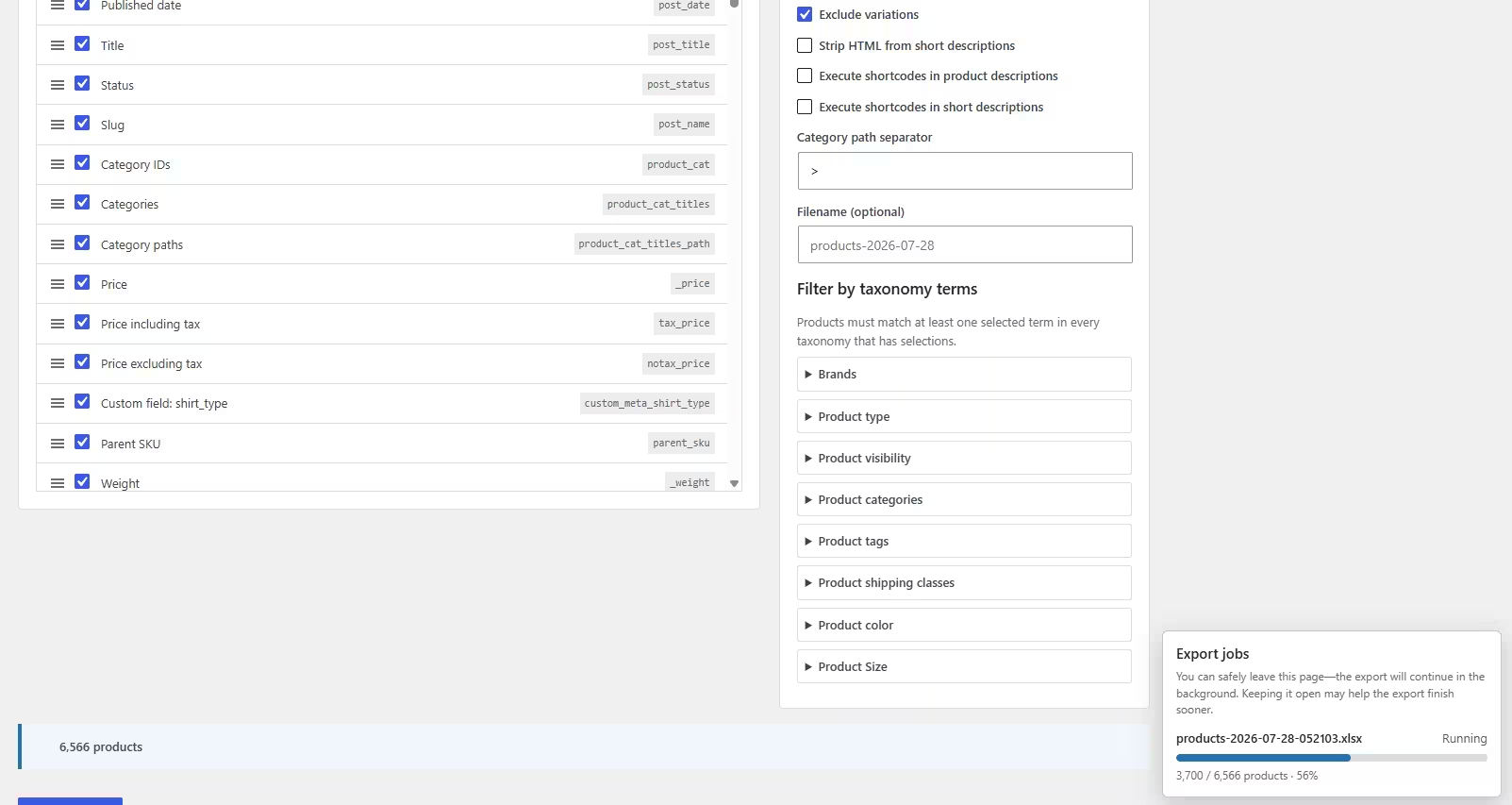
Every manual, forced, or scheduled export creates its own job. Jobs are processed first-in, first-out: the active job continues, and newer jobs wait without replacing or stopping it.
1
Create job
2
Running or queued
3
Write a batch
4
Schedule next batch
5
Complete file
Action Scheduler and fallback processing
When WooCommerce Action Scheduler is available, export batches and scheduled triggers use grouped Action Scheduler actions. A guarded WP-Cron fallback keeps processing available if Action Scheduler cannot be used.
While an authorized user stays on a plugin page, the browser polls job status and requests the next worker batch without waiting for the next cron visit. The bottom-right job panel shows running and queued jobs with progress bars.
Safe to close the tab.
Your export will continue in the background. Leave the page open when convenient for the fastest possible processing.
Job states
| Status | Meaning |
|---|---|
| Running | The job was accepted and is active or eligible for the next worker pass. |
| Queued | Another export currently owns the worker lock; this job will follow it. |
| Complete | The file closed successfully and is available under Saved files. |
| Failed | The job stopped with an error. Review the displayed message and WordPress/PHP logs. |
Saved settings
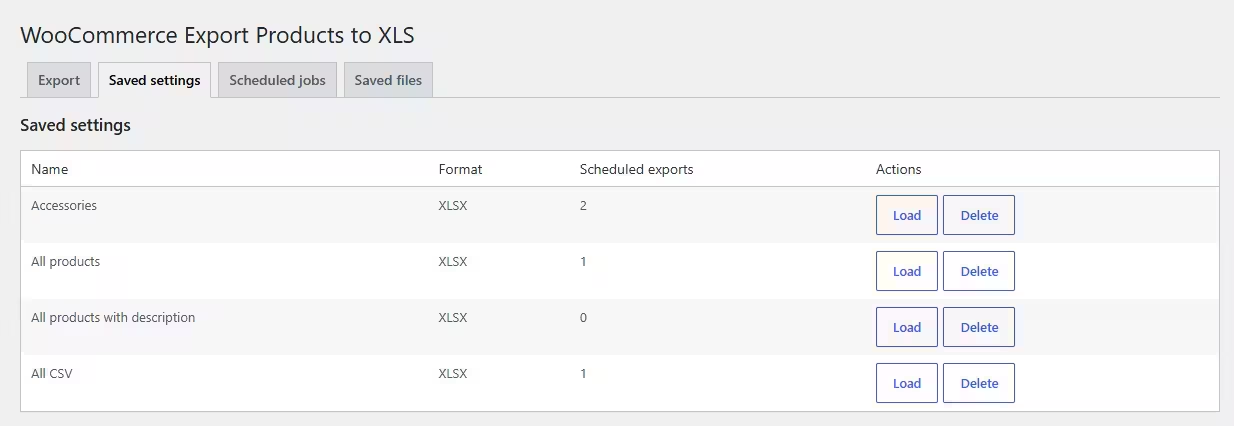
Saved settings are reusable export templates. Save a named template, load it back into the Export tab, or select it when creating a schedule.
- Loading a template replaces the current Export-tab configuration.
- Deleting a template also deletes schedules that depend on it.
- The deletion interface warns when linked schedules will be removed.
- Templates from older plugin versions are converted on installation or upgrade.
Current settings in schedules
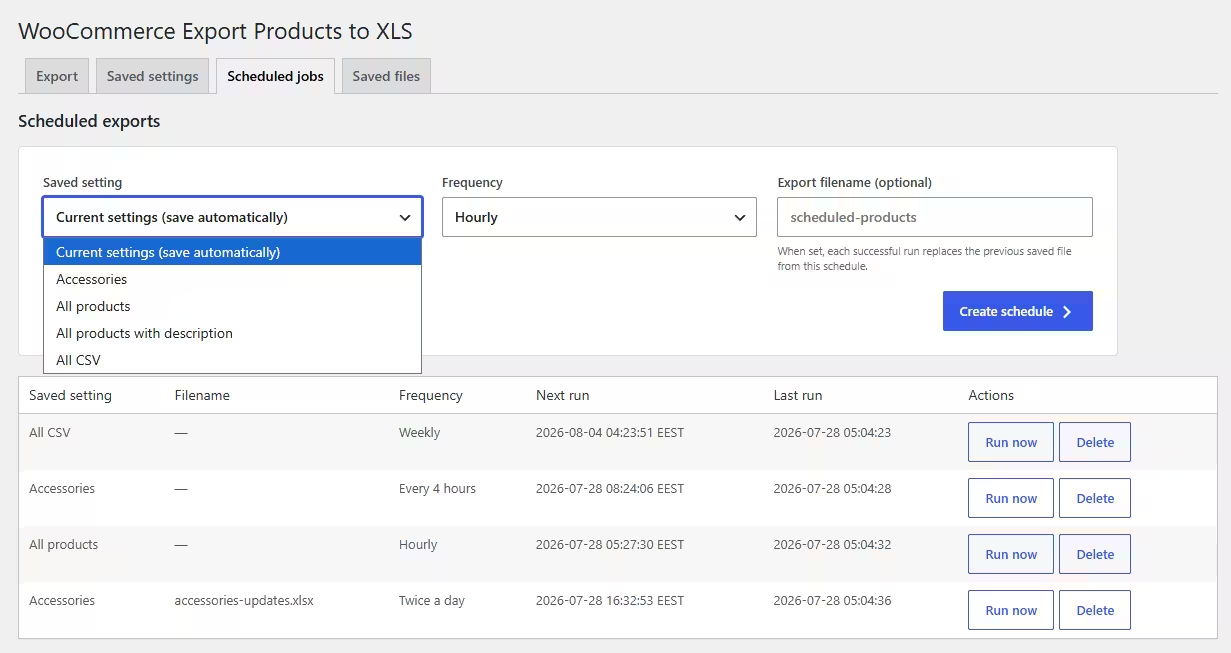
The Scheduled exports tab also offers Current settings (save automatically). Choosing it creates a background template named product-export-YYYY-MM-DD-HHMMSS, then creates the schedule from that snapshot. Later changes on the Export tab do not silently alter the schedule.
Scheduled exports
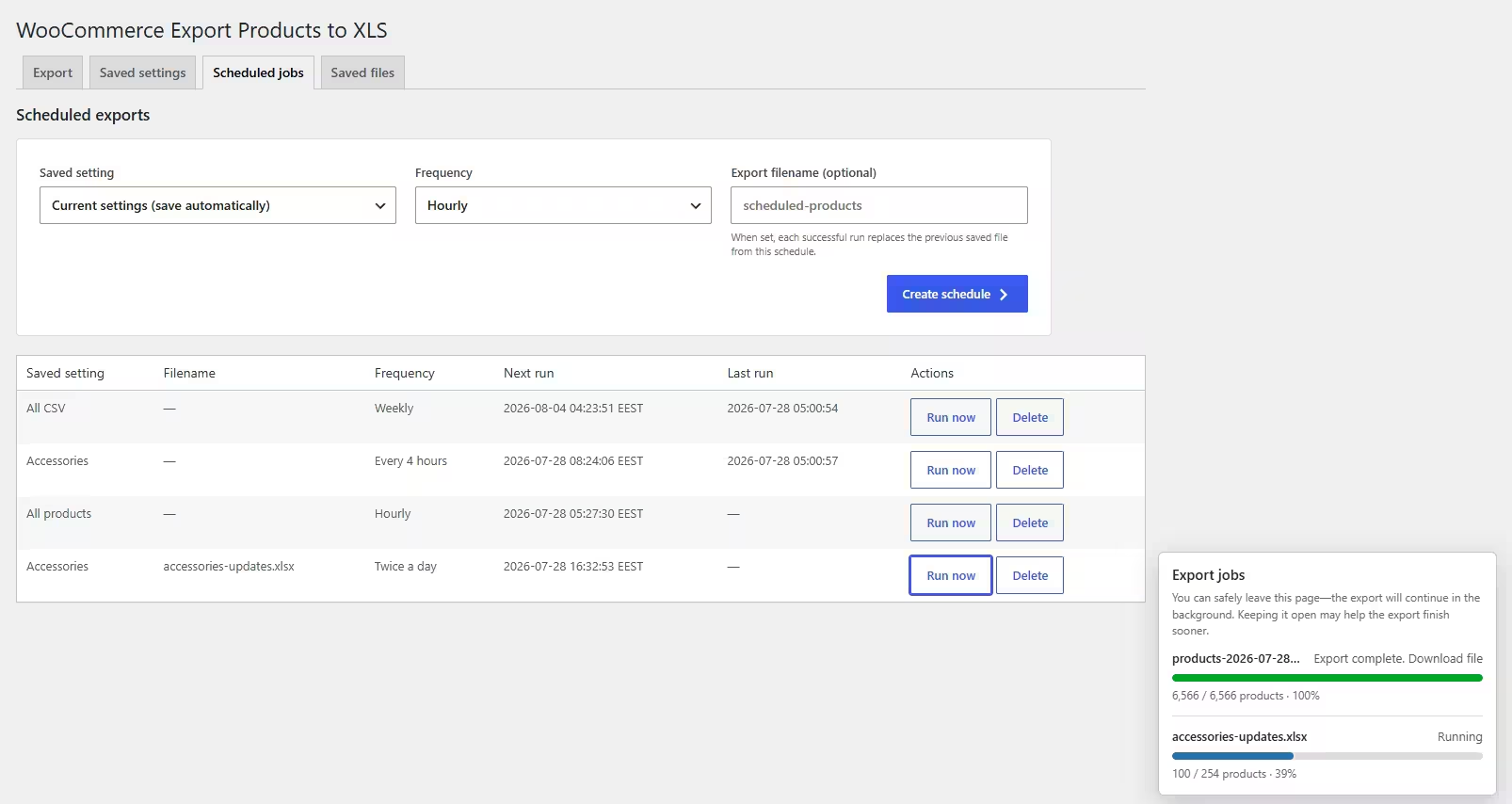
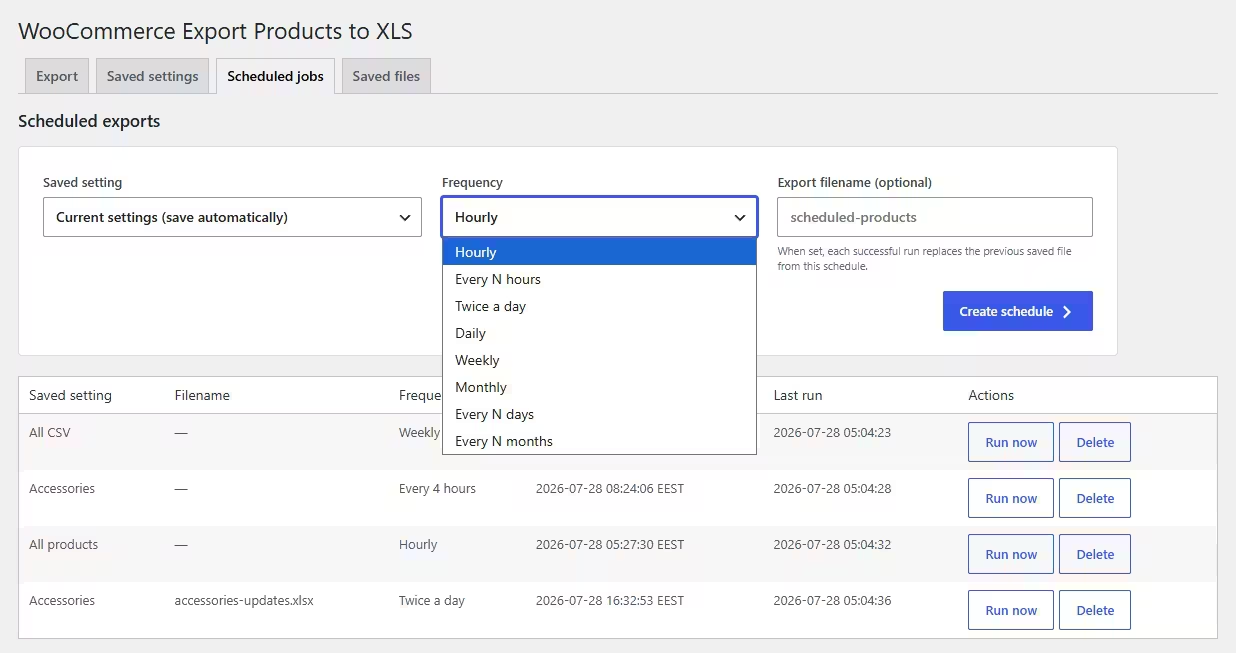
Create recurring exports from a saved template or an automatic snapshot of the current settings. The schedule table shows the next occurrence in the WordPress site’s configured local timezone.
| Frequency | Interval option |
|---|---|
| Hourly | Every hour. |
| Every N hours | Enter the number of hours. |
| Twice daily | Twice every day. |
| Daily | Every day. |
| Weekly | Every week. |
| Monthly | Every month. |
| Every N days | Enter the number of days. |
| Every N months | Enter the number of months. |
Export filename
The optional schedule filename gives recurring output a stable name. After a new run completes successfully, it replaces the previous successful saved file from that schedule. The previous file is kept until the replacement succeeds, preventing a failed run from removing the last good export.
Run now
Select Run now to force a scheduled export immediately without changing its next recurring run. Repeated Run now actions create distinct jobs. If one export is active, the others remain queued and run in order.
Deleting a schedule does not delete completed files.
Remove exports separately from Saved files when you no longer need them.
Saved files & sharing
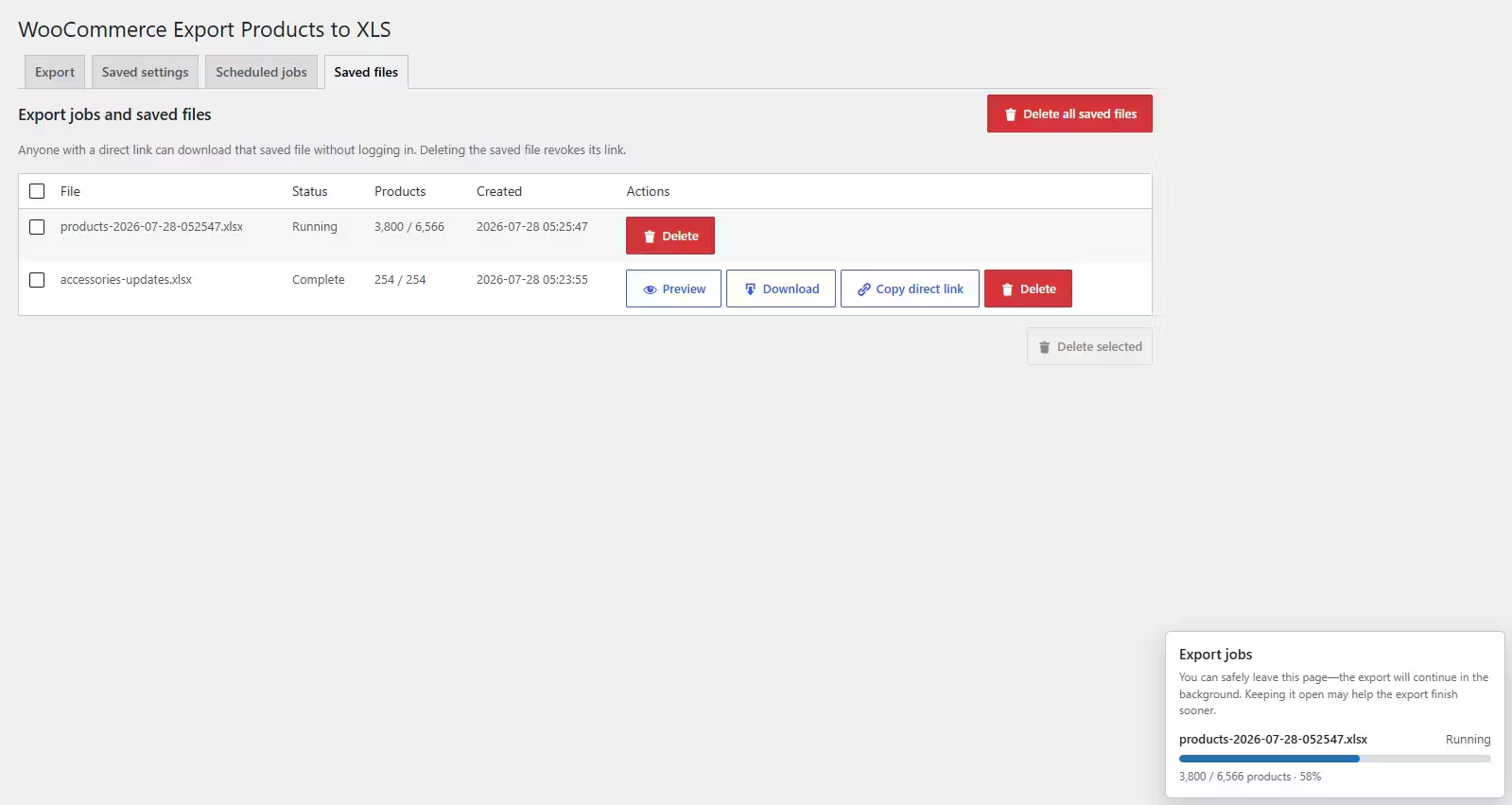
The Saved files tab lists export jobs, status, progress, filenames, dates, and available actions.
Preview
Opens a modal table without making the file public. Preview is limited to the first 100 rows and 30 columns, and long cells are shortened for a responsive administrator view.
Download
Downloads through an authenticated WordPress action after capability and nonce checks.
Copy direct link
Copies a bearer-token URL that can be downloaded remotely or shared without a WordPress login.
Delete
Select individual rows with checkboxes and delete only the selected files, or use the separate all-files action when appropriate.
Treat direct links like passwords.
Anyone who has a direct link can download that saved file without logging in. Deleting the saved file revokes its link. Scheduled files with a stable filename retain their direct URL when a successful run replaces the file.
Deleting a saved file removes its export record and stored file. This cannot be undone unless the file exists in a separate backup.
File formats
| Format | Best for | Notes |
|---|---|---|
| XLSX | Microsoft Excel, Google Sheets, most spreadsheet workflows | Recommended general-purpose format. |
| ODS | LibreOffice, OpenOffice, open-document workflows | Native OpenDocument spreadsheet output. |
| CSV | Imports, scripts, databases, simple interchange | One flat table with no workbook formatting. |
Spreadsheet library
Version 1.0.0 replaces the abandoned PHPExcel library with OpenSpout 4.32. OpenSpout is actively maintained, supports PHP 8.5, writes XLSX, ODS, and CSV, and uses a streaming architecture suitable for large product catalogs.
OpenSpout is the appropriate replacement.
It removes the legacy PHPExcel compatibility and maintenance risk while preserving efficient, low-memory export generation.
Security
Version 1.0.0 removes the legacy public export endpoint and adds layered controls around administration and file access.
- All management actions require the
manage_woocommercecapability. - All plugin tabs except License, including direct settings submissions and AJAX actions, require a locally valid EDD license status.
- License activation, deactivation, and daily validation use HTTPS requests to
amazingwpplugins.com; the license key is never printed in full after activation. - State-changing administrator actions use WordPress nonces.
- Settings, identifiers, terms, filenames, formats, and intervals are allow-listed and sanitized.
- Generated spreadsheet cells are protected against formula injection.
- Saved exports live in a protected uploads subdirectory with randomized internal filenames.
- Normal downloads are authenticated; optional direct links require a high-entropy bearer token.
- The former
xls.phpgenerator no longer performs exports and returns HTTP 410. - Admin JavaScript and CSS load only on this plugin’s own administration pages.
Server configuration still matters.
Keep WordPress, WooCommerce, PHP, and all extensions updated. Ensure the uploads directory is not executable and use HTTPS whenever direct download links leave the local network.
Developer hooks
Filters retain legacy compatibility where practical and add richer context for new integrations.
| Filter | Arguments | Purpose |
|---|---|---|
wooxls_export_fields | $fields | Add, remove, or rename field choices. |
wooxls_exportfields_filter | $fields | Legacy alias applied before wooxls_export_fields. |
wooxls_product_query_args | $args, $settings | Modify the batched product query. |
wooxls_product_count_query_args | $args, $settings, $post_type | Modify product or variation count queries. |
wooxls_product_data_filter | $data, $product_id | Change the associative data map before selected columns are extracted. |
wooxls_product_row | $values, $product, $selected | Change the final ordered row for a product. |
wooxls_value_filter | $value | Filter each cell immediately before serialization and formula-safety processing. |
Add a custom column
add_filter( 'wooxls_export_fields', function ( array $fields ): array {
	$fields['warehouse_code'] = 'Warehouse code';
	return $fields;
} );

add_filter( 'wooxls_product_data_filter', function ( array $data, int $product_id ): array {
	$data['warehouse_code'] = (string) get_post_meta( $product_id, '_warehouse_code', true );
	return $data;
}, 10, 2 );
Restrict export queries
add_filter( 'wooxls_product_query_args', function ( array $args, array $settings ): array {
	$args['date_query'] = [
		[ 'after' => '2026-01-01', 'inclusive' => true ],
	];
	return $args;
}, 10, 2 );
Keep count and export queries consistent.
If a query customization changes which products are exported, apply equivalent logic to wooxls_product_count_query_args so the live count and progress total remain accurate.
Troubleshooting
| Symptom | What to check |
|---|---|
| Export stays running or queued | Confirm WP-Cron can run, loopback requests are allowed, and Action Scheduler is healthy under WooCommerce → Status → Scheduled Actions. Keep the plugin page open temporarily to request immediate batches. |
| Plugin tabs are locked | Open the License tab and activate a valid key for “WooCommerce Export Products to XLS.” Confirm the server can make outbound HTTPS requests to amazingwpplugins.com. |
| Only one of several exports runs | New jobs should remain queued while the active job completes. Refresh Saved files and verify each click created a separate row. Check PHP and Action Scheduler logs for worker-lock or storage errors. |
| Product count looks wrong | Wait for the throttled request to finish, confirm product/variation exclusions, and review taxonomy relationships. Custom query filters must also modify the count query. |
| Spreadsheet cannot be generated | Confirm the PHP extensions listed under Requirements and that vendor/autoload.php exists in the installed plugin. |
| Saved file cannot be opened | Verify uploads is writable and the export completed. A partial running file is not available for normal download. |
| Direct link returns an error | The file may have been deleted, its token revoked, or the URL copied incompletely. Create/copy a new link from Saved files. |
| ACF media field is empty | Confirm the attachment still exists and its URL resolves. The exporter supports ID, array, and URL return formats. |
| Schedule runs late | WordPress scheduling is traffic-driven unless the server calls wp-cron.php. Configure a real server cron for reliable timing on low-traffic sites. |
Useful diagnostics
- Enable WordPress debug logging on a staging site and inspect
wp-content/debug.log. - Review failed or pending Action Scheduler entries in WooCommerce Status.
- Confirm the site URL and WordPress URL use the correct HTTPS hostname.
- Check PHP memory, execution-time, disk-space, and uploads permissions.
- Temporarily test with a small product selection and the default XLSX fields.
Frequently asked questions
Can I leave the page while an export is running?
Yes. Background processing continues through Action Scheduler or WP-Cron. Keeping a plugin page open can make it finish faster because the browser asks for the next batch immediately.
Why can I only open the License tab?
The plugin does not have a valid active license for this site. Activate the key on the License tab; successful activation immediately unlocks Export, Saved settings, Scheduled jobs, and Saved files.
Can more than one export be requested?
Yes. Every request creates an independent job. One worker processes jobs in FIFO order, so the current export continues and later jobs remain queued.
Which spreadsheet format should I use?
Use XLSX for general spreadsheet use, ODS for OpenDocument workflows, and CSV for imports or simple machine-readable interchange.
Are scheduled times shown in my browser timezone?
No. The Next run column uses the local timezone configured under WordPress General Settings.
Does a schedule filename overwrite a working file before completion?
No. The previous successful file remains available until the new run completes successfully, then the replacement occurs.
Can another server download an export?
Yes. Copy the direct link from Saved files. It is a bearer URL that requires no login, so share and store it securely.
How do I revoke a direct link?
Delete the associated saved file. This removes the file and invalidates its direct URL.
Do ACF galleries export attachment IDs?
No. Gallery items export as comma-separated full image URLs. Image and File fields also export URLs regardless of their configured return format.
Will old saved templates still work?
Version 1.0.0 migrates legacy current settings and saved templates during upgrade. Review important templates after upgrading before using them for recurring schedules.
Where are plugin scripts and styles loaded?
Only on the WooCommerce Export Products to XLS administration pages. They are not enqueued on storefront, editor, dashboard, or unrelated administrator screens.
Changelog
Release history from the initial 2014 version through the 1.0.0 modernization.
1.0.0 Modern background exports 2026
- Replaced abandoned PHPExcel with PHP 8.5-compatible OpenSpout.
- Removed the public export generator and public cached export files.
- Added capability and nonce checks to all export actions.
- Added CSV formula-injection protection and strict input sanitization.
- Rebuilt product extraction on WooCommerce CRUD APIs.
- Added resumable background jobs with immediate logged-in processing and WP-Cron fallback.
- Added XLSX, ODS, and CSV output.
- Added saved settings, migration of legacy templates, recurring schedules, and protected saved-file management.
- Added filtering by terms from every taxonomy assigned to products.
- Added type-aware ACF export values, including media URLs and structured repeater data.
- Added live filtered-product counts, nested taxonomy checkboxes, and optional shortcode execution.
- Added persistent running-job progress notifications for logged-in export managers.
- Added custom every-N-hours scheduling and an aligned scheduled-export form.
- Added secure on-demand previews for saved files and bulk taxonomy-filter selection controls.
- Added a FIFO export worker so new jobs queue without interrupting the active export.
- Added checkbox selection and secure bulk deletion for saved export files.
- Migrated export batches and scheduled-export triggers to WooCommerce Action Scheduler with grouped actions, queue visibility, and a guarded WP-Cron fallback.
- Added scheduling from current settings with an automatic timestamped saved-setting snapshot.
- Added schedule-level filenames with safe replacement of the previous successful saved export.
- Added a secure Run now action for scheduled exports without changing their next recurrence.
- Serialized option-backed job-store writes so concurrent forced jobs and progress updates cannot erase queued exports.
- Added copyable bearer-token download links for remote access, including stable links across scheduled file replacements.
- Changed manual export creation to independent AJAX queue requests so repeated exports cannot be lost during navigation.
0.6.4 Saved templates January 22, 2023
- Feature: Added the option to save and load multiple settings as templates.
- Fix: “Save changes” URL set to the default plugin page after export.
0.6.3 ACF repeater support April 25, 2022
- Feature: Added support for ACF repeater field (first level).
0.6.2 Custom product meta March 14, 2022
- Feature: Added custom product meta support.
0.6.1 PHP 8 and categories March 6, 2022
- Fix: Added PHP 8 compatibility.
- Feature: Added option to export product by categories.
0.6.0 Taxonomies and query filters August 18, 2017
- Feature: Added generic support for all product taxonomies.
- Feature: Added filter on DB query.
- Feature: Added support for WooCommerce Prices By User Role by Festi-Team.
- Fix: Removed some deprecated WooCommerce function notices.
- Fix: Removed string-to-array conversion fatal error.
- Fix: In some cases, unpublished products were exported.
0.5.9 CSV, ACF, and filenames January 17, 2017
- Feature: Added the option to strip any HTML from the excerpt.
- Feature: Added the option to set a custom filename.
- Feature: Added price fields with or without tax.
- Feature: Added export to CSV support.
- Feature: Moved files into the uploads directory.
- Feature: Added Advanced Custom Fields support.
0.5.8 PHPExcel update May 24, 2016
- Updated the PHPExcel class.
- Added PHP 7 compatibility.
- Only published products are exported.
0.5.7 String cells October 22, 2015
- Set default cell type to string.
0.5.6 Brands and filters October 1, 2015
- Added WooCommerce Brands by proword support.
- Added one more filter on the XLS export.
0.5.5 Cell filters April 21, 2015
- Added filters on cell output.
0.5.4 Product links and Yoast fields April 17, 2015
- Added product URL/link field.
- Added Yoast Twitter and Google+ field support.
0.5.3 Product type exclusions April 15, 2015
- Added option to exclude simple and/or variable products.
0.5.2 Vendors and category paths April 14, 2015
- Added WC Vendors support.
- Added categories titles path column.
0.5.1 WordPress SEO March 22, 2015
- Added WordPress SEO by Yoast support.
0.5.0 Caching and batching March 18, 2015
- Added caching option.
- Added version option.
- Added products-per-batch option.
- Fixed jQuery bug that prevented the plugin from continuing when skipping products.
0.4.0 AJAX exports March 2, 2015
- Changed the way XLS is produced with AJAX.
- Many UI/UX enhancements.
0.3.2 WPML February 11, 2015
- Added WPML support. Products can now export their language.
0.3.1 Maintenance November 8, 2014
- Minor bug fix.
0.3 Product tags November 6, 2014
- Added product tags.
0.2 Product images November 3, 2014
- Added option to export the full featured-image URL.
- Added option to export all product-gallery image URLs.
0.1 Initial release October 25, 2014
- Initial release.