


















Store your WordPress backups in Hetzner Storage Box directly from UpdraftPlus. Keep a separate cloud copy with organized folders and HTTPS transfers.
Hetzner Storage Box for UpdraftPlus adds Hetzner Storage Box to the familiar UpdraftPlus storage options, keeping a backup copy away from your WordPress server. Upload archives to your own storage account directly from the dashboard, using HTTPS WebDAV.
Install the add-on alongside UpdraftPlus, connect your Hetzner Storage Box account and choose a folder for this site. Run manual or scheduled backups, organise archives with date tags, and retrieve remote files through UpdraftPlus when you need to restore.
The plugin is free to download with an account at amazingwpplugins.com. You also need UpdraftPlus and your own Hetzner Storage Box account. It runs on compatible ordinary WordPress hosting without extra server software, and cleans up empty generated folders after remote deletion.
Get it Now!
Get Hetzner Storage Box for UpdraftPlus… it”s FREE
You will need to create an account with us
Getting started
- Install and activate UpdraftPlus and this add-on.
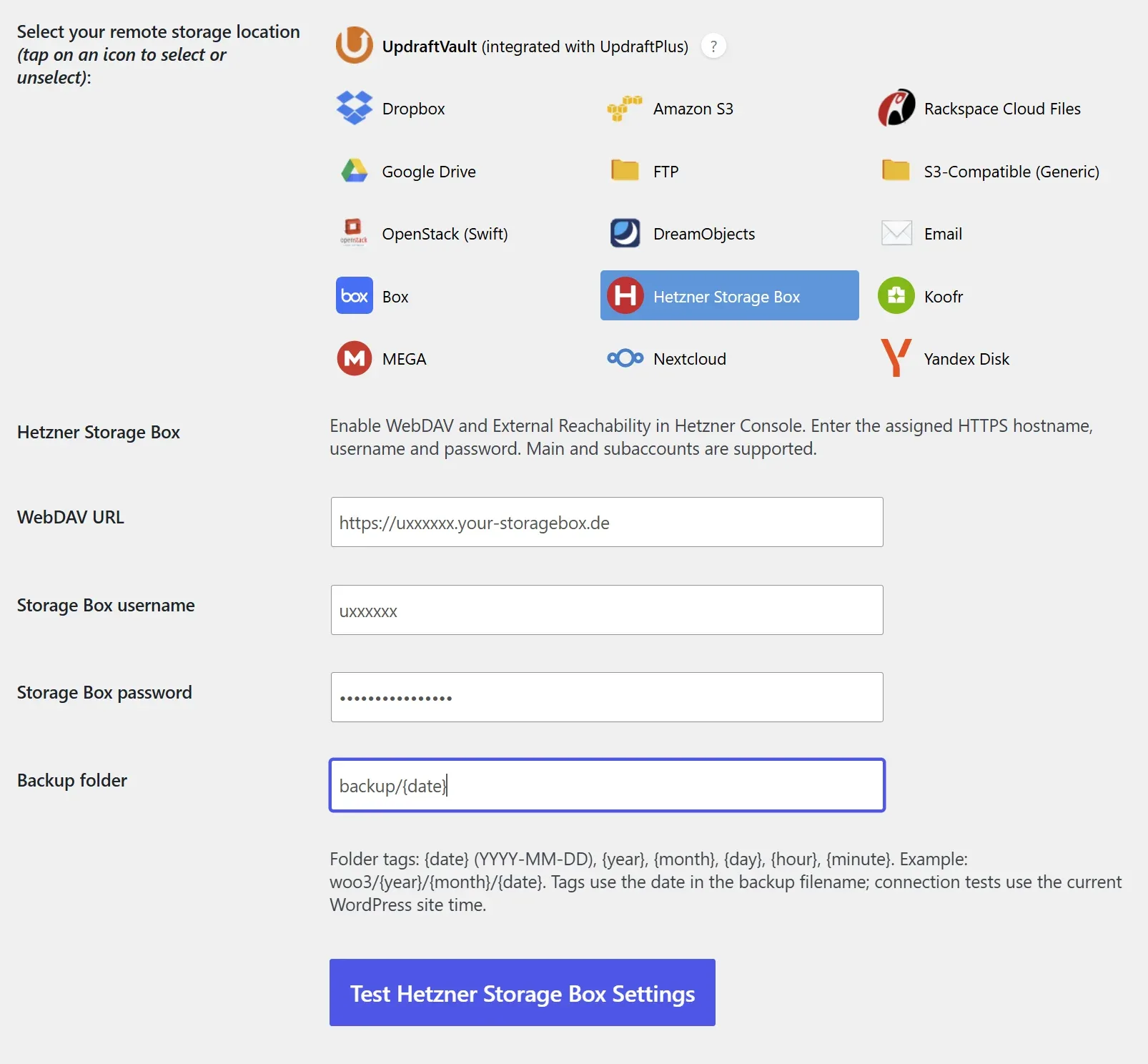
- Open Settings > UpdraftPlus Backups > Settings and select Hetzner Storage Box.
- In Hetzner Console enable WebDAV and External Reachability for your Storage Box. Enter the assigned HTTPS hostname, such as https://u12345.your-storagebox.de/, and your main-user or subaccount credentials. Choose a separate backup folder for this website.
- Choose a folder such as Backups/example.com/{year}/{month}/{date}.
- Click Test Hetzner Storage Box Settings. The test uploads, downloads and compares a random file, then deletes it.
- Save settings after a successful test. Run a small backup and wait for remote completion.
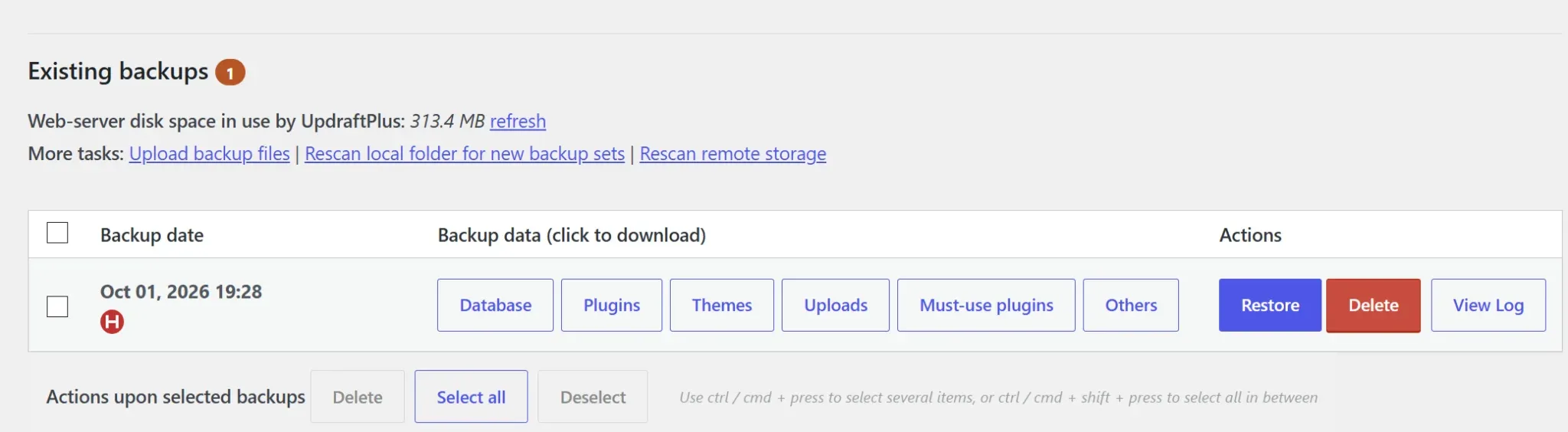
- Test a restore on a separate installation before relying on schedules. Use Existing backups > Delete to remove backups, including remote files when offered.
Account and hosting notes
A Hetzner Storage Box with WebDAV enabled is required. Main users and subaccounts use their assigned your-storagebox.de hostname. This is for Storage Box, not Hetzner Object Storage or Storage Share.
Archives stream directly from disk. Interrupted files start again on retry. Storage quotas, permissions and hosting execution limits apply. A subaccount can restrict access to a dedicated backup directory.
Key features
- Native storage option and icon in UpdraftPlus.
- Manual and scheduled remote backups.
- Streamed transfers for ordinary compatible WordPress hosting.
- Date-based folders, remote rescanning, restore downloads and retention deletion.
- Empty generated folder cleanup.
FAQ
Is the plugin free?
Yes. Download it free with an amazingwpplugins.com account. You also need your own Hetzner Storage Box account; storage-provider charges and limits are separate.
Do I need UpdraftPlus Premium?
No. The add-on works with UpdraftPlus Free. UpdraftPlus restrictions on selecting multiple destinations still apply.
How do I connect my account?
In Hetzner Console enable WebDAV and External Reachability for your Storage Box. Enter the assigned HTTPS hostname, such as https://u12345.your-storagebox.de/, and your main-user or subaccount credentials. Choose a separate backup folder for this website.
Are there any account requirements?
A Hetzner Storage Box with WebDAV enabled is required. Main users and subaccounts use their assigned your-storagebox.de hostname. This is for Storage Box, not Hetzner Object Storage or Storage Share.
Does it need extra server software?
No gateway or command-line software is required. The host needs 64-bit PHP with cURL and SimpleXML and outbound HTTPS access.
Can I use dated backup folders?
Yes. Use {date}, {year}, {month}, {day}, {hour} and {minute}. Example: Backups/example.com/{year}/{month}/{date}. Retries use the archive date.
What happens when a backup is deleted?
Remote deletion removes the selected backup files. Empty generated folders are cleaned up afterwards; fixed parent folders and nonempty folders are preserved.
Can I restore from remote storage?
Yes. Use Restore in UpdraftPlus and choose the components to recover. Test a restore on a separate site before relying on scheduled backups.
Are transfers encrypted?
Uses standard HTTPS WebDAV. It does not add client-side backup encryption; HTTPS protects the connection.
Why is a backup retrying?
Archives stream directly from disk. Interrupted files start again on retry. Storage quotas, permissions and hosting execution limits apply. A subaccount can restrict access to a dedicated backup directory. Check the UpdraftPlus log for the actual reason.
Is this an official integration?
No. This is independent software from Amazing WP Plugins, not affiliated with or endorsed by Hetzner Storage Box or TeamUpdraft.
More Amazing WP Plugins
Mega.io for UpdraftPlus
Store UpdraftPlus backups in MEGA with encrypted transfers, date-based folders and restore downloads. Free plugin; Amazing WP Plugins account required.
Koofr for UpdraftPlus
Store UpdraftPlus backups in Koofr with date folders and restore downloads. Free plugin; Amazing WP Plugins account required.

Cart to Quote Request for WooCommerce
Cart To Quote for WooCommerce is a WordPress plugin that allow you to send custom offers and quotes and your customers to request a quote for their selected products.
Box.com for UpdraftPlus
Store UpdraftPlus backups in Box with date folders and restore downloads. Free plugin; Amazing WP Plugins account required.