












OFFICIAL PLUGIN GUIDE
Marketplace-ready product feeds, without rigid exports.
Grow your list, design emails with a drag-and-drop builder, automate post-purchase follow-ups, and track the revenue every campaign earns — all inside WordPress, with native WooCommerce and Easy Digital Downloads support.
Version 2.4.0
WordPress 5.8+
PHP 7.4+
WooCommerce & EDD ready
Welcome
Amazing WordPress Newsletters is an easy-to-use but also advanced Newsletter plugin for WordPress, with dozens of customization options.
Requirements
| Component | Requirement |
|---|---|
| WordPress | 5.8 or newer |
| PHP | 7.2 or newer (7.4+ recommended) |
| WooCommerce | Optional — required only for store opt-ins, product targeting and revenue attribution |
| Easy Digital Downloads | Optional — required only for EDD opt-ins and download targeting |
| Sending | WP-Cron or a real server cron must be able to run the background sending queue |
| Encryption | PHP OpenSSL (used to store SMTP/API secrets encrypted with AES-256-GCM) |
The plugin works as a standalone newsletter tool without a store. WooCommerce and EDD unlock the commerce features (checkout & registration opt-ins, purchase-based targeting, post-purchase automations, and revenue reporting).
Installation and upgrade
- Upload the plugin ZIP through Plugins → Add New Plugin → Upload Plugin, then activate it. Activation creates the database tables and schedules the sending cron.
- Open Newsletters → Settings and set your sender name and address, sending rate, and delivery method.
- Open Newsletters → License and activate your license key to receive automatic updates.
- Create your first list under Newsletters → Lists & Tags, then build a campaign under Newsletters → Campaigns.
Reliable background sending
For low-traffic sites, disable WP-Cron and run a real cron job so mail keeps sending with no browser open:define( 'DISABLE_WP_CRON', true ); then schedule * * * * * wget -q -O - https://your-site.com/wp-cron.php?doing_wp_cron >/dev/null 2>&1
Upgrades are backward-compatible: existing lists, campaigns, templates, forms, and settings are preserved. Always back up before upgrading a production site.
License and updates
Go to Newsletters → License, enter the license key supplied by Amazing WP Plugins, and select Activate License. The page shows the activation state, expiry/renewal details, and update controls. A valid license enables one-click automatic updates from the Plugins screen.
Manual update checks
Use Check for updates to refresh update information immediately. A valid license is required to download licensed releases.
Automatic updates
Toggle automatic updates on the license page or the Plugins screen. The preference stays in sync with WordPress.
License and update requests include only the license key, site URL, product title, and update metadata. No subscriber, campaign, or order data is transmitted.
Quick start
- Create a list (e.g. “Newsletter”) under Lists & Tags, and add or import a few subscribers.
- Under Settings → Delivery, choose how mail is sent (WordPress, SMTP, Amazon SES, or a provider pool) and set your from-name/from-email.
- Create a campaign, write a subject, and design the body in the drag-and-drop builder — or start from the Template Gallery.
- Pick the audience: everyone, a specific list/segment, or (with a store) buyers of chosen products.
- Run the pre-send checklist and Spam score check, send yourself a test email, then Send or Schedule.
- Watch progress update live on the Campaigns list, then review opens, clicks and revenue in Reports.
Everything is where you expect itAll features live under the single Newsletters menu in wp-admin. Settings are grouped into tabs, and the plugin loads its admin assets only on its own screens.
Dashboard
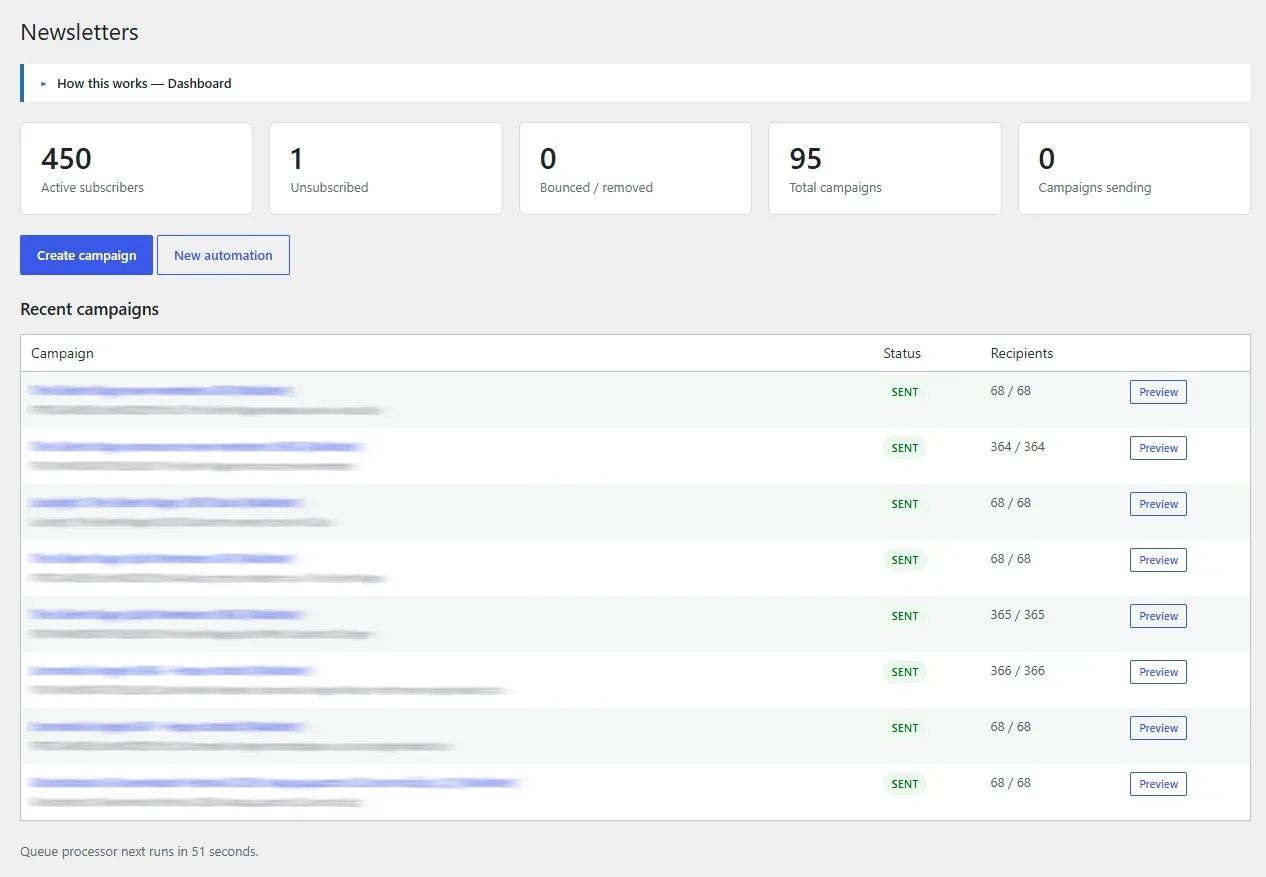
The dashboard summarizes your account at a glance: active subscribers, unsubscribed and bounced counts, total campaigns, campaigns currently sending, and — with a store connected — attributed revenue. An In progress table shows any sending campaigns with a live progress bar.
The drag-and-drop email builder
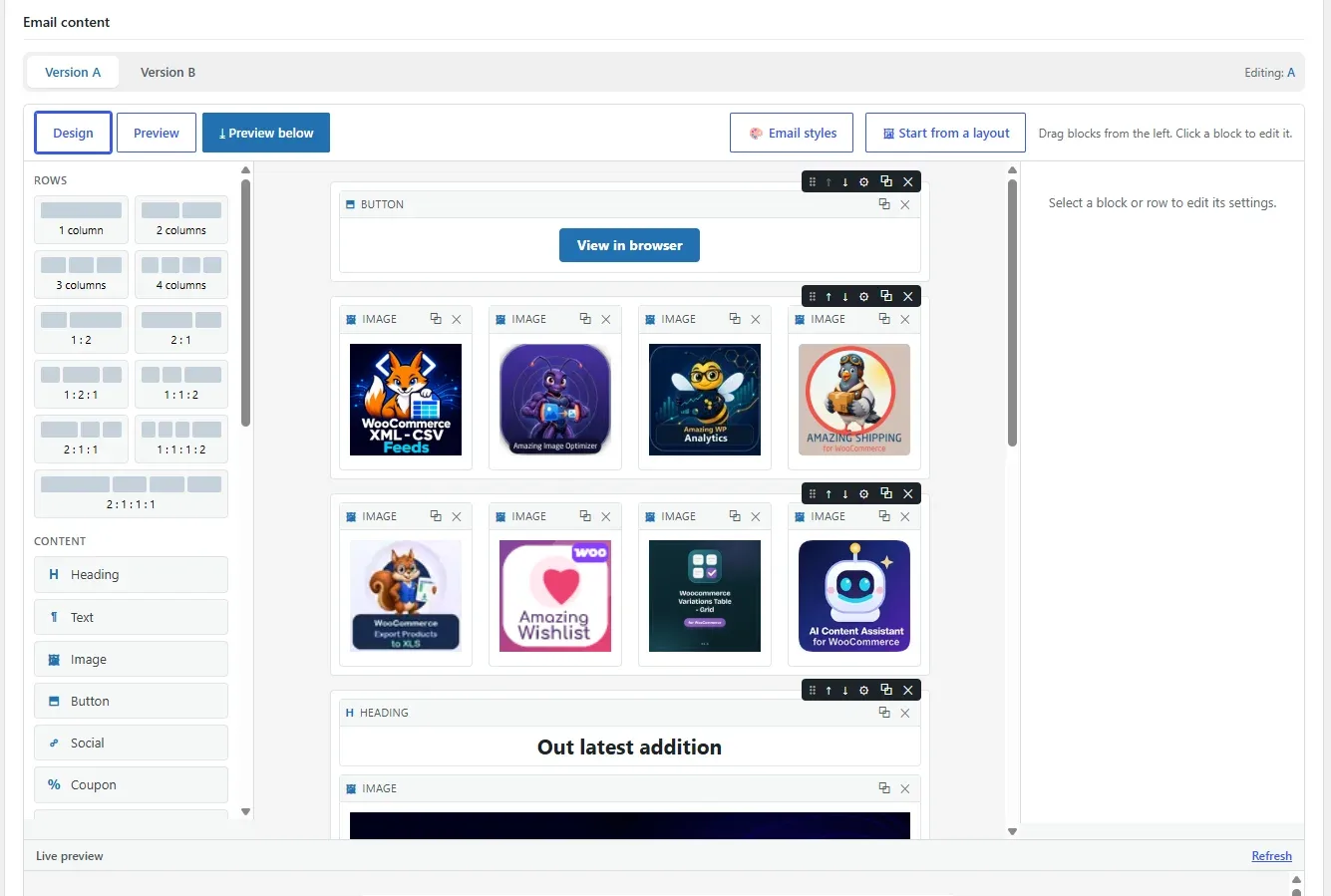
Design email-safe, mobile-ready messages visually — no HTML required. The builder produces bulletproof table markup that renders across major email clients.
Rows & columns
Drag layouts onto the canvas (1, 2, 3 or 4 columns, plus proportional layouts like 2:1:1). Reorder rows with the grip or the move buttons.
Blocks
Heading, Text, Rich Text (a WYSIWYG editor), Image, Button, Divider, Spacer, Social / Icons, Dynamic Posts/Products, Coupon, Countdown, Merge tag, and raw HTML.
Per-block styling
Colors, fonts, sizes, alignment, button size & background, image width in px or %, and line-height — set globally or per block.
Reusable saved layouts
Save any design — or a single row — as a reusable layout with Save as layout, then insert it into other campaigns or templates from the Saved layouts panel. Inserted layouts are a decoupled copy: they are not bound to the campaign’s template. You can append or replace, and rename or delete saved layouts.
Social & contact icons
The Social / Icons block includes SVG icons for popular networks (Facebook, Instagram, X, LinkedIn, YouTube, TikTok, Pinterest, WhatsApp, Telegram) plus phone, email and website. Lay them out horizontally or as a vertical list, in brand colors, a solid chip, or a single color, with adjustable size and optional text labels.
Icon rendering across email clientsIcons are inline SVG, which render in Apple Mail and iOS Mail (and the builder preview). Gmail, Outlook and some webmail clients strip inline SVG — if universal rendering matters, use image blocks for social icons instead.
Template gallery
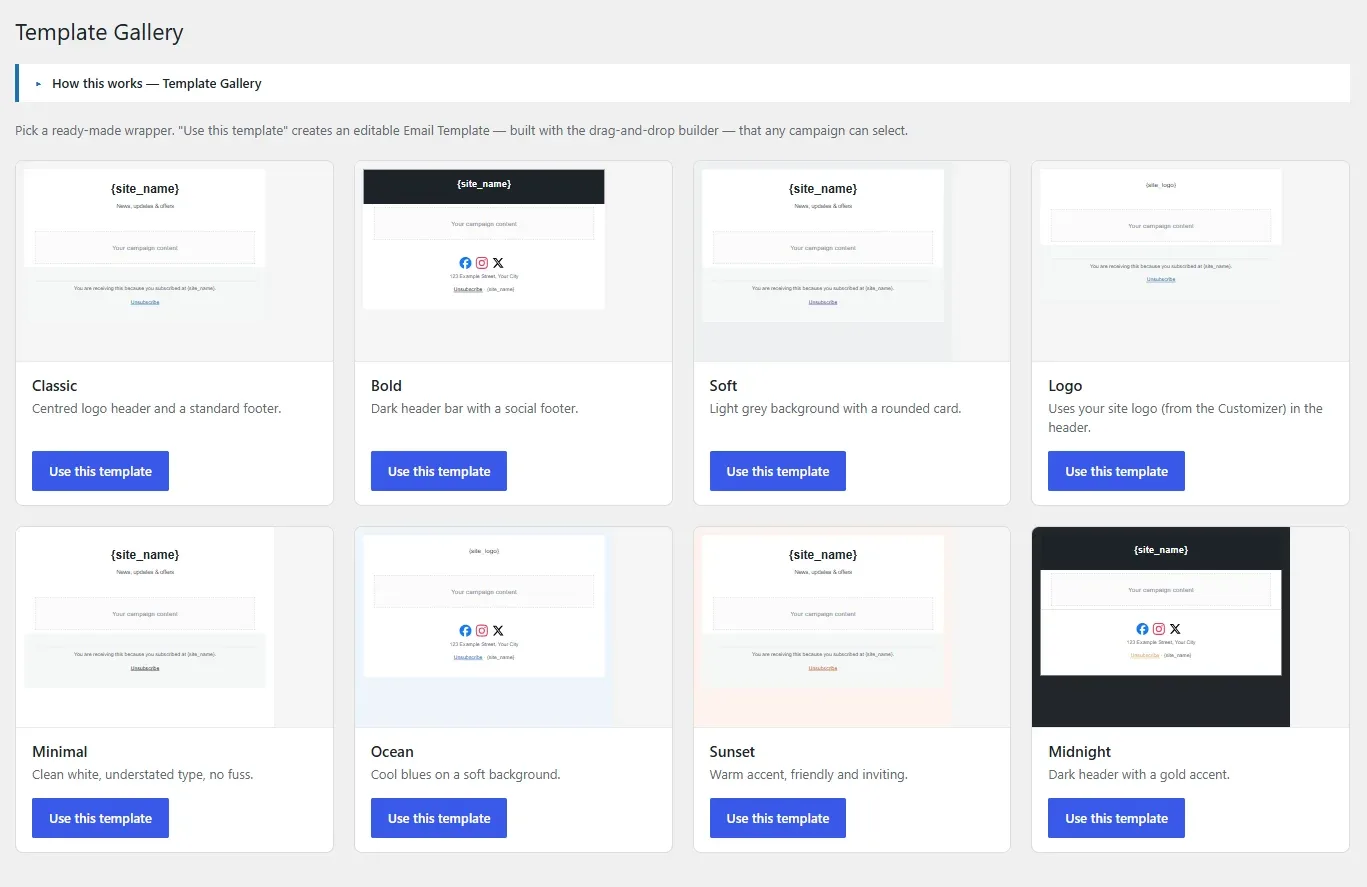
The Template Gallery provides ready-made, professionally styled email designs and wrappers (Logo, Minimal, Ocean, Sunset, Midnight, and more). Pick a starting point, then customize it in the builder. Applying a gallery design gives you a complete, editable layout in one click.
Email templates, headers & footers
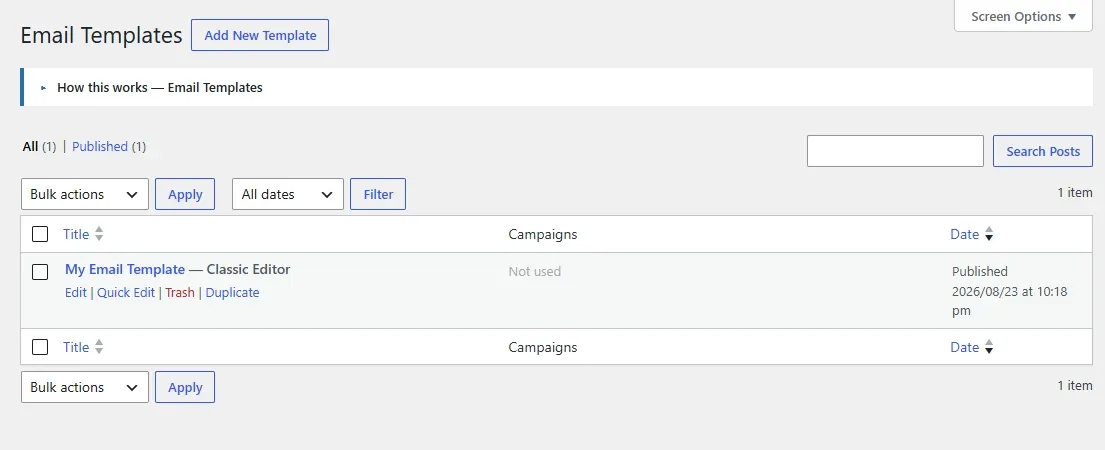
Reusable Email Templates define the wrapper (colors, fonts, container width, accent) shared by many campaigns. Headers & Footers are reusable partials — a logo header, an address/social footer — that can be inserted into templates and campaigns. The default template, header and footer are flagged in their list screens.
Email Templates
Set base styles once and apply them across campaigns. Per-block overrides still work on top of the template.
Headers & Footers
Build once, reuse everywhere. The pre-send checklist scans partials to confirm an unsubscribe link is present.
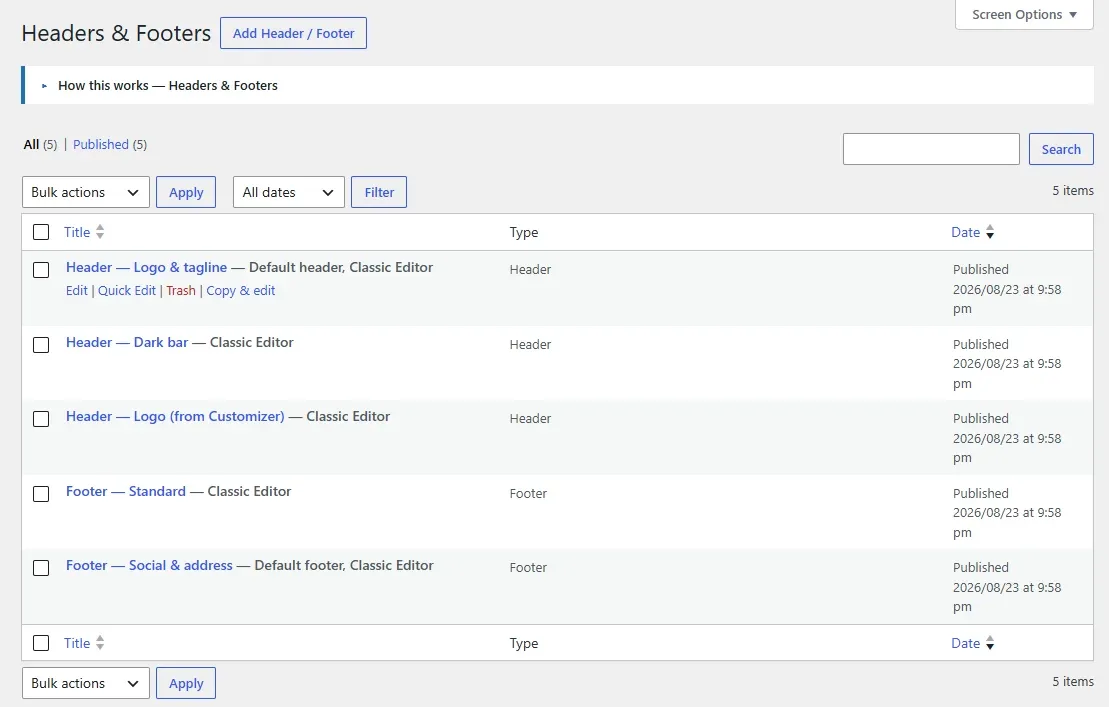
The Email Templates and Headers & Footers lists are native WordPress screens, so they include search, pagination, and a per-page Screen Options control.
Merge tags & personalization
Insert merge tags anywhere in a subject or body — including inside a link URL — and they are replaced at send time with each subscriber’s data. A Merge tags panel in the campaign editor lists every available tag; click one to copy it. The builder’s live preview renders tags with sample values so you can see the result while editing.
Subscriber & site
{first_name}{name}{email}{site_name}{site_url}{site_logo}{site_logo_url}
Links
{unsubscribe_url}{preferences_url}{view_in_browser_url}
Commerce (WooCommerce / EDD)
{last_order_number}{last_order_date}{last_order_total}{last_products}{last_products_list}{cart_items}{cart_total}{cart_url}
Merge tags survive link sanitising
A tag placed in a button or image URL (for example {view_in_browser_url}) is preserved intact and replaced at send time, not stripped.
Campaigns
Create a campaign, choose its template, write the subject and preheader, and design the body. Target everyone, one or more lists, a segment, or — with a store — customers who purchased specific products. Send now, or schedule for a future date and time.
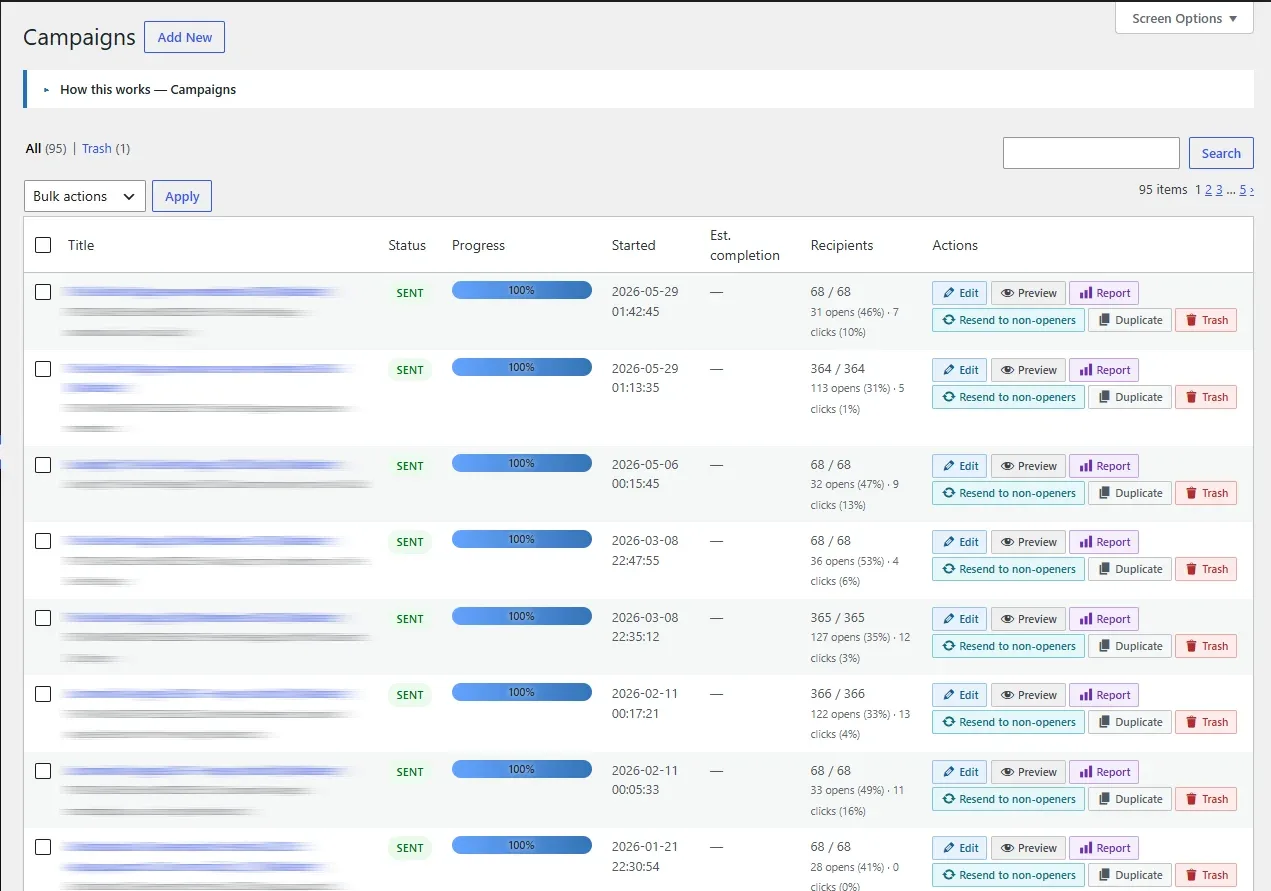
The campaign list
The Campaigns list has search and pagination (default 20 per page, adjustable via Screen Options), color-coded action buttons, and a Trash view. While a campaign is sending, its progress bar, status, recipient counts, opens/clicks, estimated completion and row actions update live via AJAX — no page refresh — and polling stops automatically once the send finishes.
The campaign editor
The editor combines content, audience targeting, scheduling, the pre-send checklist, a Merge tags panel, a Spam score panel, and A/B controls in one screen. Send a test email (optionally through a specific delivery provider) and preview in the browser before sending. Duplicate any campaign in one click.
Live statistics & the sending lock
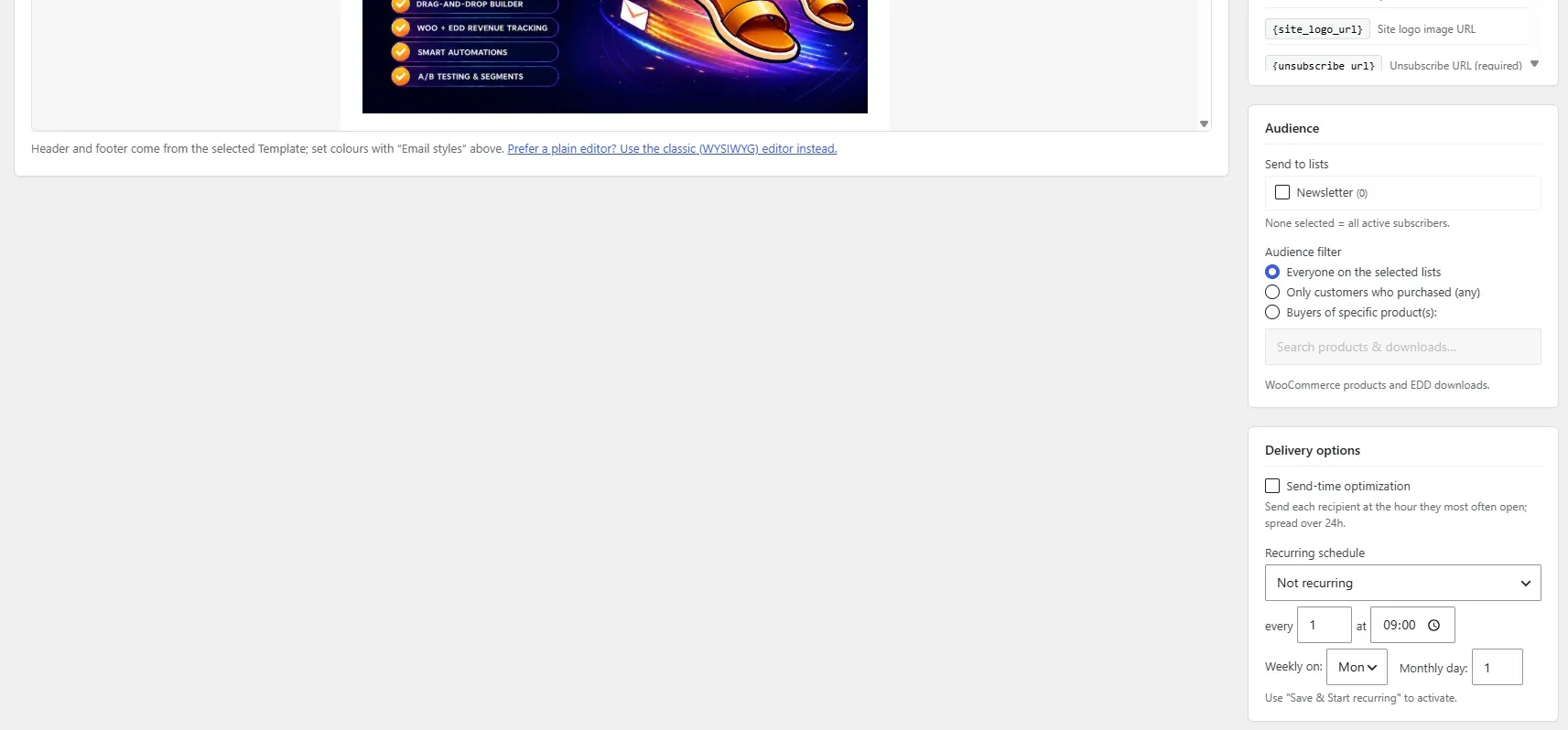
Once a campaign has started, a Live statistics panel appears above the email content — a slide-open panel showing sent, pending, opened (with open rate), clicked (with click rate), unsubscribed and failed, plus a progress bar. While the campaign is sending it refreshes automatically; the “Full report” link opens the detailed report.
While a campaign is actively sending, the editor is locked — its content and settings can’t be changed, since they’re already being mailed out. A banner reads “Pause the campaign to edit” with a one-click Pause campaign button; pause it, make your changes, then resume. The editor unlocks automatically once the campaign is paused or has finished.
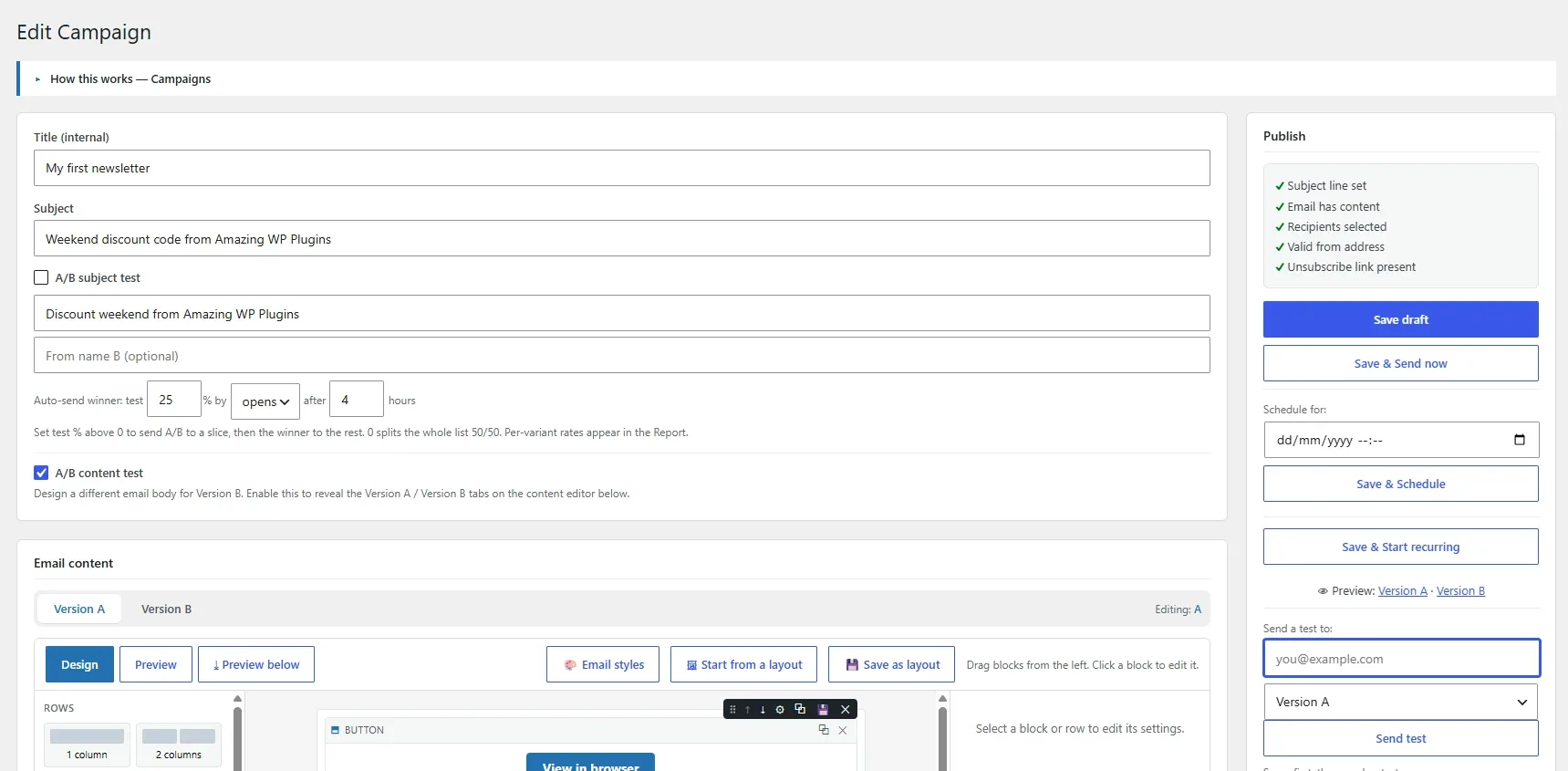
A/B testing
Test what actually converts. You can A/B the subject line, the from-name, or the entire email body (Version A / Version B tabs in the content editor). Choose the winning metric (opens or clicks) and a test window; the plugin sends the test slice, then automatically sends the winning variant to the remaining recipients.
Enable
Turn on subject, from-name, or content A/B per campaign.
Test
A percentage of recipients receives A or B; the rest are held.
Auto-send winner
After the wait window, the winner is sent to everyone held.
Inline (embedded) images
Embed images so they display without the recipient clicking “load images”. Enable it globally in Settings, or override per campaign (Default / On / Off). Only local Media Library images are embedded, and only on the WordPress / SMTP delivery path; the open-tracking pixel and remote images stay linked. Supported types include PNG, JPG, GIF, WebP and AVIF.
AVIF / WebP conversion
Many email clients — Outlook and some Gmail/Yahoo setups — don’t render AVIF or WebP. Turn on Convert AVIF/WebP images (Settings, or per campaign) and those local images are converted at send time to formats every client shows: PNG when the image has transparency, otherwise JPG. Converted copies are cached and reused, and only local Media Library images are converted (remote images are left as-is). Requires the Imagick PHP extension, or GD with AVIF/WebP support.
When to use it
Embedding improves first-open appearance but increases message size. For very image-heavy emails on API/SES delivery, linked images are used to avoid oversized messages.
Watch the size
Anything carried inside the message — embedded images and attachments — is base64-encoded, which adds about a third to its weight, and mail servers reject a single message over a fixed limit (Postfix defaults to 10 MB; hosted relays are commonly 20–25 MB). Choosing a large image in the builder shows an inline caution, and sending a test or the campaign warns you when the whole email — HTML + embedded images + attachments — is estimated to exceed the limit (default 20 MB), a common reason a heavy email “won’t send”. Resize/compress images (aim for well under 1 MB each), trim attachments, or turn image embedding off so images are linked instead. Set the limit to match your mail server via the amazing_nl_max_message_bytes filter.
Automations & workflows
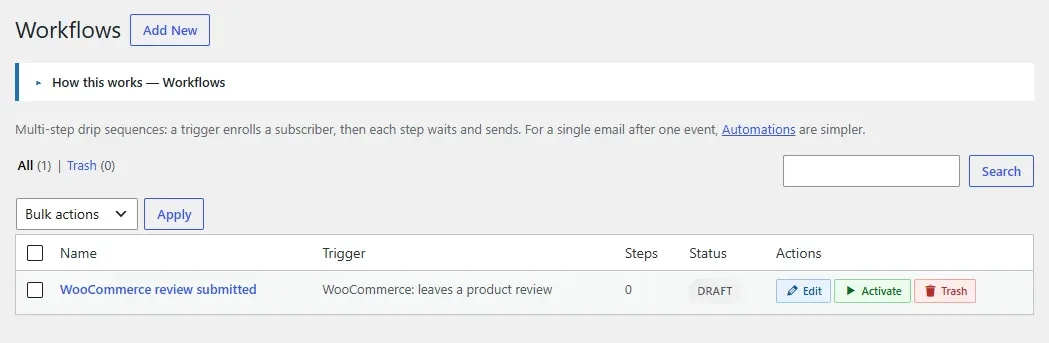
Workflows are multi-step automations: a trigger starts the workflow for a subscriber, then each step waits a delay and does something — sends an email, adds or removes a tag, adds or removes a list, unsubscribes, or branches with a condition step (“continue only if…”) that lets non-matching subscribers exit.
Automatic tagging & tag-triggered automations 2.0
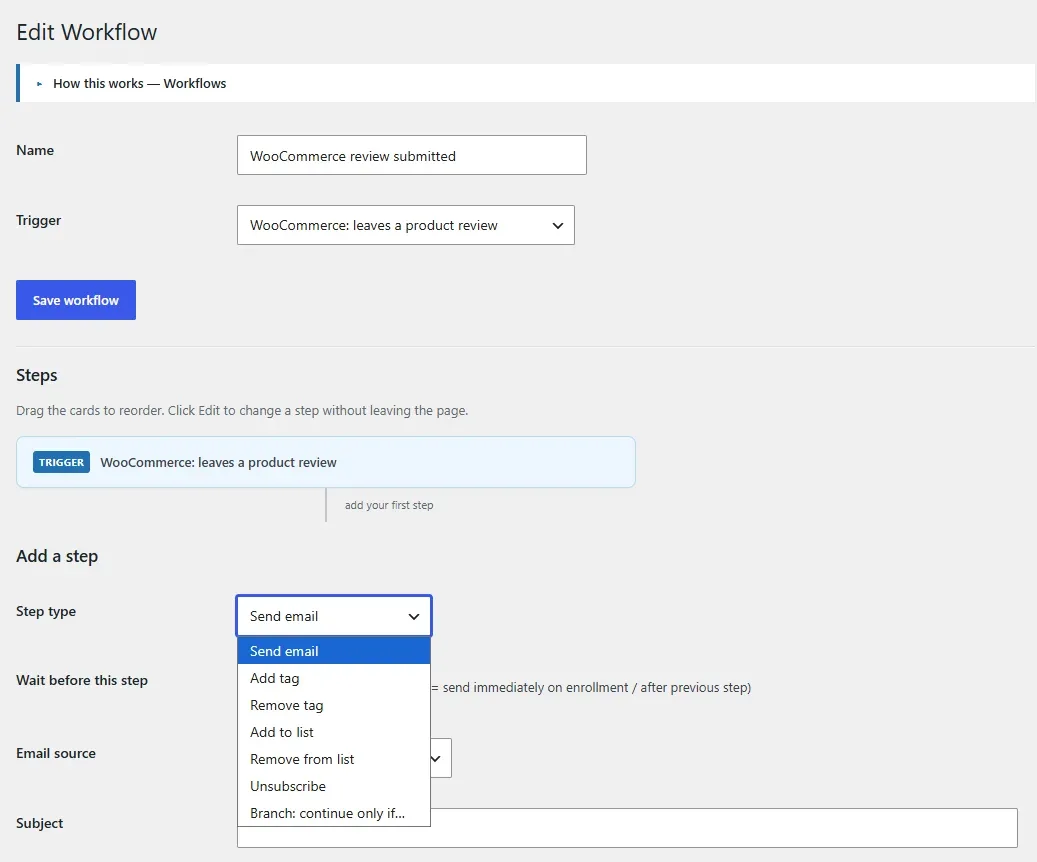
Two building blocks combine into a Mailchimp-style tagging system:
If a customer does X → tag them Y
Create a workflow with the trigger for X and a single Add tag step (0 delay = tag immediately). That’s your tagging rule.
When tagged Y → run automation Z
Use the When a tag is added trigger. The moment that tag lands on a subscriber — from a workflow, a CSV import, or a manual click — this workflow starts.
Because a tag added by one workflow can start another, you can chain automations together. A built-in safeguard stops runaway loops.
Triggers
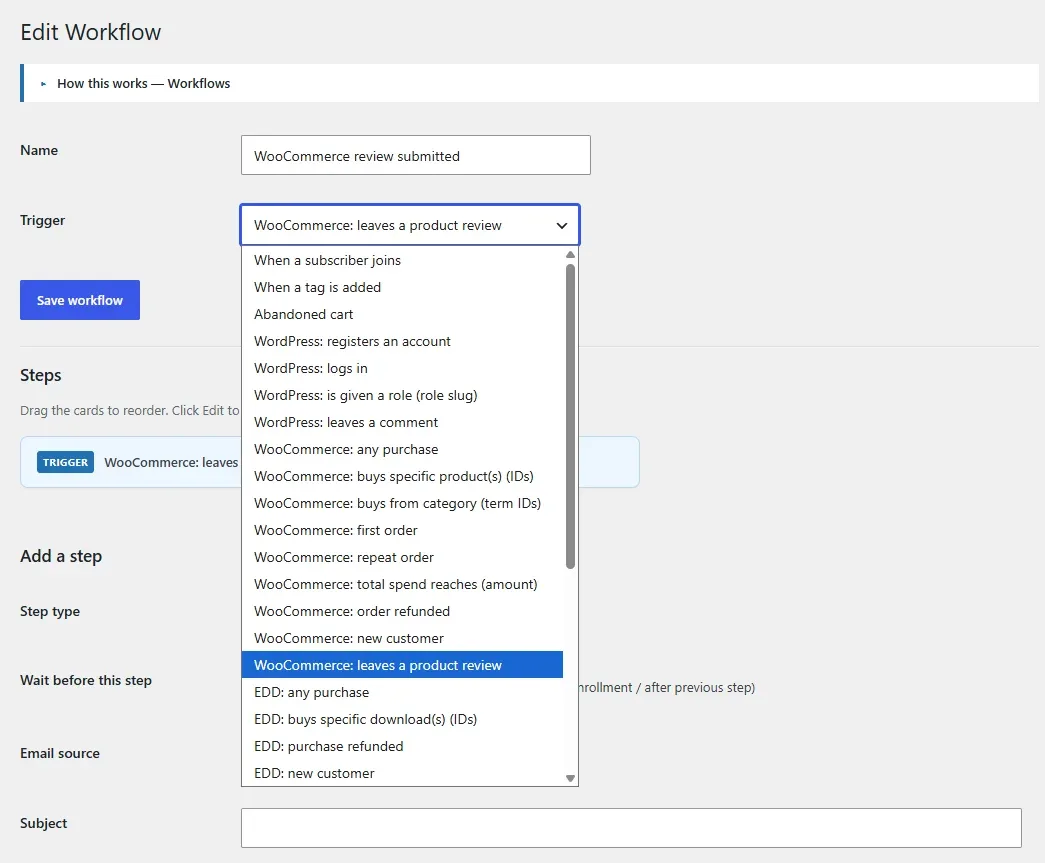
Pick a trigger when you create the workflow. Configurable triggers (product, category, download, plan, spend, role) reveal a searchable picker or field; the tag trigger reveals a tag picker.
| Source | Triggers |
|---|---|
| Subscriber | joins the list; a tag is added; abandoned cart |
| WordPress | registers an account; logs in; is given a role; leaves a comment |
| WooCommerce | any purchase; buys specific product(s); buys from a category; first order; repeat order; total spend reaches an amount; order refunded; new customer; leaves a product review |
| Easy Digital Downloads | any purchase; buys specific download(s); refunded; new customer |
| WooCommerce Subscriptions | created; active; on hold; cancelled; expired; renewal payment; payment failed; trial ended |
| WooCommerce Memberships | created; active; paused; cancelled; expired |
Subscribers are created automatically
When a store event matches a trigger for a customer who isn’t a subscriber yet, they’re added as a subscriber so your tagging and automations always apply.
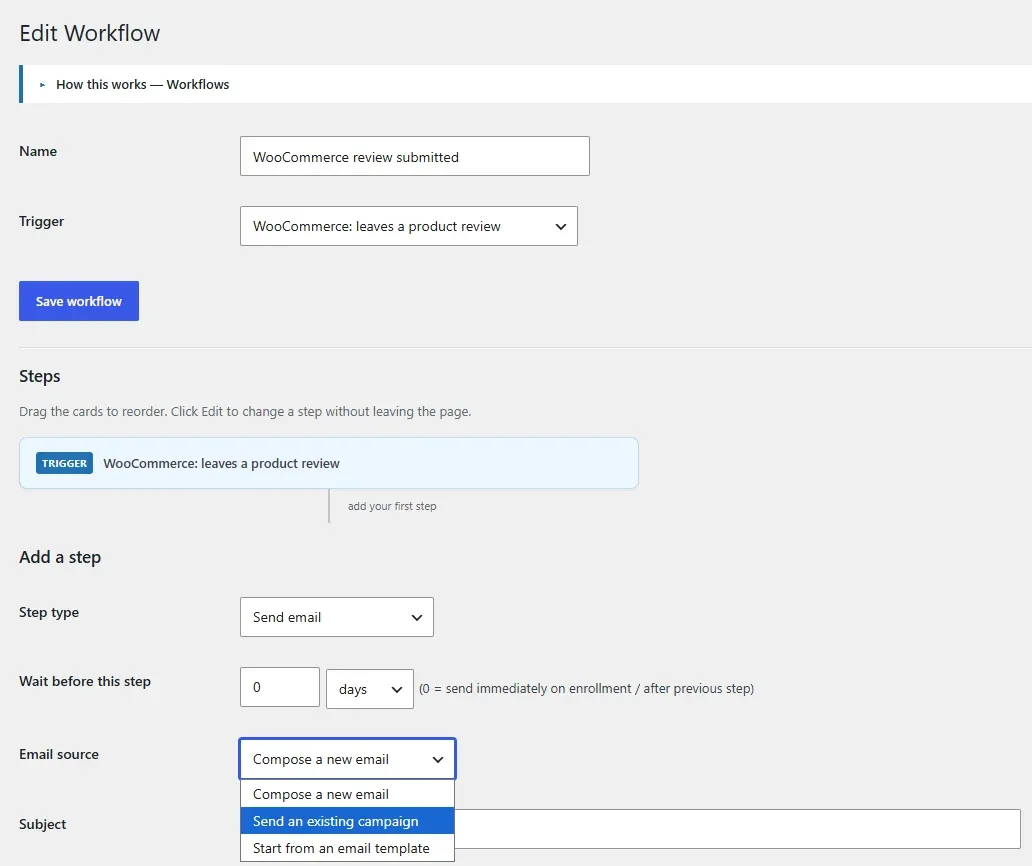
The “Send email” step
An email step can:
- Compose a new email — write the subject and content, optionally on a chosen template.
- Send an existing campaign — a snapshot of that campaign’s subject, content and design is copied into the step (later edits to the original don’t change the step).
- Start from an email template — the template’s design seeds the step; add a subject.
Automations vs. Workflows 2.0
Automations are the simple option: they send one email when a single event happens (after a delay).
Workflows are the multi-step engine above.
They share the same trigger system, so:
| Automations | Workflows | |
|---|---|---|
| Best for | One email after one event | Sequences, tagging, list changes, branching |
| Steps | A single email | Any number of steps, each with its own delay |
| Triggers | The full trigger catalog | The full trigger catalog |
| Screen | Newsletters → Automations | Newsletters → Workflows |
As of 2.0, Automations use the same expanded trigger catalog and searchable pickers as Workflows — so a single email can fire on a tag being added, a WordPress or membership event, a subscription change, or a richer WooCommerce/EDD event, not just after a purchase or signup. In the Automation editor, set the trigger and delay in the Automation panel (top of the sidebar); the email is queued once per subscriber when the trigger matches. Each list screen links to the other so you can pick the right tool.
Triggers that need a value
A few triggers can only match once you give them a value — the tag added trigger needs a tag, and the total spend reaches trigger needs an amount. If you try to activate an automation with one of these left blank, it’s kept as a draft with a reminder rather than activated but silently inert. (Product, category, plan, download and role triggers treat a blank value as “any”.)
Automatic post notifications can also email a chosen list whenever you publish a post — configured under Settings → Growth.
Developer note
The trigger list is filterable via amazing_nl_workflow_triggers; a tag attach/detach fires amazing_nl_tag_added / amazing_nl_tag_removed; and every store/site trigger also fires amazing_nl_event_trigger (trigger, email, name, context) for add-ons and Automations.
Tag rules 2.0
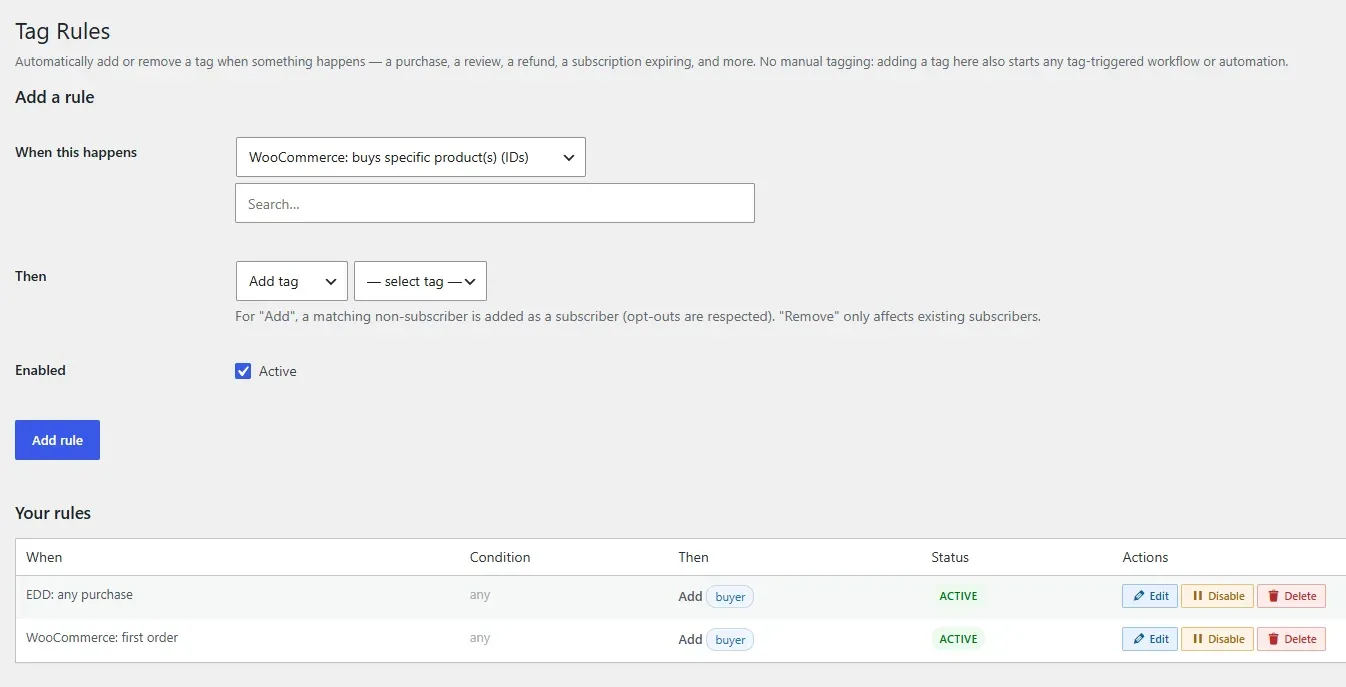
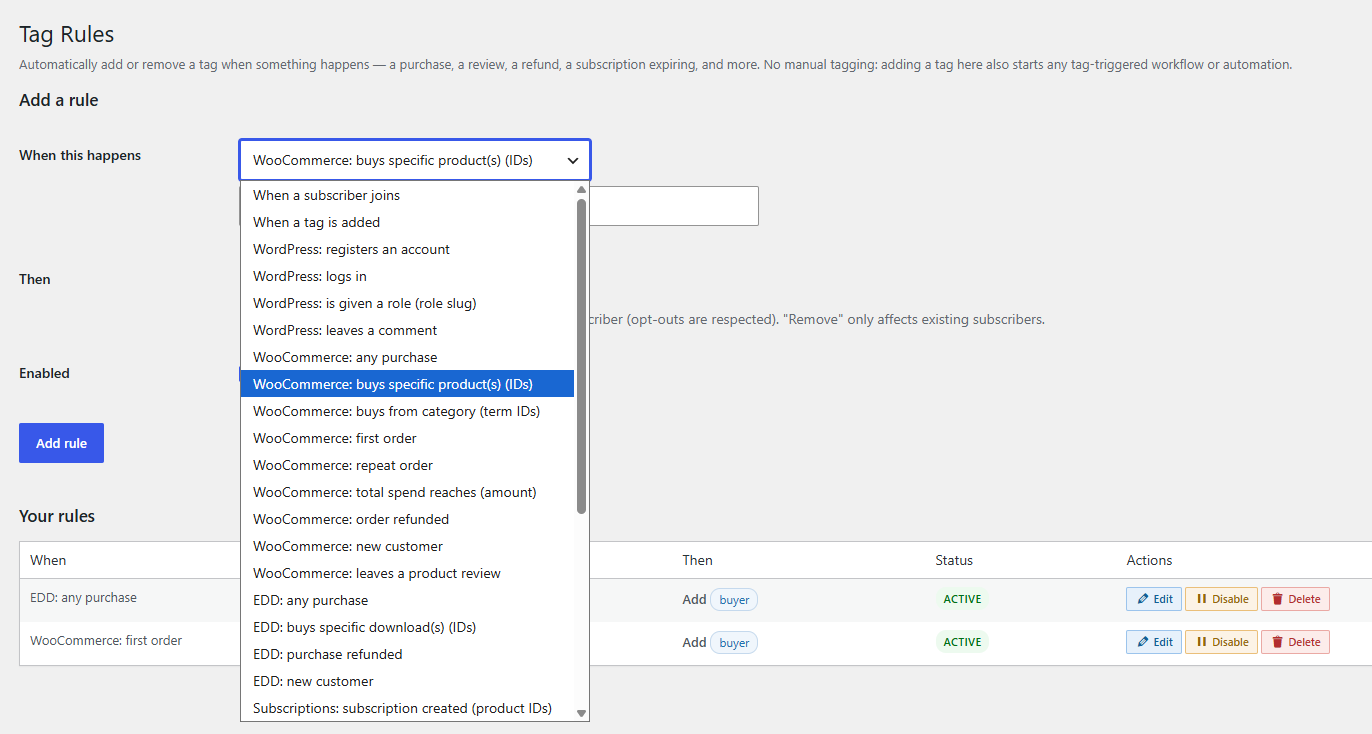
Automatically add or remove a tag when something happens — so you never have to tag subscribers by hand to drive your automations.
A tag rule reads: “When [event] (with an optional condition) → Add / Remove [tag].” Manage them under Newsletters → Tag Rules. Because adding a tag fires the same event as a manual tag, a rule that tags someone automatically starts any tag-triggered workflow or automation — giving you the chain event → tag → workflow with no manual work.
Examples
| When | Then |
|---|---|
| Buys a specific product (by ID) | Add tag “Bought Course A” |
| Places any order | Add tag “Customer” |
| Leaves a product review | Add tag “Reviewer” |
| Order is refunded | Add tag “Refunded” |
| Subscription expires | Remove tag “Active member” |
| Membership becomes active | Add tag “Member” |
Events
Rules can react to the full trigger catalog (see Automations & workflows): purchases (any, a specific product, a category, first vs. repeat order, spend threshold, refund, new customer, review), Easy Digital Downloads purchases and refunds, WordPress events (register, login, role, comment), WooCommerce Subscriptions and Memberships status changes, and even “a tag is added” (to chain tags together). Configurable events reveal the same searchable pickers used elsewhere.
Add vs. Remove
An Add rule creates the subscriber automatically if they aren’t one yet (so tagging always works).
A Remove rule only affects existing subscribers. Both respect opt-outs — a previously unsubscribed or bounced person is never revived or re-tagged for mailing.
Rule vs. workflow step
A tag rule is the quickest way to tag on an event. If you also need to send emails, wait, or branch, build a Workflow instead (its steps include Add / Remove tag too). Tag rules and workflows work together: a rule tags, and a tag-triggered workflow takes it from there.
Signup forms
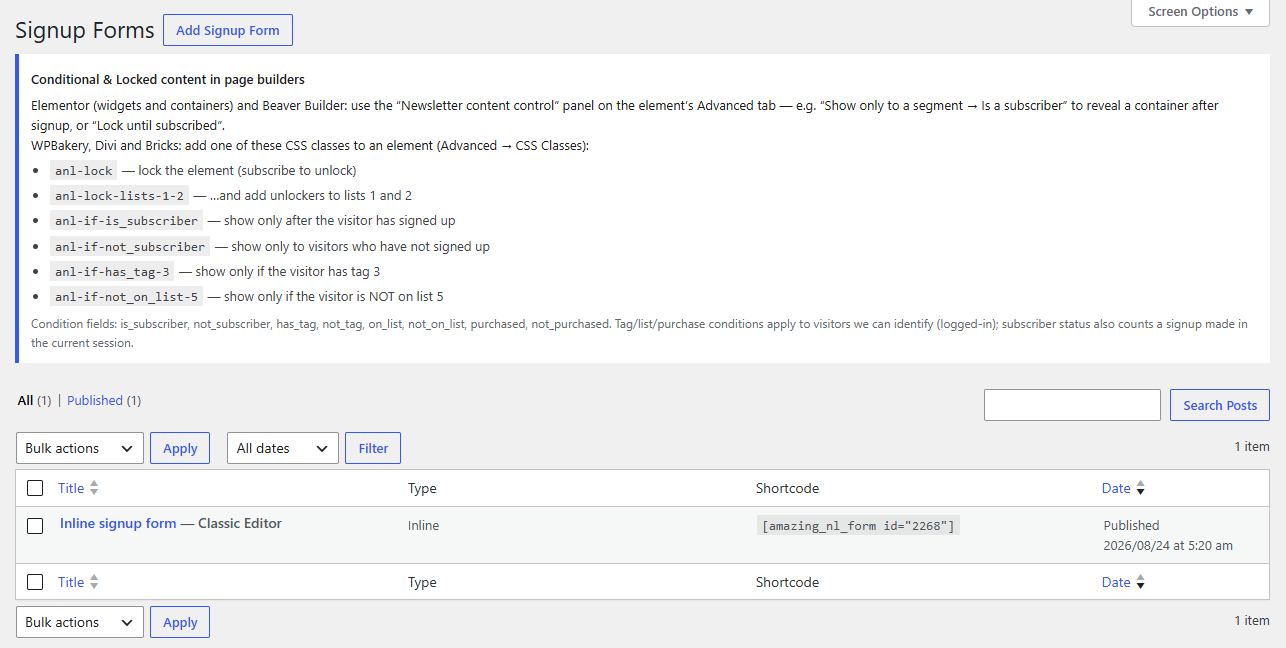
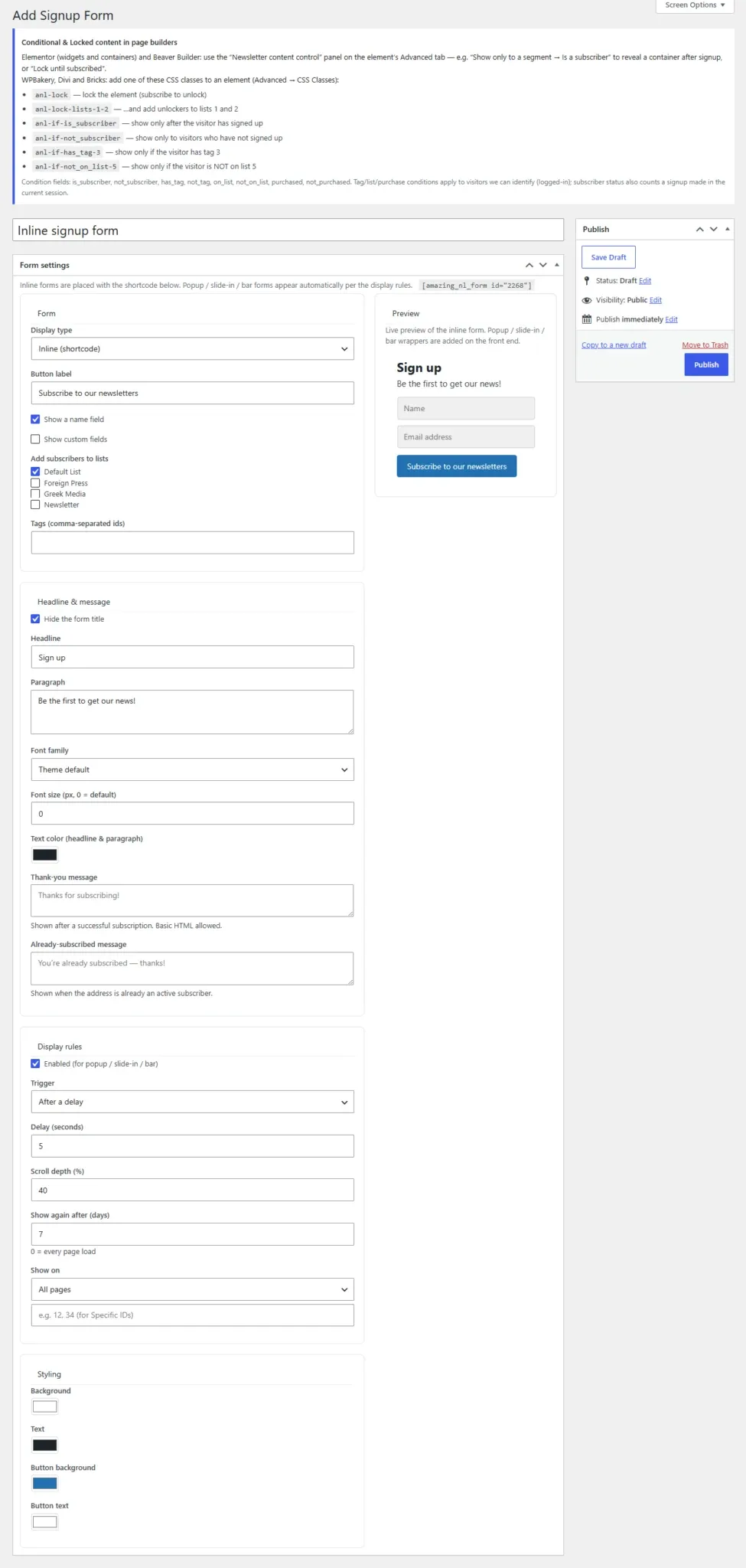
Grow your list with built-in forms — inline, popup, slide-in, or a floating bar — created in a visual editor with a live preview. Forms submit via AJAX (no page reload) and show your custom thank-you message in place. A headline, paragraph and thank-you message support basic HTML, and lists/tags are chosen with searchable pickers.
Place a form anywhere
Use the shortcode, the Gutenberg block, or the native page-builder elements for Elementor, WPBakery, Divi, Beaver Builder and Bricks. Popup and slide-in forms are automatically suppressed for visitors who already subscribed this session or who are logged in as an existing subscriber.
[ amazing_nl_form id="12" ][ amazing_nl_posts ][ amazing_nl_if ... ][ amazing_nl_locked ]
Conditional and Locked content let you show a block only to a segment, or hide it until a visitor subscribes — via native controls in Elementor and Beaver Builder, or CSS-class markers (e.g. anl-lock, anl-if-has_tag-3) in any builder.
Third-party form integrations
Already using a form plugin? Bridge its submissions into a list. Map a form to a list under Newsletters → Integrations and new submissions add subscribers automatically.
| Supported form plugin | How it connects |
|---|---|
| Gravity Forms | Maps a form’s email/name fields to a list on submission |
| Contact Form 7 | Captures the email/name from the submitted mail tags |
| WPForms | Reads the email/name fields on entry |
| Ninja Forms | Extracts email/name after submission |
| Forminator | Captures submissions into the mapped list |
| Elementor Pro Forms | Adds subscribers from Elementor form submissions |
Spam protection (CAPTCHA)
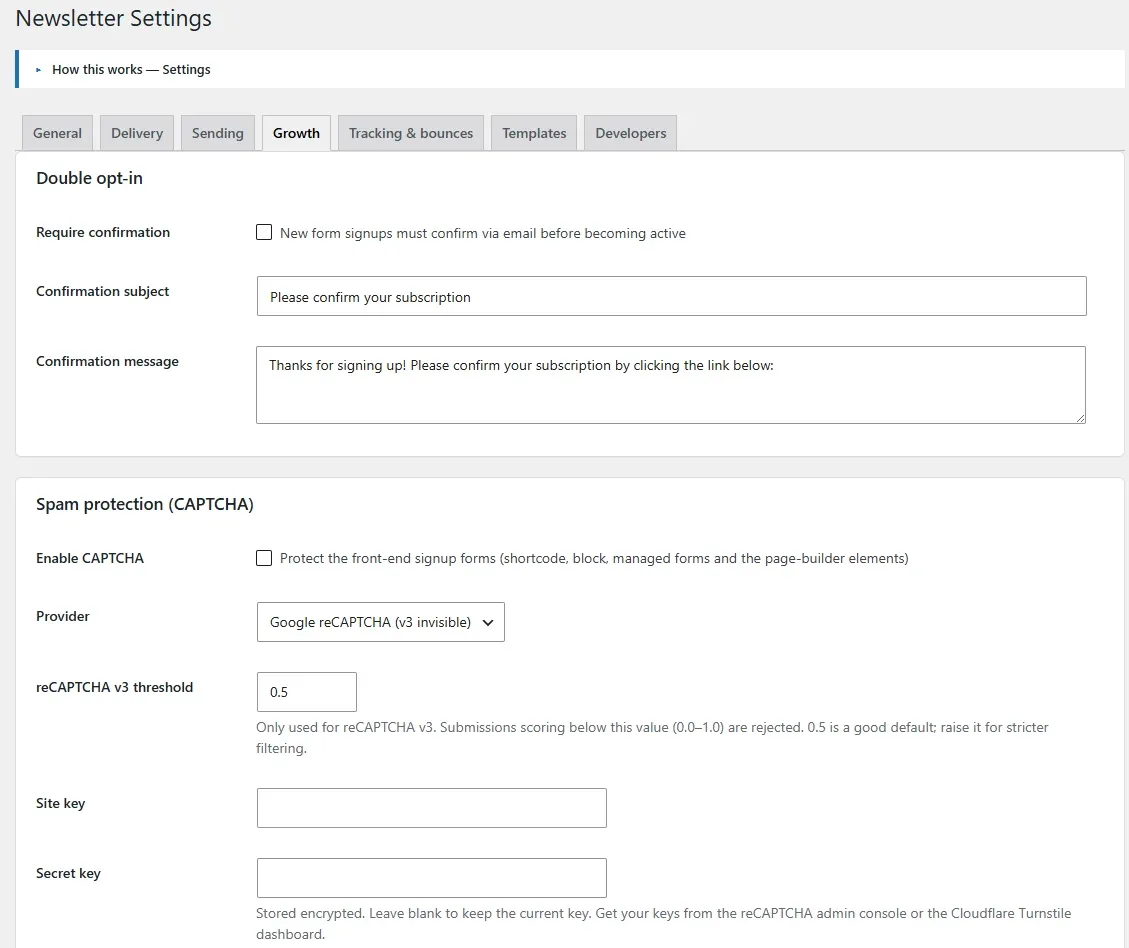
Protect every front-end signup form from bots. Enable a provider under Settings → Growth and enter your keys; protection then applies to the shortcode, block, managed forms and every page-builder element automatically.
| Provider | Notes |
|---|---|
| Google reCAPTCHA v2 | Visible “I’m not a robot” checkbox |
| Google reCAPTCHA v3 | Invisible score-based check with an adjustable threshold (0.0–1.0) |
| Cloudflare Turnstile | Privacy-friendly, low-friction challenge |
Secret keys are encrypted
Provider secret keys are stored encrypted (AES-256-GCM). Leave a secret field blank when saving to keep the existing key.
WooCommerce & Easy Digital Downloads
Add a subscribe checkbox to the checkout and the registration forms of WooCommerce and EDD (and the WordPress registration form), each with a custom label, default state and target list. Configure them under Settings → Growth. Combined with purchase-based targeting and revenue attribution, this ties your list directly to your store.
Subscribers
Browse, search and manage your audience. The list supports pagination, a Filter by list dropdown, and a Lists column showing (and linking to) the lists each subscriber is on. Status tabs cover Active, Unsubscribed, Bounced, All and Trash, and each row shows engagement level, bounce counts, source and date added. Add a subscriber inline, or bulk unsubscribe/trash.
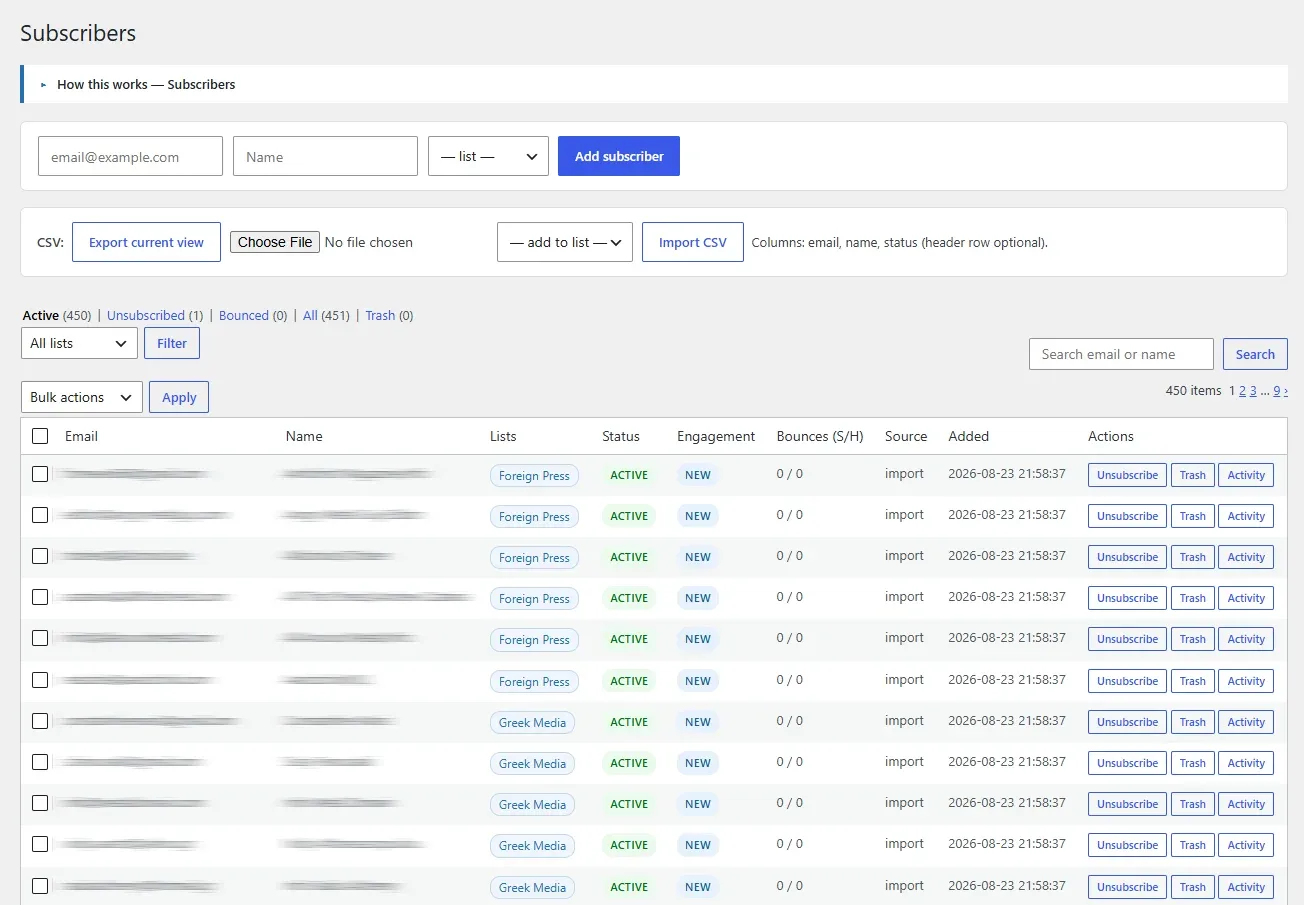
Open a subscriber’s Activity view for a per-person timeline (sends, opens, clicks, subscription changes) built from the activity log.
Lists & tags
Lists are the audiences people subscribe to; tags are flexible labels for finer targeting. Create and manage both from one screen, and use them as campaign audiences or as building blocks for segments.

Segments
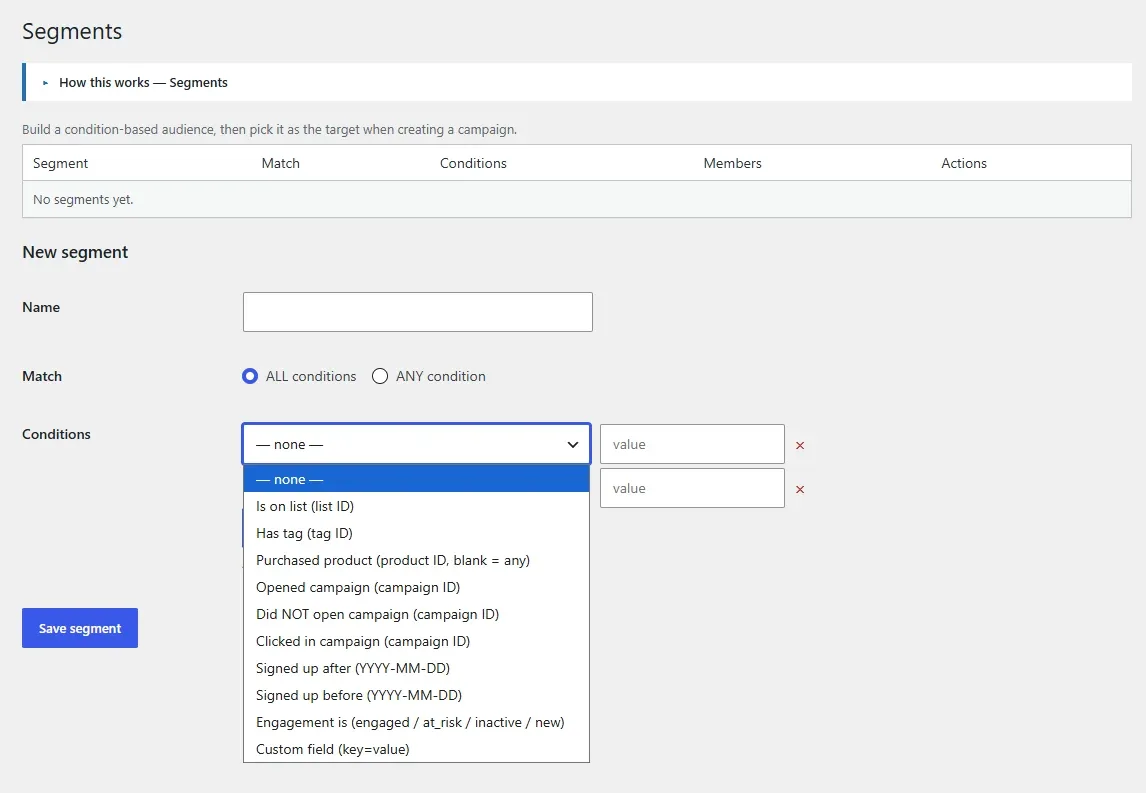
Segments are dynamic audiences defined by conditions — list membership, tags, purchase history, custom fields, and engagement level (engaged, at-risk, inactive, new). Use them to target re-engagement campaigns or to keep your list clean. Segment conditions are combined to describe exactly who should receive a campaign.
Import & export
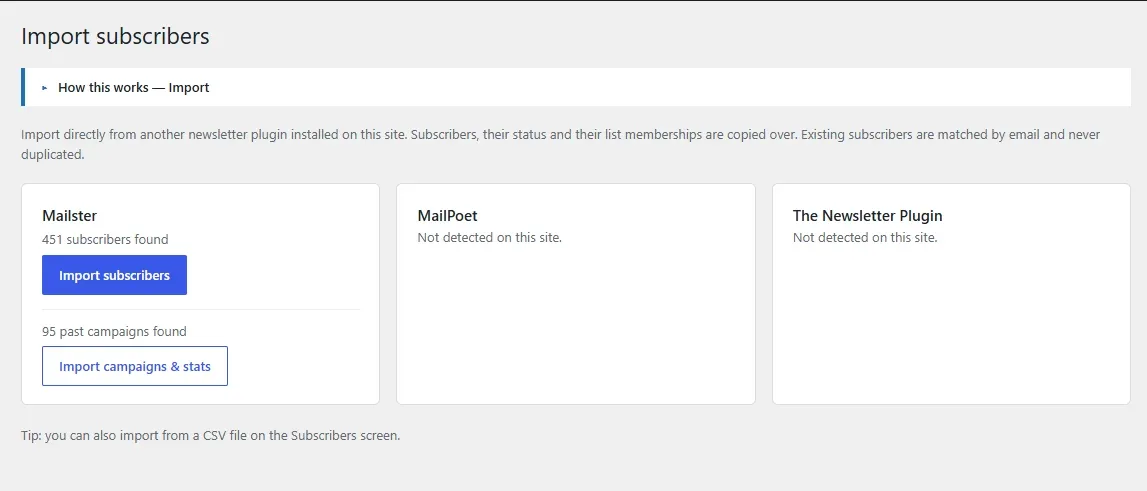
Import subscribers from a CSV (columns: email, name, status; header row optional) and assign them to a list on import. Large files are processed in batches with a progress bar so they don’t time out. Export the current subscriber view (respecting the status and list filters) to CSV at any time.
Engagement scoring
Every subscriber is scored by recent open activity into Engaged, At risk, Inactive or New. The level appears in the subscribers list and is available as a segment condition, so you can run re-engagement campaigns to at-risk contacts or sunset the inactive ones for better deliverability. The thresholds are filterable by developers (amazing_nl_engaged_days, amazing_nl_at_risk_days).
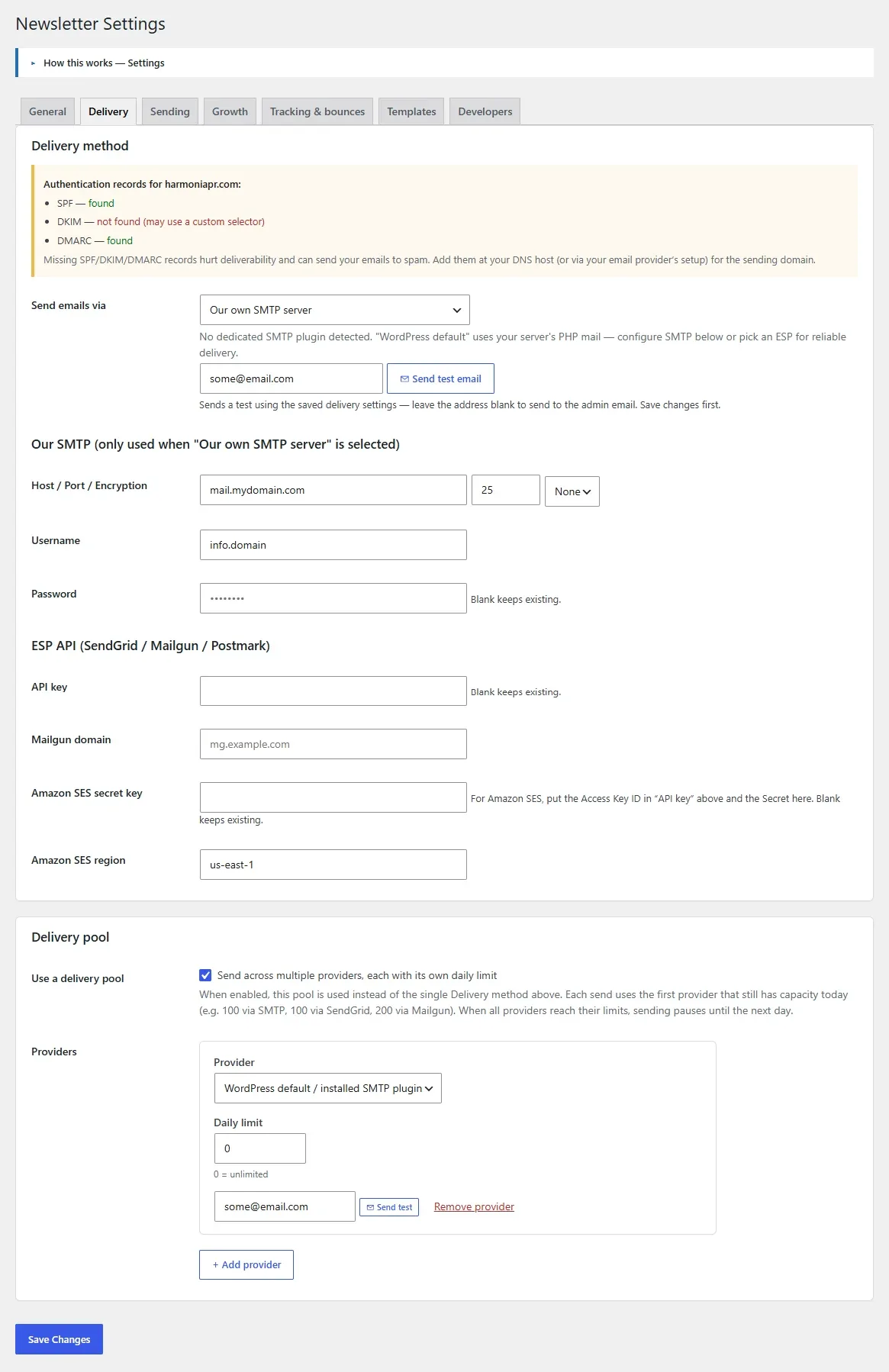
Delivery methods
Choose how mail leaves your site under Settings → Delivery. Use a single method or a provider pool that balances volume across several providers.
| Method | Best for |
|---|---|
WordPress (wp_mail) | Getting started; also the path that supports inline (embedded) images |
| SMTP | Any transactional SMTP provider; credentials stored encrypted |
| Amazon SES | High-volume sending via the native SES API (region + keys) |
| API / provider pool | Balance sending across multiple providers for scale |
You can send a test email through a specific provider (the single method, or any provider in the pool) to verify configuration before a real send.
Sending & throttling
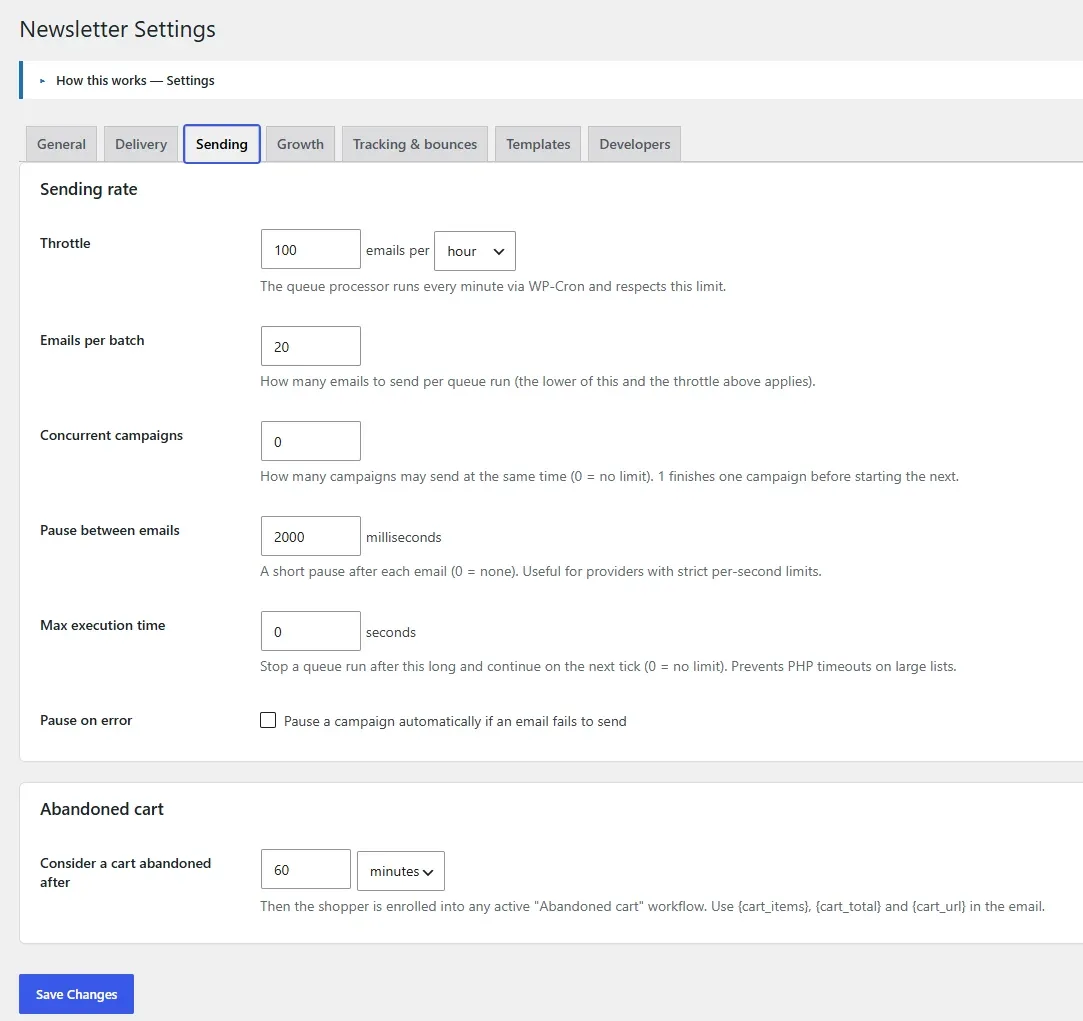
Real background delivery runs through the sending queue, so mail keeps going with no browser open. Control the pace under Settings → Sending:
| Setting | Effect |
|---|---|
| Throttle (rate) | Cap emails per hour or per minute to respect provider limits |
| Emails per batch | How many are processed per queue run (default 20) |
| Delay between emails | Optional pause between each message |
| Max execution time | Time budget per queue run (0 = no limit) |
| Concurrent campaigns | How many campaigns send at once (1 = finish one before the next; 0 = no limit) |
| Pause on error | Automatically pause a campaign if an email fails |
Deliverability & spam score
Land in the inbox, not the spam folder. The plugin checks your sending domain’s SPF, DKIM and DMARC records and warns on the Settings page when authentication is missing. Every campaign can be run through an internal spam-score check (no external service) that grades authentication, the unsubscribe link, subject wording, text/image balance, alt text, link count, message size, from-domain alignment and a physical address — out of 10 with a pass/warn/fail checklist.
Recommended pre-send flow
Preview in the browser → run the spam score → send yourself a test → confirm the pre-send checklist is green → send or schedule.
Reports & revenue
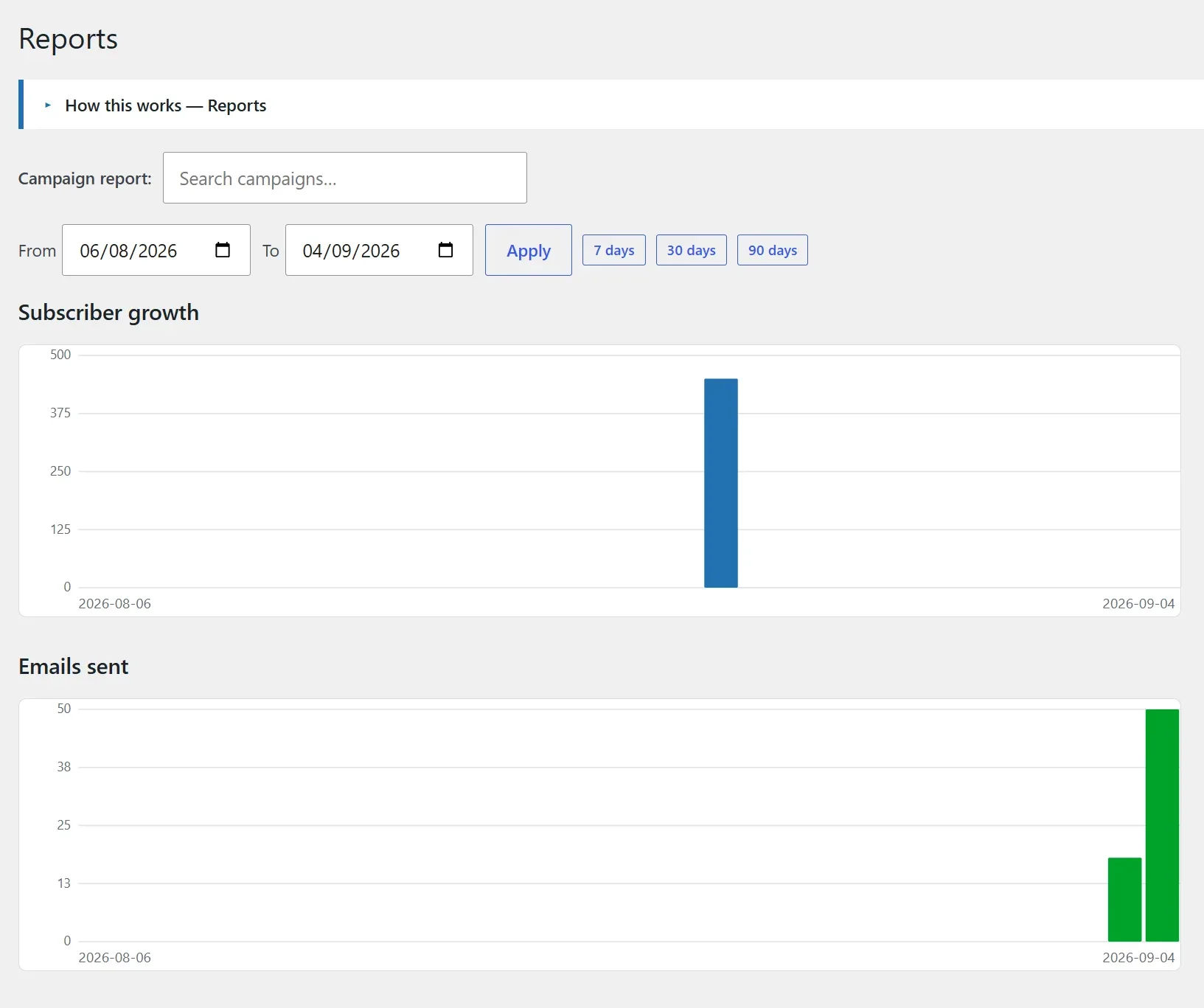
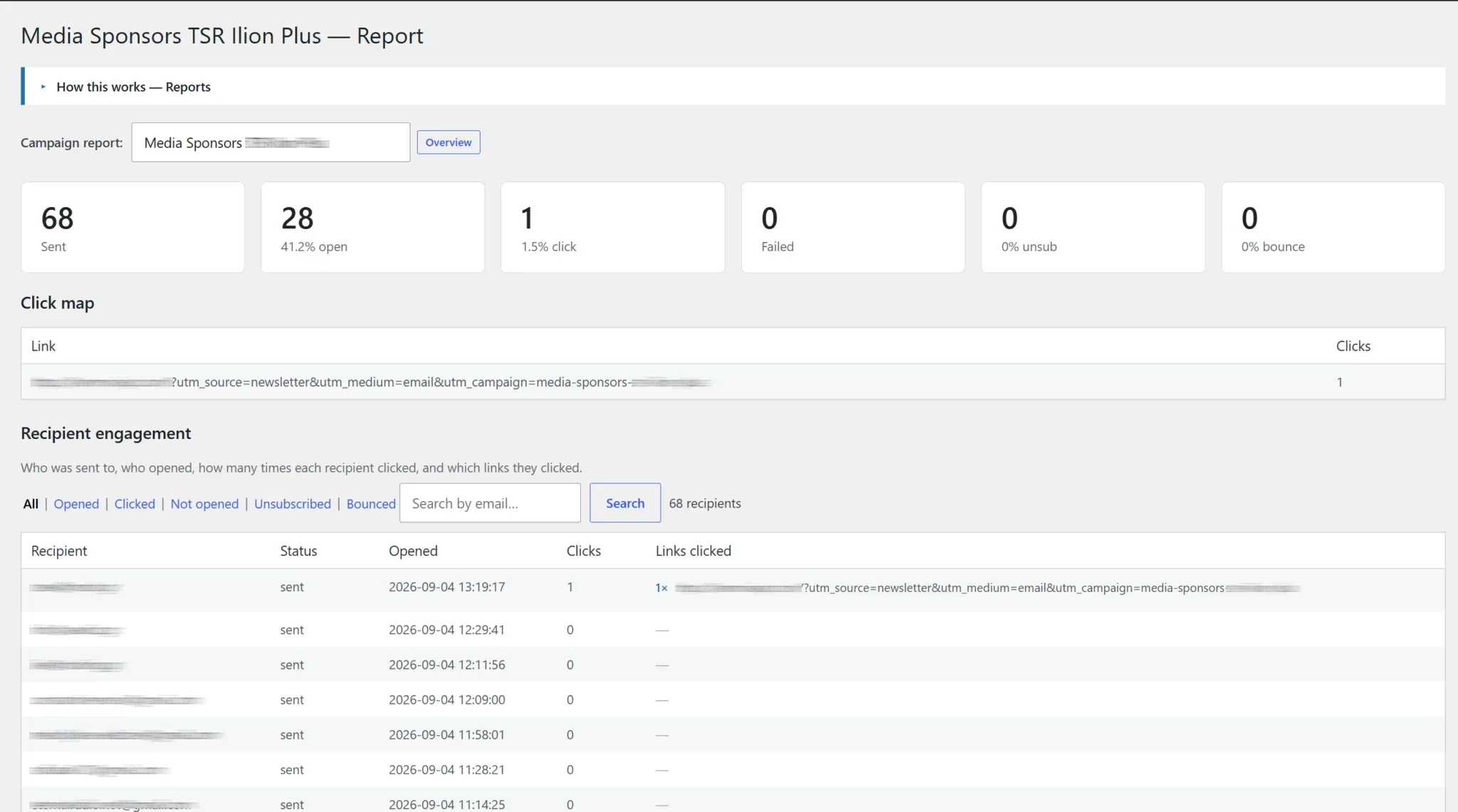
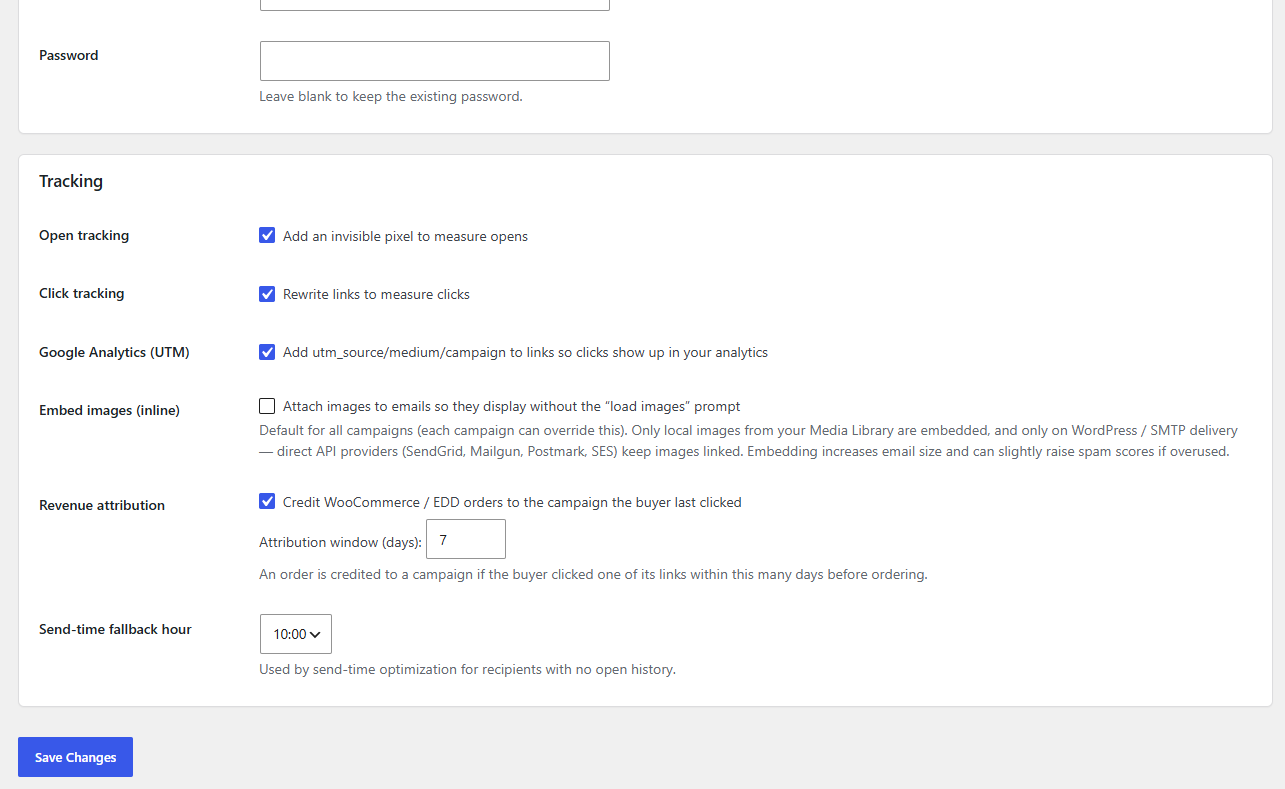
Track opens, clicks, growth and revenue with clear charts and a date-range picker (with 7 / 30 / 90-day presets). Per-campaign reports show open and click rates from signed, tamper-proof tracking links. With WooCommerce or EDD connected, revenue attribution ties orders back to the campaign that earned them (last-click within a configurable window), so you can see real money next to each send.
Tracking & bounces
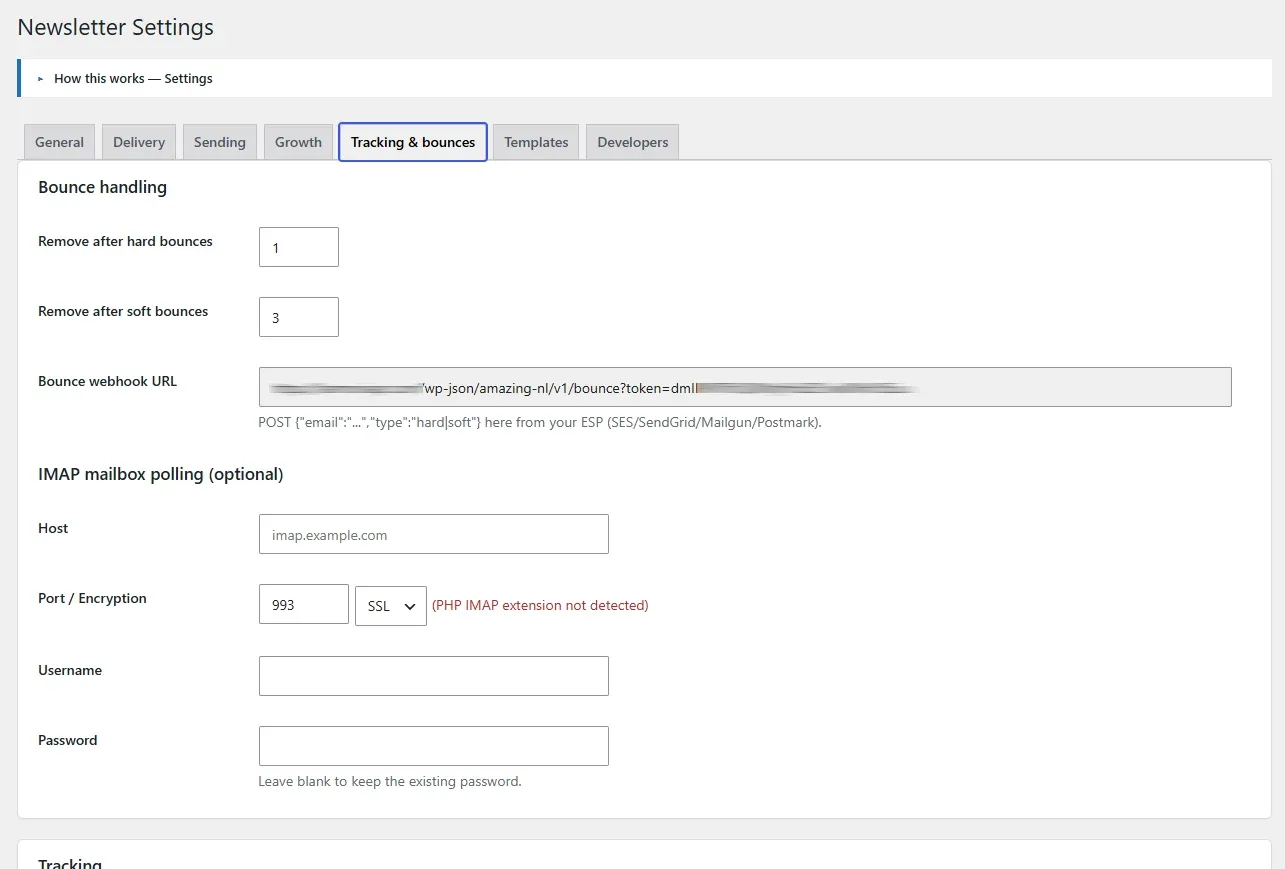
Under Settings → Tracking & Bounces, control open and click tracking and optional UTM tagging, and configure bounce handling. Hard bounces are removed immediately; soft bounces are removed after a configurable threshold. Feed bounces via an IMAP mailbox poll or a REST webhook. One-click unsubscribe includes List-Unsubscribe headers.
Set an optional bounce (Return-Path) address — a dedicated mailbox like bounces@yourdomain.com (on your sending domain, so SPF/DMARC stay aligned) that failed deliveries are returned to. If you leave it empty and let bounces come back to your normal inbox, the IMAP poller is safe on that shared mailbox: it only ever acts on genuine delivery failures (mailer-daemon/postmaster senders, delivery-status reports and standard failure subjects) and leaves all your other email untouched and unread. Use the Test IMAP connection button to verify the mailbox login and see its message count without waiting for the hourly poll.
Suppression & logs
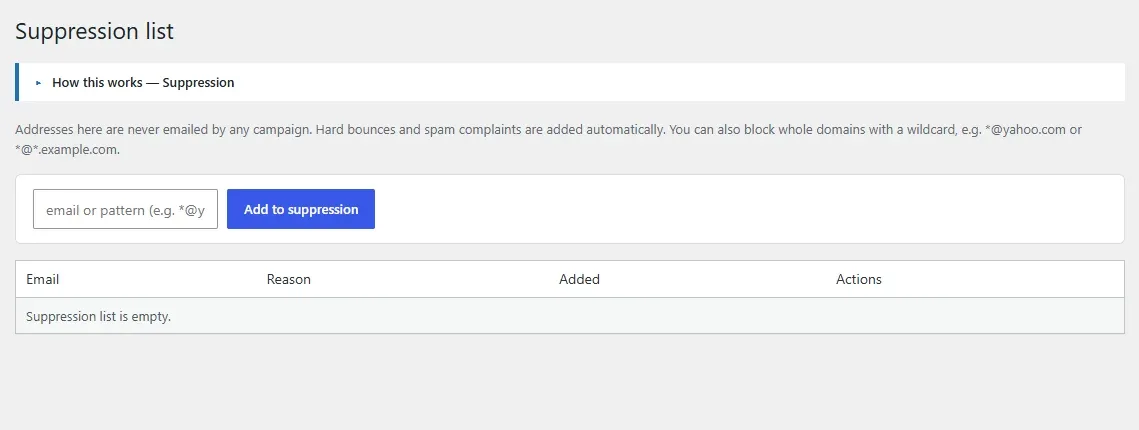
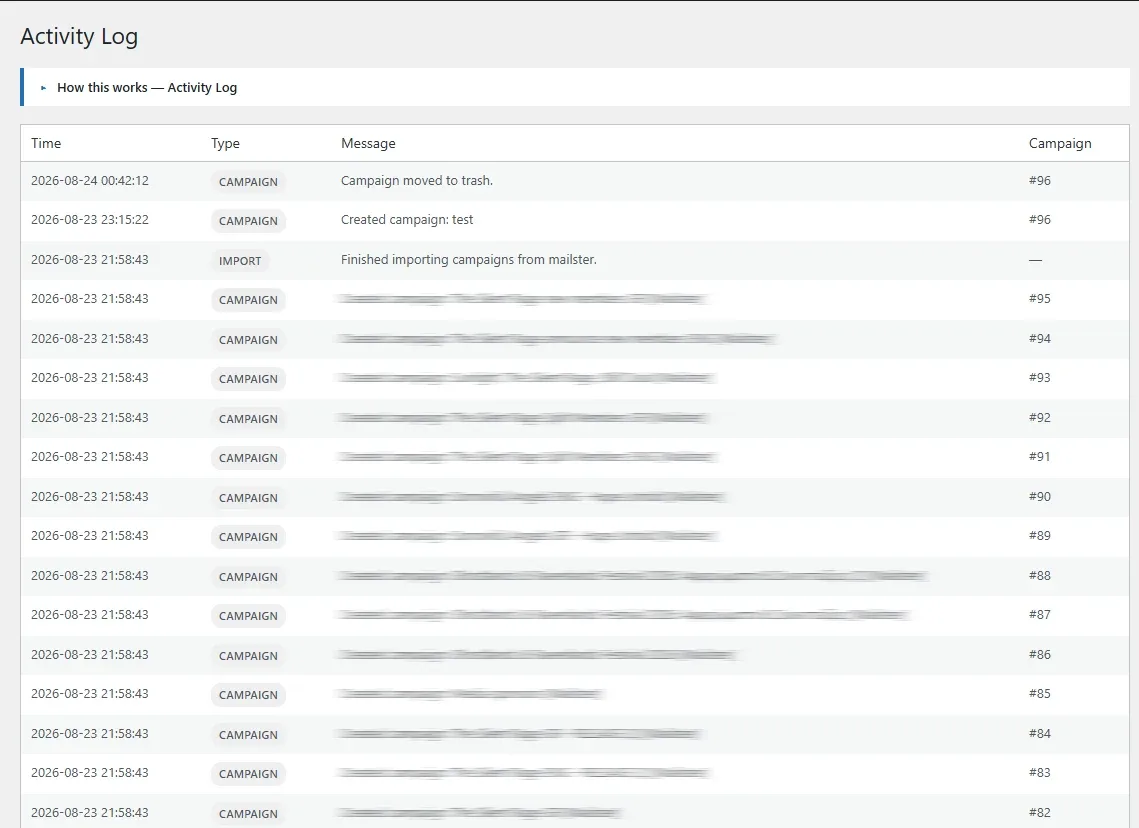
The Suppression list holds addresses that must never be emailed (banned or globally unsubscribed). Suppressed addresses are skipped at send time regardless of list membership. The Logs screen records plugin activity — sends, bounces, subscription changes and errors — for auditing and troubleshooting.
Settings
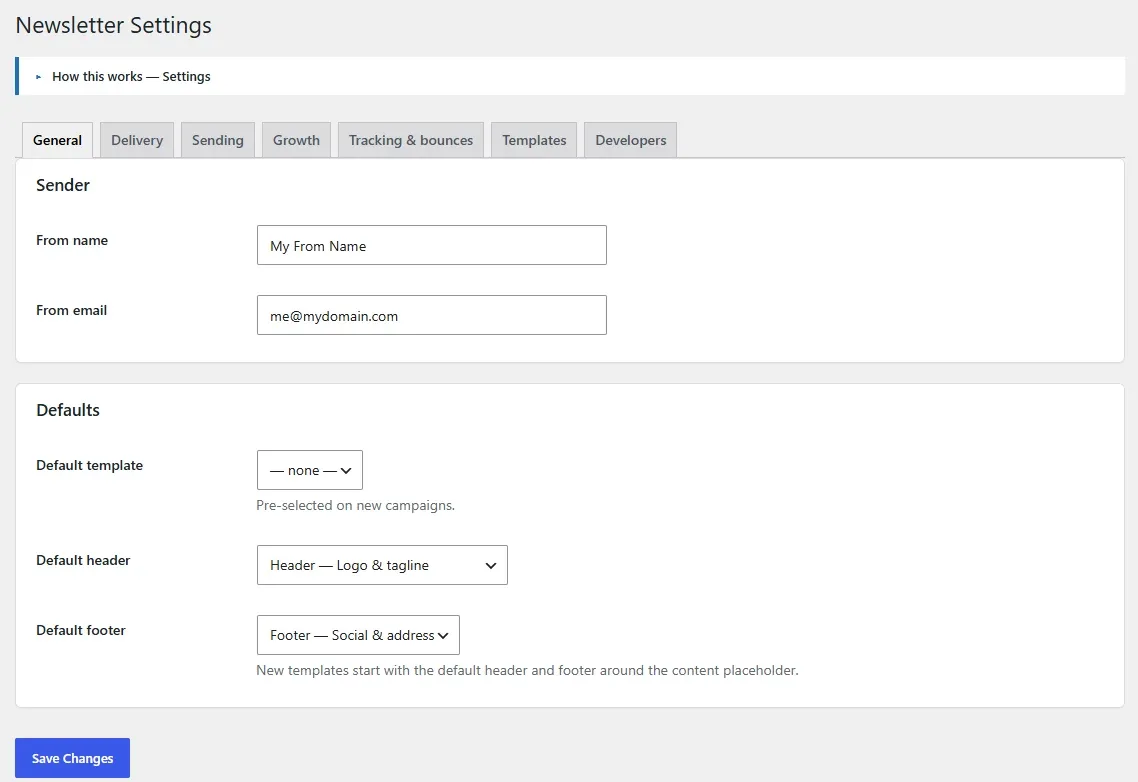
All configuration lives under Newsletters → Settings, grouped into tabs. The page returns to the tab you were on after saving.
| Tab | Contains |
|---|---|
| General | Sender name/address, defaults |
| Delivery | Delivery method or provider pool, deliverability notice, per-provider test |
| Sending | Throttle, batch size, delays, max execution time, concurrency, pause-on-error |
| Growth | Signup forms, CAPTCHA, checkout & registration opt-ins, post notifications |
| Tracking & Bounces | Open/click tracking, UTM tagging, bounce handling (IMAP / webhook) |
| Template settings | Default template, header and footer, base styles |
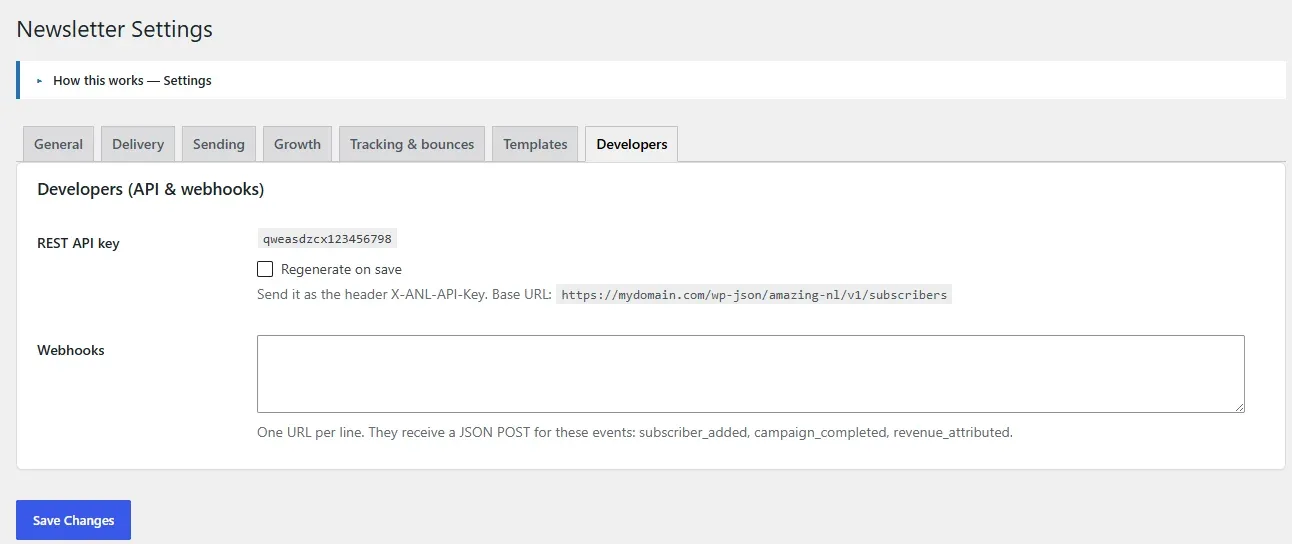
| Developers | REST API key (and regenerate) and outgoing webhooks |
REST API & webhooks
Integrate the plugin with your app, CRM or automation stack. The REST namespace is amazing-nl/v1. Requests authenticate with an API key sent in the X-ANL-API-Key header (generate it under Settings → Developers) or as a logged-in administrator.
Subscriber endpoints
| Method | Route | Purpose |
|---|---|---|
| POST | /amazing-nl/v1/subscribers | Create or update a subscriber |
| GET | /amazing-nl/v1/subscribers/{email} | Read a subscriber |
| DELETE | /amazing-nl/v1/subscribers/{email} | Delete a subscriber |
| POST | /amazing-nl/v1/subscribers/{email}/unsubscribe | Unsubscribe a subscriber |
Outgoing webhooks
Add webhook URLs under Settings → Developers to receive a POST when these events fire:
subscriber_addedcampaign_completedrevenue_attributed
curl -X POST https://your-site.com/wp-json/amazing-nl/v1/subscribers \
  -H "X-ANL-API-Key: YOUR_KEY" \
  -H "Content-Type: application/json" \
-d '{"email":"jane@example.com","name":"Jane","list_ids":[2]}'Developer hooks
Extend the plugin without editing core. All extension points use the amazing_nl_ prefix. A selection of the most useful:
Filters
| Hook | Purpose |
|---|---|
amazing_nl_email_html | Modify the assembled email HTML before send |
amazing_nl_email_subject | Modify the subject line before send |
amazing_nl_campaign_recipients | Adjust the resolved recipient set for a campaign |
amazing_nl_is_suppressed | Programmatically suppress an address |
amazing_nl_attribution_hit | Adjust revenue-attribution matching |
amazing_nl_engaged_days / amazing_nl_at_risk_days | Tune engagement-scoring thresholds |
amazing_nl_visitor_is_subscribed | Override the “is this visitor a subscriber?” check |
Actions
amazing_nl_email_sentamazing_nl_subscriber_addedamazing_nl_subscriber_activatedamazing_nl_campaign_completedamazing_nl_revenue_attributedamazing_nl_send_post_notification
Add data to an email
add_filter( 'amazing_nl_email_html', function ( $html, $campaign, $subscriber ) {
	// Append a personalised footer note, for example.
	return $html;
}, 10, 3 );
React when a campaign finishes
add_action( 'amazing_nl_campaign_completed', function ( $campaign_id ) {
	error_log( 'Newsletter campaign ' . $campaign_id . ' finished sending.' );
} );
Privacy & GDPR
The plugin integrates with WordPress’s personal-data export and erase tools: a subscriber’s data (including recorded consent) can be exported, and erasing removes the subscriber and their related records. Consent (source, date, IP) is recorded when someone subscribes. A preference center (via the {preferences_url} tag) lets subscribers update their name, choose lists, or unsubscribe with an optional reason — no login required, authenticated by a signed token.
Every email is compliant by defaultMessages include a one-click unsubscribe link and List-Unsubscribe headers, and the pre-send checklist verifies an unsubscribe link is present across the body, template and header/footer partials.
Troubleshooting
Emails are queued but not sending
Sending runs on cron. Confirm WP-Cron is firing (or configure a real server cron), and check Settings → Sending for a throttle or concurrency limit that is pacing the queue. The Campaigns list shows live progress while a send is active.
Emails land in spam
Set up SPF, DKIM and DMARC for your sending domain (the Settings page warns when they’re missing), run the per-campaign spam score, and prefer a proper SMTP/SES provider over raw wp_mail.
Some images don’t show
When embedding images, only local Media Library images on the WordPress/SMTP path are embedded. Remote images stay linked. For API/SES delivery, images are linked rather than embedded.
The email sends fine without images (or attachments) but fails with them
This is almost always message size. Embedded images and attachments are base64-encoded into the message and add about a third to their weight, so a few large files can push the email past your mail server’s limit (Postfix defaults to 10 MB; many relays allow 20–25 MB) — and the server rejects it. The builder shows a caution when you pick a large image, and a test/real send warns you with the estimated encoded total. Fix it by resizing/compressing images (aim for well under 1 MB each), trimming attachments, or setting Embed images to Off so images are linked instead. You can also raise your server’s limit (e.g. Postfix message_size_limit) and match the plugin’s warning to it with the amazing_nl_max_message_bytes filter.
Social icons are missing in Gmail/Outlook
Inline SVG icons render in Apple/iOS Mail but are stripped by Gmail and Outlook. Use image blocks for social icons if those clients matter for your audience.
A form’s submissions aren’t creating subscribers
For third-party forms, confirm the form is mapped to a list under Integrations and that the form actually collects an email field. For the plugin’s own forms, check the selected list and that CAPTCHA keys are valid.
Scheduled campaign didn’t send on time
Scheduling depends on WordPress cron dispatch. On low-traffic sites, configure the server to call wp-cron.php regularly.
Frequently asked questions
Do I need WooCommerce or EDD to use the plugin?
No. It works as a standalone newsletter tool. WooCommerce and EDD add store opt-ins, purchase-based targeting, post-purchase automations, and revenue attribution.
Are there monthly or per-subscriber fees?
No. Everything runs inside your own WordPress. You own your list and your data, and you provide your own sending (WordPress, SMTP, Amazon SES, or an API pool).
Will mail keep sending if I close the browser?
Yes. Delivery runs in the background through the sending queue on WordPress cron, so campaigns continue with no browser open.
Can each campaign send at a controlled pace?
Yes. Set an hourly/per-minute rate, a batch size, a delay between emails, a max execution time per run, and how many campaigns may send concurrently.
Can I A/B test the whole email, not just the subject?
Yes. You can test the subject, the from-name, or the entire body (Version A / Version B), and auto-send the winner to the rest of the audience.
How do I see which campaign made a sale?
With a store connected, revenue attribution links orders back to the campaign that earned them (last-click within a configurable window) and shows the revenue in Reports.
Can I move a configuration between sites?
Templates and saved layouts are reusable within a site, and the REST API and webhooks let you sync subscribers with external systems.
When should I use an Automation vs a Workflow?
Use an Automation when you want to send a single email after one event (a welcome, a post-purchase thank-you, a membership-expiry win-back). Use a Workflow when you need multiple emails, tagging, list changes or branching. Both use the same trigger catalog, so pick based on how many steps you need.
Is it GDPR-friendly?
Yes. It records consent, integrates with WordPress export/erase tools, offers a subscriber preference center, and adds one-click unsubscribe with List-Unsubscribe headers.
Changelog
Current version: 2.4.0. See readme.txt in the plugin package for the complete, itemized history.
2.3.0 Deliverability & safer bounce handling
- New dedicated bounce (Return-Path) address — return failed deliveries to e.g.
bounces@yourdomain.com(keep it on your sending domain so SPF/DMARC stay aligned). - New: bounce polling is safe on a shared mailbox. With no dedicated bounce address set, the IMAP poller only acts on genuine delivery failures (daemon/postmaster senders, delivery-status reports, standard failure subjects) and leaves all other mail untouched and unread. Hard/soft classification was tightened so ordinary content isn’t misread as a bounce.
- New “Test IMAP connection” button — logs in to the bounce mailbox and reports the message count (or the exact error) without waiting for the hourly poll.
- New DKIM selector field for the deliverability check, so a custom signing selector is checked instead of being reported “not found”.
- Improved: outgoing SMTP uses a short connection timeout, so a wrong/unreachable host fails fast instead of hanging the test-send.
2.3.0 Dynamic Posts layouts & AVIF/WebP conversion
- New Dynamic Posts layouts — besides Columns, pick row layouts: image left/text right, image right/text left, or alternating sides per item, with a selectable image-column width (25–75%); stacks on mobile.
- New Dynamic Posts taxonomy filter — filter by any taxonomy of the chosen post type (categories, tags, product categories, custom taxonomies) and pick one or more terms.
- New: automatic AVIF/WebP → JPG/PNG conversion for emails, so images display in clients that don’t support modern formats (Outlook, some Gmail/Yahoo). Transparent images become PNG, opaque ones JPG; converted copies are cached. Global default in Settings, overridable per campaign. Needs Imagick or GD with AVIF/WebP support.
2.2.0 Rich Text WYSIWYG block & resizable settings panel
- New Rich Text block — a lightweight WYSIWYG that writes email-safe HTML and pastes as plain text. Bold, italic, underline, strikethrough, text color & highlight, headings (H1–H6) & quotes, per-paragraph alignment, lists, links and a divider. Available in both campaigns and automations.
- The builder’s settings panel is now resizable — drag the divider to widen it; the width is remembered (double-click to reset).
2.1.0 Recipient engagement, live stats, send lock & attachments
- New per-recipient engagement in the campaign report — who opened, how many clicks each recipient made, which links they clicked, and who unsubscribed or bounced, with filters (incl. Unsubscribed/Bounced), email search and paging; plus Unsubscribed % and Bounced % summary cards.
- New searchable campaign dropdown on the Reports page to jump to any campaign’s full report.
- New live statistics panel in the campaign editor — a slide-open panel above the content showing sent, pending, opened, clicked, unsubscribed and failed with rates and a progress bar, refreshing automatically while sending.
- New: a sending campaign is locked for editing — a banner prompts “Pause the campaign to edit” with a one-click Pause button; the editor unlocks once paused or finished.
- New file attachments — attach Media Library files (e.g. a PDF) to a campaign; sent with every copy on the WordPress/SMTP path and the SendGrid, Mailgun and Postmark APIs.
- New email size warnings — an inline caution on large images in the builder, and a pre-send warning when the whole email (HTML + embedded images + attachments) would exceed the limit (default 20 MB, filterable via
amazing_nl_max_message_bytes). - Fixed: social / contact icons now display in Gmail, Outlook and Yahoo — sent as PNG images instead of inline SVG (which those clients strip).
- The Text block now allows more email-safe HTML (paragraphs, headings, blockquote, lists, and more inline formatting).
2.0.0 Automatic tagging & tag-triggered automations
- New “When a tag is added” workflow trigger — a tag (from a workflow, an import, or a manual click) can start an automation.
- Greatly expanded trigger catalog across WordPress, WooCommerce, Easy Digital Downloads, WooCommerce Subscriptions and WooCommerce Memberships (see Automations & workflows).
- Searchable pickers for product, category, download and membership-plan trigger conditions; a role picker and a spend-amount field.
- Subscribers are auto-created from matching store events so tagging always applies.
- The “Send email” step can send an existing campaign (snapshot) or start from an email template.
- Loop-safe tag cascades.
- Automations now use the same expanded trigger catalog and pickers as Workflows, with the Automation panel moved to the top of the editor sidebar; each list links to the other.
- New Cart contents dynamic block for abandoned-cart emails (product image, name, quantity, price, total and a recover-cart button).
- New Tag Rules — automatically add or remove a tag on an event (purchase, review, refund, subscription/membership change, and more), which in turn starts tag-triggered workflows and automations.
- Automations gained a Repeat option, opt-out respect on all trigger paths, and bulk activate/deactivate; the Workflows list gained search, Trash, bulk actions and colour-coded buttons.
1.9.0 Builder, deliverability, automation & growth
- Drag-and-drop email builder with reusable saved layouts, per-block styling, and a Social / Icons block (SVG social, phone & email icons, horizontal or vertical).
- A/B testing for subject, from-name and full content, with automatic send-to-winner.
- Inline (embedded) images so emails display without “load images”.
- Deliverability tools: SPF/DKIM/DMARC checks and an internal per-campaign spam score.
- Sending controls: batch size, delays, max execution time, concurrent-campaign limit, and pause-on-error.
- Amazon SES delivery and a multi-provider delivery pool with per-provider test sends.
- Signup forms (inline/popup/slide-in/bar) with AJAX submit, plus native Elementor, WPBakery, Divi, Beaver Builder and Bricks elements.
- Third-party form bridges: Gravity Forms, Contact Form 7, WPForms, Ninja Forms, Forminator and Elementor Pro Forms.
- CAPTCHA on front-end forms: reCAPTCHA v2, reCAPTCHA v3 (score threshold) and Cloudflare Turnstile.
- WooCommerce, EDD and WordPress checkout & registration opt-ins; purchase-based targeting; revenue attribution.
- Segments, engagement scoring, post-purchase automations and multi-step workflows with a condition step.
- REST API for subscribers, outgoing webhooks, and a library of
amazing_nl_hooks. - Reports with date ranges and revenue; live AJAX campaign progress; search, pagination and list filtering on the admin lists.
Amazing WordPress Newsletters documentation · Version 2.1.0 · Amazing WP Plugins